| Author |
 Replies: 22 / Views: 12,667 Replies: 22 / Views: 12,667 |
|
Pillar of the Community
United States
9807 Posts |
Well I ordered my first Dansco album - Blank cover, Slipcase and 6 pages all 23mm sized for my 2¢ pieces (well some of them). I won the slipcase in an auction along with some books, and got the deal from ebay on the blank album w/6 free pages of my choice from Vernon coin supply, best deal I found online. Decided it was about time to have them out in a way to display them better. Any ideas on how to label the slots best? I do have a label maker, but I think it's too large. I'm not doing a date set but more of a die variety collection, Cuds, die breaks, DDOs and DDRr, RPDs stuff like that. Maybe just print info on a seperate card (page sized) and insert it between each page? Currently my coins are in 2x2s (quarter sized) and stored in sheets in a 3-ring binder, or in 2x2 boxes not as convenient to group or show off. The amount of data needed for some is a bit much for (old school) letra-set press ons or label maker prints I'm afraid, and my hand wrtting isn't great. I figure the printed extra page might be easier if I change out coins and arders down the road. Anyone else using Dansco custom built albums out there in CCF Land that might have some tips or tricks to this?  "Buy the Book Before You Buy the Coin" - Aaron R. Feldman - "And read it" - Me 2013! ANA Life Member #3288 in good standing since 1981, ANS, Early American Coppers Member (EAC), Colonial Coin Collectors Club member (C4), Conder Token Collector Club member (CTCC), Civil War Token Society (CWTS) member, Liberty Seated Collectors Club (LSCC) & Numismatic Bibliomania Society member (NBS), USMex, Member in good standing, 2¢ variety collector. See my want page: http://goccf.com/t/140440Edited by westcoin
07/11/2013 03:30 am
|
|
|
|
Moderator
 United States
14463 Posts |
In some standard Dansco albums, I have a few blank pages for varieties that I just have date labels from a basic label maker.
In other blank Dansco albums, I have a label on the binder of the coin type, but those are using pages to hold flips and the flip inserts hold the coin information. I have made "custom" albums for my Birth Year Set and an album for "Visit the Darkside" (places I have went), darkside bullion, or general darkside coins.
|
|
Pillar of the Community
United States
1109 Posts |
The font in most of the Dansco albums on the pages for the dates and whatnot is Futura 10 point. I used the Avery clear easy-peel address labels and made a sheet with dates I needed for my albums, then printed them out. I measured and taped off to make sure the dates were about 1/4 inch under the holes, cut the dates out really close to the numbers, and stuck them on. If you want to put a label at the top of a blank page, say, "2 Cent Pieces", that is Stymie 12 point font. I'll attach an example photograph for visual explanation. I think they look great. And to go one step further, if you really want to go for the gusto and want a label for your album cover, the front of the albums use 54 point Brush Script font, and the spine has 28 point Brush Script font. If you find a local sign and decal shop to make it for you, try to get Mirror Gold or similar color for the lettering. It's the most similar to what is normally embossed on the albums. See photo. 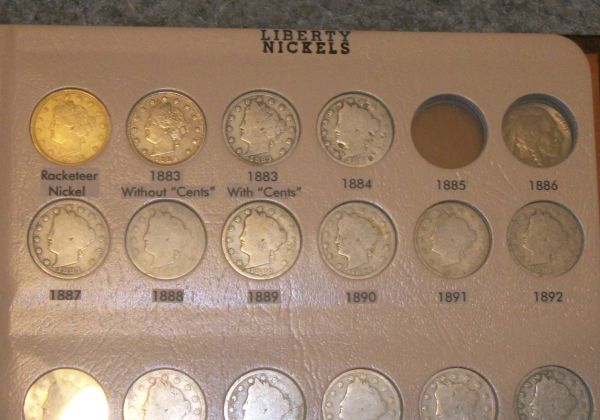 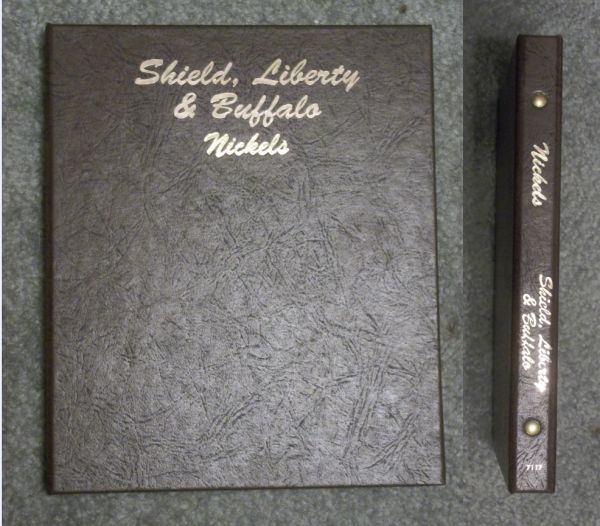 Edited by skyshark124
07/11/2013 04:02 am
|
|
Pillar of the Community
 United States
9807 Posts |
Looks great skyshark124! Thanks for the tips on font sizes. They look pretty darn good and show up nicely. Are you using inkjet or laser printer with the Avery labels?
"Buy the Book Before You Buy the Coin" - Aaron R. Feldman - "And read it" - Me 2013! ANA Life Member #3288 in good standing since 1981, ANS, Early American Coppers Member (EAC), Colonial Coin Collectors Club member (C4), Conder Token Collector Club member (CTCC), Civil War Token Society (CWTS) member, Liberty Seated Collectors Club (LSCC) & Numismatic Bibliomania Society member (NBS), USMex, Member in good standing, 2¢ variety collector. See my want page: http://goccf.com/t/140440 |
|
Pillar of the Community
United States
1109 Posts |
It's an inkjet. HP Photosmart C3180. I really like the way the labels came out. If you go this route, be aware of two things: 1) It will take up a bit more time than one may think it should, and 2) Cutting as close to the numbers/letters as possible without actually cutting into them makes it look a lot nicer. This is because the labels are not really 100% "clear" and see-through, but rather mostly see-through. When you cut the labels and press them in place, if you cut it close enough to the printed numbers or letters, you barely notice the label background since the eye is drawn to the dates and words and not the background itself. One of those semi-optical illusions. The labels I used from Avery are number 88695, though any of their clear labels should work. And for the record, after reading everything I have typed, I think I am starting to see why my friends think I have too much time on my hands on my off days.  Edited by skyshark124
07/11/2013 05:20 am
|
|
Pillar of the Community
United States
1109 Posts |
Oh, and to address the question about what to do for putting info about the coins (blank page in between pages) I have thought about this too for my combined nickel set. I almost wonder if a sturdy sheet of pleather in a similar color would work here? OR maybe pleather or vinyl glued to a cardboard backing? you could cut it in the shape of a page and punch or drill holes for the album mounting, then make labels saying whatever you want and put them on that page. I think I have a project for Thursday now.
|
|
Moderator
United States
194816 Posts |
Quote:
Maybe just print info on a seperate card (page sized) and insert it between each page? I like this idea. The ATB Quarter and Presidential dollar Dansco Albums proved to me that it looks fine.. I like the room for additional information, which may be especially helpful for variety and error details. That being said, looking good, skyshark124!  |
|
Pillar of the Community
United States
613 Posts |
Skyshark's stuff looks really good! My approach for custom albums has been to use laserjet transparencies run through (obviously!) an HP laserjet. I line up a table in a Word document with the layout of my custom coin page so the printed information goes right under where each coin port is. Right before printing, I turn all the gridlines blank. I trim the page to dansco size, punch holes, and insert between pages. It lays flat and is almost invisible. 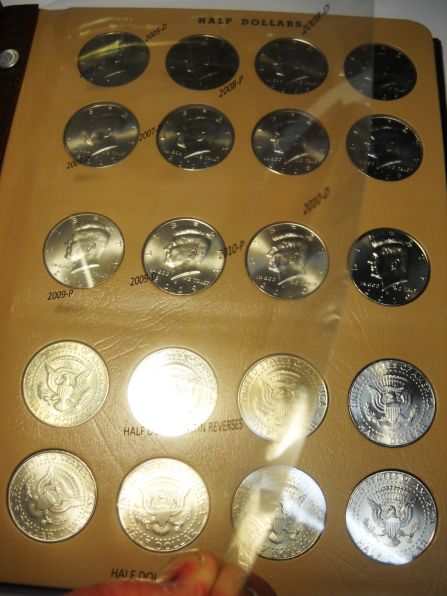 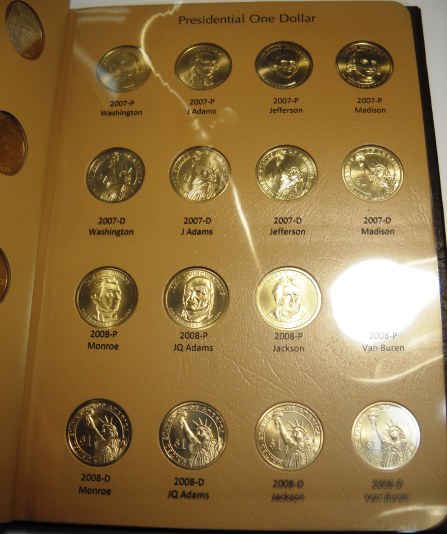 |
|
Moderator
United States
194816 Posts |
Quote:
My approach for custom albums has been to use laserjet transparencies run through (obviously!) an HP laserjet. I forgot that you had done those. |
|
Pillar of the Community
United States
1109 Posts |
Those transparencies are a good idea too, actually. Probably less labor-intensive than my method too.
|
|
Valued Member
Puerto Rico
92 Posts |
Wow. Skyshark124, that album looks absolutely perfect. Bookmarked this thread. Kudos to you, sir.
|
|
Pillar of the Community
United States
1053 Posts |
Very nice layout skyshark. |
|
Bedrock of the Community
United States
20753 Posts |
A real advantage of using a separate sheet inserted in the Albums is the ability to change coins without trying to figure out what to do with info printed or stuck on the coin pages. I've made many Albums with Whitman rub off letters/numbers sheets. Then found if I wanted to move of change a coin, now what with the info on that page. An additional page if fromt could have a lot of info in addition to the date, mint mark also. And if you decide to add, remove or chage a coin on a page, skmply make a new sheet with the info.
|
|
Valued Member
United States
374 Posts |
Sky shark, nice album! But a lot of effort to get that racketeer nickel in there. I suppose the whole page was blank at first?
|
|
Pillar of the Community
United States
1109 Posts |
It was all blank. It was the Dansco nickel album. I basically was able to modify and put whatever I wanted in there since it was like having a blank template to start with. I like Billymac's layout too, but I also like how my method mimics the actual Dansco albums.
|
|
Pillar of the Community
United States
1476 Posts |
I love both ideas! With the transparencies, Are they 'coin safe'? No pvc or anything to hurt the coins?  |
| |
Replies: 22 / Views: 12,667 |








 Posted 07/11/2013 03:52 am


