| Author |
 Replies: 16 / Views: 3,746 Replies: 16 / Views: 3,746 |
|
Valued Member
United States
374 Posts |
How did this photo come out? I used two lights with a high angle. I tried to keep the ISO at 400 with a longer exposure time. What can be done for improvement? 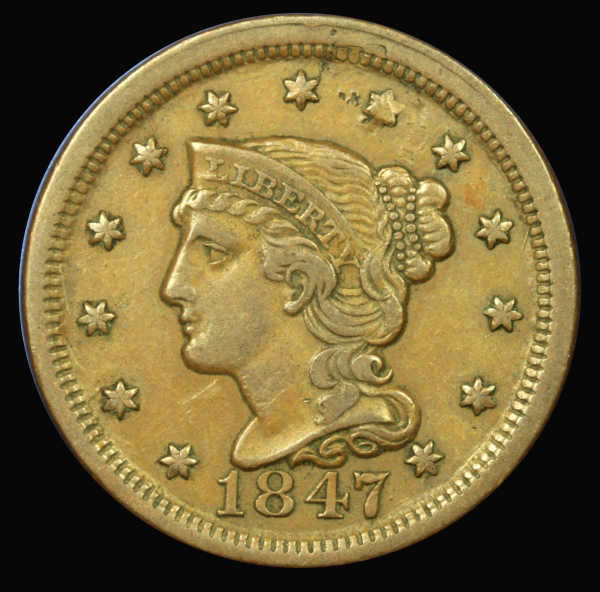 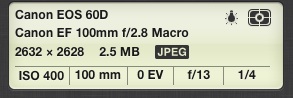 |
|
|
|
Moderator
 United States
23522 Posts |
That's a nice shot. It's up to you to determine how closely it captures the original color; without having any idea how it looks, I think the coin might be slightly brighter than it is in real life.
With the 100mm Macro, set the aperture at f/8 and leave it there. That's the sweet spot for that lens, in my opinion. F/8 would have allowed you to go to ISO100 (not really necessary with your camera - it's still plenty clean at ISO400) or expose at 1/25 or faster, thereby gaining a little bit of sharpness. Keep in mind, though, I'm splitting hairs. Your equipment is serious overkill just for posting on an internet forum.
The other pieces of advice regard postprocessing:
1) Always crop as close to the coin as you can. Every little bit of real estate saved that way increases the size of the image you can post.
2) Post larger images; you're quite capable of nice sharp pics at the 800x800 pixels I consider appropriate. Use a remote host such as Photobucket or something.
|
|
Valued Member
 United States
374 Posts |
Thanks for the reply. I took a look at the con again Iin daylight. The color is off and it is more of a medium brown. Ill follow your recs regarding f8. How do you control the size of the photo? I think I am doing some after editing to make it smaller unintionally.
|
|
Moderator
United States
23522 Posts |
I think with a slightly shorter exposure (for the same settings otherwise) you'll find it both a bit darker and a bit closer to actual color. Are you shooting tethered to the computer? Canon includes software to run the whole show from the mouse/keyboard with their cameras, so you can use your computer's monitor for focus.
|
|
Pillar of the Community
United States
9810 Posts |
 The new live view focusing method will really let you grab details you normally miss even using the auto focus feature on board. F/8 is where you want to be to get as much detail from the fields to the top of the devices, otherwise parts will be out of the depth of field and slightly blury. The Canon EF100mm macro lens is great quality, I have one and use it a lot. Next step is to shoot in RAW and use something like Photoshop Raw converter to adjust the color temp after you shoot to bring the coin back to the color most matching the original coin image you see. The photo you took is already better than 80% of ebay coin photos I see, so you have that going for you. Shooting under sunlight is okay, but I still think using a couple of small lamps in a controlled environment will allow you to get a better look to your images, and once you find the sweet spot, you can shoot all the time day or night. Remember to keep the controlled environment free from fluorescent lights or other distracting and color altering light sources turned off. I have forgotten to turn off an overhead lamp in the room and wondered why my color is so off before. Just a little bleed from a spurious light source can be quite detrimental. "Buy the Book Before You Buy the Coin" - Aaron R. Feldman - "And read it" - Me 2013! ANA Life Member #3288 in good standing since 1981, ANS, Early American Coppers Member (EAC), Colonial Coin Collectors Club member (C4), Conder Token Collector Club member (CTCC), Civil War Token Society (CWTS) member, Liberty Seated Collectors Club (LSCC) & Numismatic Bibliomania Society member (NBS), USMex, Member in good standing, 2¢ variety collector. See my want page: http://goccf.com/t/140440 |
|
Valued Member
United States
374 Posts |
Westcoin, thanks for the pointers. I will try that. I have not used the RAW format before. Regarding lights is there a particular small lighting source that you would recommend?
|
|
Moderator
United States
23522 Posts |
Quote:
Regarding lights is there a particular small lighting source that you would recommend? The Jansjo lamp from Ikea is the weapon of choice around here. They're little gooseneck LED lights (40w equivalent), infinitely adjustable and $10 each(!). They're a loss-leader kind of thing for Ikea; you'll find bins full of them scattered around the store. RAW is a last-few-percent option, but since you're using high-end gear you might as well maximize it. I find Canon's Digital Photo Professional (also included with your camera's software package) to be quite suitable for processing RAW images - they have to be converted into .jpg or whatever you use before you can do final postprocessing - and I do any color/chromatic corrections and all sharpening in DPP these days. The only things left that I do in the Gimp are cropping, sizing and quality adjustment for a manageable filesize. |
|
Pillar of the Community
United States
9810 Posts |
I'll second the jansjo lights small, inexpensive, cool, easy to manipulate into posistion, though I do use some tissue paper over them to cut back on the amount of brightness they produce. They work really well.
"Buy the Book Before You Buy the Coin" - Aaron R. Feldman - "And read it" - Me 2013! ANA Life Member #3288 in good standing since 1981, ANS, Early American Coppers Member (EAC), Colonial Coin Collectors Club member (C4), Conder Token Collector Club member (CTCC), Civil War Token Society (CWTS) member, Liberty Seated Collectors Club (LSCC) & Numismatic Bibliomania Society member (NBS), USMex, Member in good standing, 2¢ variety collector. See my want page: http://goccf.com/t/140440 |
|
Valued Member
United States
374 Posts |
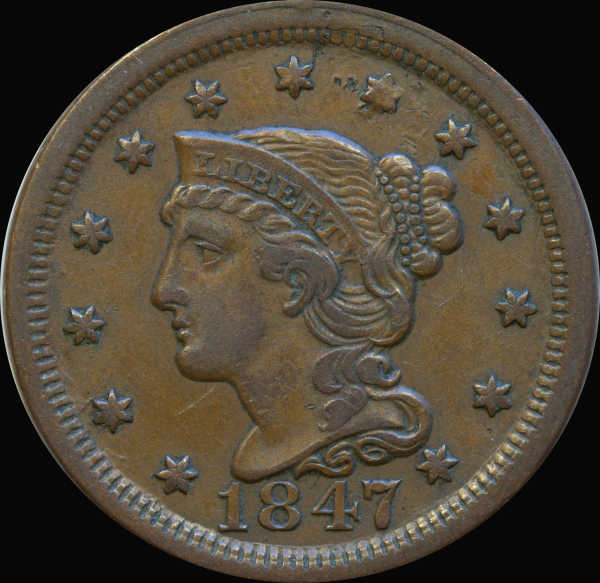 Thanks for the tips! I used the Av setting, picking f8, iso100 and a the camera did a longer exposure. Two lights (I have the ones from Ikea at home !). I used RAW format and then edited the colors in photoshop. I tried to match the coin's actual color as best I could. Then I cropped out the coin and put it on a black background. I think there is a lot more detail in the photo |
|
Pillar of the Community
United States
8534 Posts |
Wow, much better.
Oregon coin geek.....*** GO BEAVS ! ! ! ***
|
|
New Member
United States
41 Posts |
The coin photo does not look very sharp to me. Manual focusing would be best. Using a focusing rail would help. Using the 2 or 10 second timer would help. I don't know what kind of focusing magnification set up Canon might have, but you should see if you have one and use it. The photo is not bad, but could be much sharper. Also more light might be helpful by using larger 5500k bulbs and moving them closer to your coin. .25 second is probably too long of an exposure time if your set up is not rock solid and vibration free. Good luck on your quest.
|
|
Moderator
United States
23522 Posts |
That's glorious, Bababooey. Great shooting.
|
|
Pillar of the Community
United States
9810 Posts |
Quote:
The coin photo does not look very sharp to me. Manual focusing would be best Looks pretty sharp to me, the EF100mm Macro is a sharp lens, and auto focus does an excellent job at close subject ranges. There may be a bit of difference between the fields of the coin and the high points of the devices. At F/8 that should negate the small depth of field giving a pretty sharp over all average. Unless you plan on using focus stacking you can't get much better. I use a bubble level on my coin shooting surface and then on the camera to insure that both are the same level. The real tough ones are in slabs where the coin is at an angle in the slab, sometimes some tweaking is needed to compensate for that. Remember focus amounts are very small with macro. "Buy the Book Before You Buy the Coin" - Aaron R. Feldman - "And read it" - Me 2013! ANA Life Member #3288 in good standing since 1981, ANS, Early American Coppers Member (EAC), Colonial Coin Collectors Club member (C4), Conder Token Collector Club member (CTCC), Civil War Token Society (CWTS) member, Liberty Seated Collectors Club (LSCC) & Numismatic Bibliomania Society member (NBS), USMex, Member in good standing, 2¢ variety collector. See my want page: http://goccf.com/t/140440 |
|
Moderator
United States
23522 Posts |
Westcoin, just lay a pocket mirror on the coin surface and center the lens in the viewfinder. Instant plumb, square and level.  |
|
Pillar of the Community
Canada
2786 Posts |
looks like you are cropping out the original background and replacing it with black?
there is a thread somewhere in this section about the effects of background color that you might want to look up.
the original blue background you are photographing might be throwing the color balance off & affecting the output color of the coin.
|
|
Valued Member
United States
374 Posts |
thanks for all the comments, they are very helpful. I appreciate them all. I am working on the adjustments and recommendation. I will look up about the background. What is the best to use? I have tried black, blue and white, and and yes, I noticed that the coin color is altered with each.
|
| |
Replies: 16 / Views: 3,746 |










 Posted 08/07/2013 12:19 pm


