



Coin Community Family of Web Sites Join Thousands of Coin, Bullion, & Money Collectors
Vancouvers #1 Coin and Paper Money Dealer 300,000 items to help build your collection! Royal Estate Auctions - $1 Coin AuctionsSpecializing in Modern Numismatics Coin, Banknote and Medal Collectors's Online Mall Royal Canadian Mint products, Canadian, Polish, American, and world coins and banknotes. Join Thousands of Coin, Bullion, & Money Collectors


Username:
Password:
Save Password
Forgot your Password?


This page may contain links that result in small commissions to keep this free site up and running.

Welcome Guest! Registering and/or logging in will remove the anchor (bottom) ads. It's Free!

Need Tips, Help Or Suggestions

To participate in the forum you must log in or register.
Author Previous TopicReplies: 7 / Views: 2,663Next Topic  
New Member
therisker's Avatar
United States
10 Posts
 Posted 06/01/2007  9:45 pm Show Profile   Bookmark this topic Add therisker to your friends list Get a Link to this Message Number of Subscribers
I'm new to coin photography and would like to get better at it. After reading through the great tips in this forum I feel like I'm starting to get the hang of it. However, I have a way to go to get even close to the fantastic photos I see here.

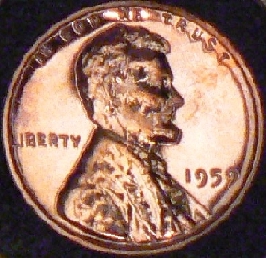
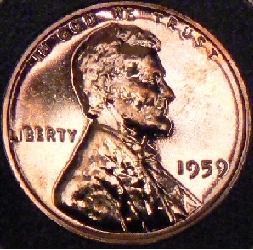
I'm having the most trouble with copper coins (which are my favorite). It seems that I have to tilt the camera slightly to get any kind of a good picture

Here are a couple of examples:

Need-Tips,-Help-Or-Suggestions

This one is a touch out of focus but captures the true color of tone/color of the coin. (tilted camera)

Need-Tips,-Help-Or-Suggestions

This one is better on the focus, however has the "dark" areas I get if I point the camera straight on.

Any suggestions would be greatly appreciated.

Thanks in advance!
Moderator
Learn More...
GO's Avatar
United States
6563 Posts
 Posted 06/03/2007  01:39 am  Show Profile   Check GO's eBay Listings Bookmark this reply Add GO to your friends list Get a Link to this Reply
What type of camera are you using? And what do you do to the pictures once they get on your computer? They look kinda distorted and pixelated.
New Member
therisker's Avatar
United States
10 Posts
 Posted 06/03/2007  11:19 pm  Show Profile   Bookmark this reply Add therisker to your friends list Get a Link to this Reply
I'm using a Panasonic DMC-F27. They were shot at F7.1, 1/800 and used optical zoom. Once downloaded, the only thing I do with the pictures is resize so they can be uploaded. Normally the size of the picture is twice what is allowed for uploads.

I'm really wanting to learn so any feedback would be appreciated.
Pillar of the Community
garylcsr's Avatar
United States
1952 Posts
 Posted 06/05/2007  5:01 pm  Show Profile   Bookmark this reply Add garylcsr to your friends list Get a Link to this Reply
Do you use a scope or some kind of magnification or is this pic from you camera alone?
have you tried a ramp? a ramp is nothing more than a coin flip folded over but not all the way I put black cloth on my ramp to take some of the glare out. try that and you will not have to Tilt your camera cause your coin is already tilted.
if you need any more help feel free to PM me I will help where I can.
Gary too
Bedrock of the Community
BadThad's Avatar
United States
19961 Posts
 Posted 06/05/2007  6:37 pm  Show Profile   Bookmark this reply Add BadThad to your friends list Get a Link to this Reply
Does your cam have a macro mode? That made a HUGE difference for me....even though I'm a noob.
Lincoln Cent Lover!
VERDI-CARE™ INVENTOR
https://verdi.care/
New Member
therisker's Avatar
United States
10 Posts
 Posted 06/05/2007  11:59 pm  Show Profile   Bookmark this reply Add therisker to your friends list Get a Link to this Reply
This picture is straight from the camera no scope was used. Thanks for the tip on not having to tilt the camera. I only find that I have to do this with copper and not silver coins? And yes I'm using the Macro mode.
Pillar of the Community
garylcsr's Avatar
United States
1952 Posts
 Posted 06/07/2007  02:23 am  Show Profile   Bookmark this reply Add garylcsr to your friends list Get a Link to this Reply
if your light is not too hot. put a paper or something over it that may help a bit or alot. your pic is flooded with light.
Gary too
Valued Member
stratocaster's Avatar
United Kingdom
240 Posts
 Posted 06/07/2007  05:59 am  Show Profile   Bookmark this reply Add stratocaster to your friends list Get a Link to this Reply
Try this:
-center spot metering, rather than a matrix or whole picture
-AV mode with the smallest possible number, that is largest apperture to get a shorter exposure and set the ISO to the smallest nr(50 or 100).
Hope this will help and hope I didn't repeat someone else's advices or something you alredy knew.
  Previous TopicReplies: 7 / Views: 2,663Next Topic  

To participate in the forum you must log in or register.


Disclaimer: While a tremendous amount of effort goes into ensuring the accuracy of the information contained in this site, Coin Community assumes no liability for errors. Copyright 2005 - 2026 Coin Community Family- all rights reserved worldwide. Use of any images or content on this website without prior written permission of Coin Community or the original lender is strictly prohibited.
Contact Us  |  Advertise Here  |  Privacy Policy / Terms of Use

Coin Community Forum © 2005 - 2026 Coin Community Forums
It took 0.32 seconds to rattle this change. Forums