| Author |
 Replies: 14 / Views: 2,311 Replies: 14 / Views: 2,311 |
|
|
Pillar of the Community
United States
7375 Posts |
Not sure if this is the right forum for the topic...moderator please move it if it isn't. I've been looking forward to selling LWC. Figured I would just scan it and have an awsome scan like I see online all the time. We have what I thought is a nice HP scanner. So here is what I get. Photo of same coin below. Am I doing something wrong with the scanner? scan  photo  |
|
|
|
Pillar of the Community
United States
1314 Posts |
I believe that some of the HP scanners are adjustable for quality when saving as a jpeg file. That might be a start.
|
|
Pillar of the Community
Canada
5417 Posts |
|
|
Pillar of the Community
Canada
3167 Posts |
 Mine ranges in quality from 200 up to 4800 dpi. Edit: I have an HP as well. Edited by noahs-numismatics
11/07/2013 9:27 pm
|
|
Moderator
 United States
23522 Posts |
I would expect better results than that. Set the resolution to either 600dpi or 1200dpi - use the larger number if it gives decent results - and downsize the resulting image to a postable size. The downsizing process will increase perceived sharpness. More resolution than that merely creates an unusably-large file without much increase in quality. Also, have a look at the scanner software's color settings - the white balance of this image is off.
|
|
Pillar of the Community
 United States
7375 Posts |
Thanks for your responses. I tried 300 and 600dpi, and the image was about the same. Forgot to mention that the background is a piece of my kids tan construction paper. the color of the paper looks correct, but will look into the white balance settings too. I also tried the white scanner background and the image was the same.
Will have too look at the scanners software settings, and do some more playing. Would have expected more from a first scan though. BTW it's an HP Officejet Pro 8500 A910.
To be continued.... Thanks. ed
|
|
Moderator
United States
23522 Posts |
Never mind my comment about white balance then - I thought it was the standard white cover color. Yeah, you'll probably have to just fiddle with various settings; I'd expect better from a scanner than you've received so far. As an Epson kinda guy, though, I've no specific recommendations for your HP.
|
|
Pillar of the Community
United States
7375 Posts |
I must just have a lousy scanner for pennies. There really aren't many settings to play with. At least none that seem to be able to sharpen the image. Only contrast and brightness. Hard to believe the focus could be off that much with a coin flat on the glass. Maybe I'm looking in the wrong place, but checked the manual and it wasn't much help either. Oh well. Thanks to forum members I recently learned how to take a half decent photo. Looks like I will be using a camera.  |
|
Pillar of the Community
United States
1314 Posts |
Just tried this one on my HP 2512. http://i1169.photobucket.com/albums...tTG/Cent.jpgNot being a wise guy, but having a lifetime of foolish errors to reflect on... Do you have any young children that may have tried to copy a peanut butter and jelly sandwich? Is the glass clean? Stick with it. |
|
Pillar of the Community
United States
1314 Posts |
|
|
Pillar of the Community
United States
7375 Posts |
Glass is squeaky clean. I don't get it. Unless I'm totally missing the boat, I don't see anywhere to make any big adjustments. I've gone into 'Scanners and Cameras' in Control Panel on my PC, but nothing to see there. I'll have to look more carefully at the touchpad on the scanner. I think my wife has the original scanner software disk somewhere......might try to find that and reinstall it. FWIW I've scanned a bunch of stuff on this scanner and everything else, photos, documents, looks great.  Edited by edweather
11/08/2013 08:28 am
|
|
Pillar of the Community
2087 Posts |
My experience with scanners( a long time ago) it that they never produce good pictures of coins.....a point and shoot camera with macro function will always beat a scanner.
|
|
Pillar of the Community
United States
8533 Posts |
I've seen some amazing scanner pics of coins but by and large they almost always look bad and you can pic them out a mile away.
Oregon coin geek.....*** GO BEAVS ! ! ! ***
|
|
Pillar of the Community
United States
7375 Posts |
Thanks guys. Yeah, I'm not going to sweat it. A little disappointed, but I'll get over it. Especially when there is such great photo help on this forum. Thanks to the unselfish, willing to help forum members, have already learned how to quickly take a half decent photo of a coin almost quicker than a scanner. Ed |
|
Pillar of the Community
United States
7375 Posts |
Think I figured it out. Kind of a 'duh' moment, but I tried 1200dpi and it was much better, but not as good as a real photo IMO. scan shows some details better, but color is way off 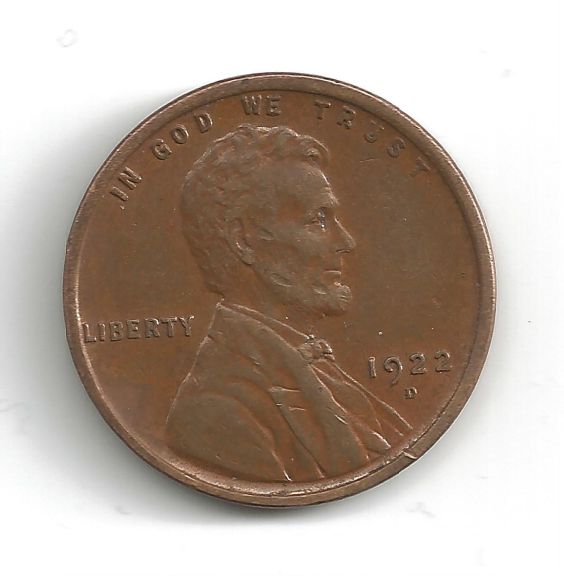 photo overall better IMO, & much better color 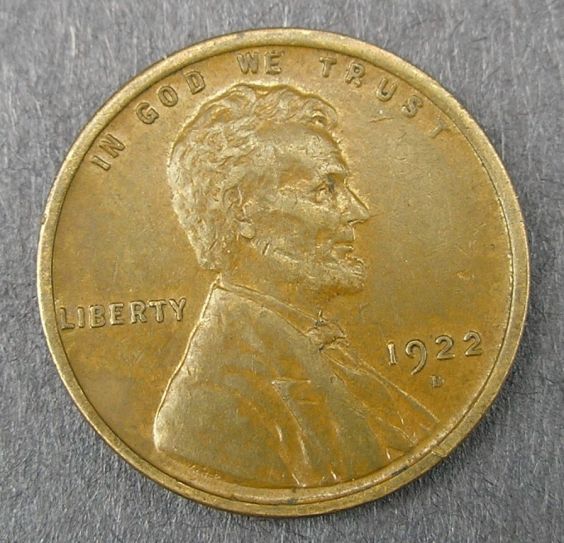 Thanks. Ed |
| |
Replies: 14 / Views: 2,311 |
|







 Posted 11/07/2013 4:30 pm





