| Author |
 Replies: 11 / Views: 2,151 Replies: 11 / Views: 2,151 |
|
|
Pillar of the Community
United States
1314 Posts |
Background color matters. These two photos (of the same coin,) were take with identical settings. All I changed was the background fabric. 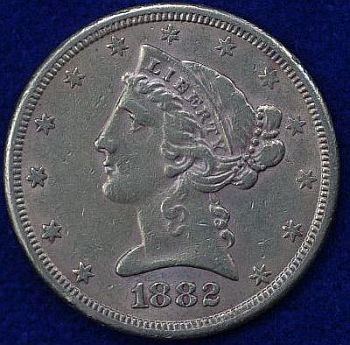 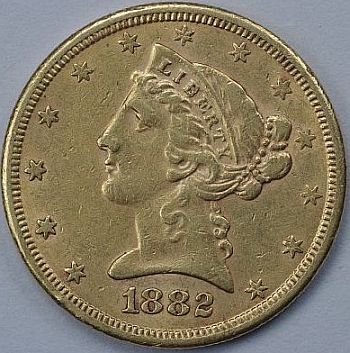 |
|
|
|
Moderator
 United States
23522 Posts |
Pentax boasts some of the best color correction in the business - your rig shouldn't have totally freaked out that way over a dark blue background. Were you by some chance using a Custom white balance setting, or a preset other than Auto? Retry the blue-background shoot on Auto.
|
|
New Member
United States
22 Posts |
Agreed, it looks as though something threw the white balance.
|
|
Valued Member
United States
374 Posts |
Looks to me like a pretty common saturation issue.
|
|
Pillar of the Community
 United States
1314 Posts |
You are so correct. And I am pleased to add... as usual. I had the camera setting on a White Balance for tungsten lamps. That's what I use (as long as the government will let me,) and it has been working well for my silver coins. In a broader scope, I've tried to use manual settings rather than auto, in the belief that I could learn more. In this case I did. And learned that auto is powerful. Same coin with auto WB setting. 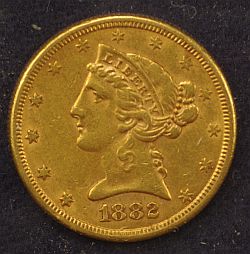 Thanks for another lesson. |
|
Moderator
United States
23522 Posts |
Still a little curious as to why the WB was so far off using that preset - after all, the lamps were tungsten - but we'll chalk it up to a glitch and move on.  |
|
Pillar of the Community
2087 Posts |
I disagree with the threads title IMHO background doesn't matter at all when taking coin photographs. With modern photo editing software. You can add any background you like. I use a backlight and edit out the background( takes all of 2 minutes. I use a white background after editing but you can choose any color you like. IMHO focus on the coin ( all every way) when setting up and taking the shot. Then worry about the background later.
|
|
New Member
United States
22 Posts |
The background will matter to him if his camera is interpreting the white balance incorrectly. I took that third photo, and I opened it up in Lightroom (photo editing). The only thing I did was hit the 'auto white-balance' setting. This is what happened:  Just my 2 cents, but it would be beneficial to do the majority of the adjusting on the camera. Unless able to shoot RAW images, you're going to lose image quality if you start post-processing every image. It'll get noisy! |
|
Moderator
United States
23522 Posts |
No reason not to eliminate steps when possible. The thing that gets to me about this one is, there's no hue/saturation/white balance issue that I can think of which would result in a monochromatic coin while retaining color in the background. A white balance issue can always be fixed - to one extent or another - by subtracting hue. There's no way to subtract from that coin and reach anything resembling gold.
Which is why I called it a glitch.
|
|
New Member
United States
22 Posts |
Yeah, the camera is a bit confused. Lol. I wonder if there's an option to set your own custom white balance on his camera?
|
|
Pillar of the Community
United States
1314 Posts |
Plausable explanation. Operator error. When the bulbs burn out, I just grab one from another lamp. One or more may not be tungsten. I could have in the mix some new, Federally Mandated high efficiency bulbs. I don't know what spectrum I'm working with. Austrokiwi, I really appreciate your input and perspective, but my goals may not be the same as others. As a novice, I see coin photography from two "angles." Many shutter bugs are working hard to create the best artistic product possible. I will too, someday. But for now, I need an image that is technically correct rather than artistically pleasing. I need to pick the detail necessary for VAMming and grading. I want the color to be approximate. And I want to do it with a minimum of editing. My computer is an antique, and I need to get some stuff on ebay with a minimum of effort. I look forward to the time when I can dedicate a little more time to going the extra mile (kilometer.) Thanks for the help, you guys have gotten me this far. |
|
Pillar of the Community
2087 Posts |
Quote:
I need an image that is technically correct rather than artistically pleasing. I need to pick the detail necessary for VAMming and grading. I want the color to be approximate. And I want to do it with a minimum of editing. Huh? I think you read my post wrong. I am not interested in artistically pleasing that's why I don't give a toss about the background when I photograph a coin! So I repeat IMHO the background of a coin, when photographing, is unimportant, and I go further and say its an unnecessary distraction an waste of time when setting up the shot properly. I certainly don't want the colors to be approximate; I want them to be exact!! Like you I am dealing with minute detail and coin features that separate out different varieties. So high resolution (I now use a camera without an anti-aliasing filter), accurate lighting, and sharpness are extremely important. Then there is the question of minimal editing....I recall that I had huge problems with editing photos until I attended that ANA summer seminar last year and participated in the seminar on how to photograph coins. I would often think as you have stated (re minimal editing) but in fact I did more editing than I do now. I now spend more time setting up the shots and as little time as possible editing. So I suspect your comment, like my previous attitude, comes from a lack of knowledge. The only editing I do is as follows( assuming I am happy with the photograph.
- Step 1: Using the elliptical Marque(standard cropping tool)...I select the coin
- Step 2: I then invert the selection ( so that only the background is selected)
- Step 3 I hit delete removing all the background and leaving only the coin
That's usually the end of my editing. As I have already set a default white background the coin appears to be on white. However you can pick any background color you like. the reason I use a white background is so that when the picture is published the coin is all that is seen on the page. For ebay of course one would pick other colors to make the coin stand out As others have pointed out White balance is really important. Too important to rely on the camera's pre-set options. So I use custom white balance ie: I set the white balance using standard 18% grey cards purchased from a camera shop. Edited by austrokiwi
02/12/2014 02:06 am
|
| |
Replies: 11 / Views: 2,151 |
|







 Posted 02/10/2014 11:03 pm





