Coin Community Family of Web Sites Join Thousands of Coin, Bullion, & Money Collectors
Royal Estate Auctions - $1 Coin AuctionsJoin Thousands of Coin, Bullion, & Money Collectors Vancouvers #1 Coin and Paper Money Dealer Royal Canadian Mint products, Canadian, Polish, American, and world coins and banknotes. Coin, Banknote and Medal Collectors's Online Mall Specializing in Modern Numismatics 300,000 items to help build your collection!


Username:
Password:
Save Password
Forgot your Password?


This page may contain links that result in small commissions to keep this free site up and running.

Welcome Guest! Registering and/or logging in will remove the anchor (bottom) ads. It's Free!

I Just Need To Know....

To participate in the forum you must log in or register.
Author Previous TopicReplies: 5 / Views: 1,584Next Topic  
Valued Member

136 Posts
 Posted 02/10/2014  11:17 pm Show Profile   Bookmark this topic Add eagleeye4coins to your friends list Get a Link to this Message Number of Subscribers
So the pictures I've been posting arnt good enough and I keep being told the glare on my coin.... well what I can say is the glare I keep being told about is metal on my coin. Not sure why it keeps glaring I'm using a scanner at 1200 dpi but perhaps the zoom makes this happen..... but I need to know what I need to buy to MAKE sure my pics work for everyone. I am getting frustrated with posting because what I see the pic.... doesn't show? I have two coins I posted earlier that I know are exactly what is know as a doubled die. I even went and compared to wexler and some on ken potters list. Am I dumb lol? Or does my scanner suck?
Pillar of the Community
Jayman931's Avatar
United States
2651 Posts
 Posted 02/11/2014  12:04 am  Show Profile   Bookmark this reply Add Jayman931 to your friends list Get a Link to this Reply
I use flickr and then use the hyperlink to post pictures. This works good for me. Now I don't use a scanner but I haven't had a problem with uploading pics to Flickr and then putting them here.
Pillar of the Community
Classic Coins's Avatar
United States
940 Posts
 Posted 02/11/2014  12:18 am  Show Profile   Bookmark this reply Add Classic Coins to your friends list Get a Link to this Reply
Coins and scanners don't play well. If you don't have a tripod and DSLR camera, do the best you can to stabilize a point-and-shoot camera and use the delayed timer, and a remote shutter release if possible. A key to taking clear coin images with cameras is eliminating camera shake. If you want to get serious about coin photography, get a DSLR camera, a tripod, and a remote shutter release. See my Civil War Token photo at this topic:

https://goccf.com/t/169696
Edited by Classic Coins
02/11/2014 12:19 am
Pillar of the Community
52Raymo's Avatar
United States
8516 Posts
 Posted 02/11/2014  12:30 am  Show Profile   Check 52Raymo's eBay Listings Bookmark this reply Add 52Raymo to your friends list Get a Link to this Reply
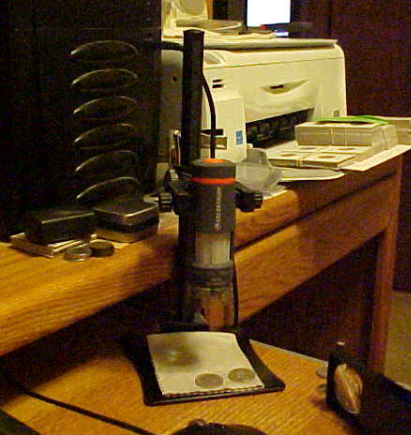
A USB microscope works really well for what you're wanting and it takes up very little space. I use mine right next to my mouse and keyboard.


I-Just-Need-To-Know....
Oregon coin geek.....*** GO BEAVS ! ! ! ***
Edited by 52Raymo
02/11/2014 12:32 am
Moderator
Learn More...
SsuperDdave's Avatar
United States
23522 Posts
 Posted 02/11/2014  12:34 am  Show Profile   Bookmark this reply Add SsuperDdave to your friends list Get a Link to this Reply
Start by dropping to 600dpi. 1200 is overkill for coins, and pushes the scanner optics past the point of showing coin detail accurately. Second, post the resulting images full-size; the stuff you've been posting is a small percentage of the size it was when it came from the scanner. At 100%, a Cent should fill the average computer monitor's resolution. This may require that you host images elsewhere and link them in your post, as CCF's Optimizer requires pretty fair knowledge of postprocessing to use to best advantage.
New Member
vanslem6's Avatar
United States
22 Posts
 Posted 02/11/2014  5:58 pm  Show Profile   Bookmark this reply Add vanslem6 to your friends list Get a Link to this Reply
OP, light will reflect off your coin just like when you try to make a cut or bank shot playing pool. Any direct light will shine back at you. If you could angle the coin 10Ëš or so on the scanner (lift one side of the coin slightly off the surface so it isn't lying flat), it should eliminate any direct reflections from the bulb in the scanner. Ever take a picture into a mirror with the flash on? It's the same effect. Good luck!
  Previous TopicReplies: 5 / Views: 1,584Next Topic  

To participate in the forum you must log in or register.


Disclaimer: While a tremendous amount of effort goes into ensuring the accuracy of the information contained in this site, Coin Community assumes no liability for errors. Copyright 2005 - 2026 Coin Community Family- all rights reserved worldwide. Use of any images or content on this website without prior written permission of Coin Community or the original lender is strictly prohibited.
Contact Us  |  Advertise Here  |  Privacy Policy / Terms of Use

Coin Community Forum © 2005 - 2026 Coin Community Forums
It took 0.29 seconds to rattle this change. Forums