| Author |
 Replies: 7 / Views: 1,691 Replies: 7 / Views: 1,691 |
|
|
Pillar of the Community
United States
1314 Posts |
I would like to show 2 pictures. The first has an unnatural gold tone, the second a more natural silver color. Could this be due to where I was standing? And wearing a tan t-shirt? My sole adjustment was to focus. And you can see by the hologram that there was no change in position of the camera or lighting. I used a 2 second timer. Shots were taken approximately 5 seconds apart. Comments appreciated. Thanks. 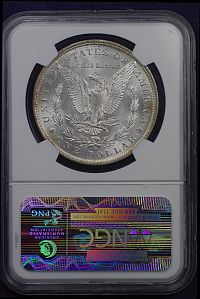 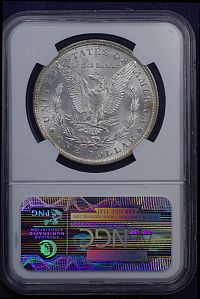 |
|
|
|
Pillar of the Community
United States
1158 Posts |
The most common color problems have to do with the camera's white balance. Are you using a custom white balance or setting it to match your lighting (i.e. flash/tungsten, etc)? If not, the camera is just guessing at the color of your light and can change slightly from photo to photo.
Fortunately you could fix that in a photo editor in like 10 seconds with the white balance tool by clicking on the white coin slab area for reference.
Most cameras have a custom white balance feature where you either pick from presets or shoot a white sheet of paper under the lighting you are using as a white reference. Then your white point will be set and match for all photos taken under that light.
Edited by tkbslc
07/02/2014 12:50 pm
|
|
Pillar of the Community
United States
9810 Posts |
Yes I think light was reflecting off your tan shirt, try turning off extra lights in the room, like the TPG graders do, this will lessen any reflected colors onto your coins or slabs. This is not a white balance issue, as the the OP stated nothing was changed between shots, and you can tell even the lighting did not move or change, only he did, so that has to be the answer. "Buy the Book Before You Buy the Coin" - Aaron R. Feldman - "And read it" - Me 2013! ANA Life Member #3288 in good standing since 1981, ANS, Early American Coppers Member (EAC), Colonial Coin Collectors Club member (C4), Conder Token Collector Club member (CTCC), Civil War Token Society (CWTS) member, Liberty Seated Collectors Club (LSCC) & Numismatic Bibliomania Society member (NBS), USMex, Member in good standing, 2¢ variety collector. See my want page: http://goccf.com/t/140440 |
|
Pillar of the Community
United States
1158 Posts |
That's certainly a probable explanation. However, custom or preset white balance is still highly recommended for maintaining consistency. The camera re-evaluates between every shot if you leave it on auto WB.
Another critique is that the OP is using ISO 1600 and 1/4000 shutter speed. You'd get better color and less noise using the lowest ISO possible, and in this case ISO 100 and 1/250 would have worked better for the given lighting. ISO 1600 is beginning to show a fair amount of noise and the camera is likely using noise reduction methods which can reduce detail.
I'm new to coins, but I'm not new to photography!
Edited by tkbslc
07/02/2014 3:26 pm
|
|
Pillar of the Community
United States
9810 Posts |
 I did not know the settings on the camera. I set up a custom white balance, or use daylight only never AWB. ISO as low as I can usually 100 or 200 ISO. My F/ratio is usually F/5.6 or F/8 and since I'm mounted on a carbon fiber tripod, shutter time is not an issue, I also use live view (Canon) for focusing via computer screen at enlarged size, then mirror lock up to minimize any camera shake from the mirror slap. "Buy the Book Before You Buy the Coin" - Aaron R. Feldman - "And read it" - Me 2013! ANA Life Member #3288 in good standing since 1981, ANS, Early American Coppers Member (EAC), Colonial Coin Collectors Club member (C4), Conder Token Collector Club member (CTCC), Civil War Token Society (CWTS) member, Liberty Seated Collectors Club (LSCC) & Numismatic Bibliomania Society member (NBS), USMex, Member in good standing, 2¢ variety collector. See my want page: http://goccf.com/t/140440 |
|
Pillar of the Community
 United States
1314 Posts |
The ISO was set too high as a left-over from earlier experimentation. The pictures were taken at night. The setting on the camera was for fluorescent â€" cool white. The two bulbs were compact fluorescents, the cork screw type. All other lights were off. My camera is a Pentax K-x, and it appears as though the lowest manual setting for ISO is 400. I am a beginner at photography, and have so much to learn. Like post processing. I have Irfanview, PhotoStudio 5.5, and Paint. Which might be most user friendly for me lighten in editor? Thanks. |
|
Pillar of the Community
United States
1158 Posts |
Pentax k-x can for sure go to 125 or 100. You might have some DR expansion setting enabled or something that is setting an artificial floor. Just use the lowest ISO that still gets you a 1/200 or higher shutter speed when using that 100mm lens.
Most of those corkscrew bulbs are balanced to replicate light from incandescents. I'd try the Tungsten setting. Or do custom and use a white card or paper to program a white reference, is probably most accurate. However if you had the WB fixed, then you probably did cause some reflections as mentioned above.
I honestly don't use any of those editors, but I use Picasa (free from Google) to organize and view my photos. It has a half decent quick fill light and white balance tool that would be handy. For more serious stuff I use Corel Paint Shop Pro X4. Another free one I like is PhotoScape.
|
|
Pillar of the Community
United States
1314 Posts |
Thanks tkbsic, If the manual doesn't show me how to lower the floor, I'll contact Pentax. As long as I'm here, what effect does the focal length setting have when using a bellows?
|
| |
Replies: 7 / Views: 1,691 |
|










 Posted 07/02/2014 2:09 pm


