| Author |
 Replies: 17 / Views: 5,122 Replies: 17 / Views: 5,122 |
|
Pillar of the Community
United States
1911 Posts |
Hi all, I am completely new to (proper) coin photography and from what I saw from the posts in this forum, there are many specifics and details about cameras and lighting and what not. But for someone that has little to no experience even using a camera for close-up details, where is the best place to start? I have used my wife's phone camera and we have a little digital camera that always gets blurry when I try to zoom in on a coin. Is it possible to use a cheap camera and take good photos without spending money on a better one or lighting? How best to set up lighting, if using regular household lamps? Many broad questions so if anyone would have a good over-arching strategy or if someone could direct me to a "photographers start here" post that I missed would be greatly appreciated!  |
|
|
|
Moderator
 United States
56855 Posts |
Tell us what you have to work with,make model etc. I use a point-n-shoot just make sure you set it to macro...the little flower icon on your camera. I also use a usb microscope sometimes. Some members get great pics with their smart phones using an adapter for the lens. John1  |
|
Rest in Peace
United States
4078 Posts |
Looks like you posted this question in the right forum. Now it is time to read the post from, "coin photography".
John1, is also correct and post what you have.
ps. Watch out for that Ssuper Ddave guy. He is in the know about "coin photography".
|
|
Pillar of the Community
 United States
1911 Posts |
I will add more details about the camera I use and everything later this evening. Thanks for your help!
|
|
Moderator
United States
23522 Posts |
Oh, boy. Fresh meat.  |
|
Pillar of the Community
United States
1911 Posts |
Ah yes.. Dave I have seen lots of you on this forum topic. :P Any help is welcome! The camera I use is a Sony Cybershot says 5x optical zoom Optical steady shot DSC-WX50. 16.2 megapixels. And I looked and I can't seem to find any "plant" for "macro" that has been bantered about on other posts. And the phone camera seems to be 5 Megapixel on a ZTE Imperial I cant seem to find much more information about it. The phone seems to take somewhat better pics than the actual camera but none of the pics I have taken come close to ones on CCF. It's probably just me, though.
|
|
Pillar of the Community
Canada
3049 Posts |
When I started I used a point and shoot auto digital camera.. Approx $200 at the store.... I didn't like the shots I was getting so I ended up picking up a small screw In adjustable tripod from best but for $10.. With that I could play around a bit more with my light sources an increase the exposure rate to get a bit better shots...it works pretty good... But last year I bought my wife an iPod mini...and I bought one of those macro lenses that fits over the camera ... With an old science stand to hold the iPad I& the macro lense I can once again play with the lighting and zoom and pick up some pretty good shot....
Basically.. What ever technology you are currently using.. You could probably rig a decent set up for less than $50 which will dramatically improve the shots you are taking now....
|
|
Pillar of the Community
New Zealand
526 Posts |
I use a old Canon Ixus 65 which has a macro setting (used without flash), and can get decent pics if I get the natural light right. I have a later purchased Nikon Coolpix S3100 which does not do a good job with macro
The Canon display is now missing a large block of pixels, but is still usable for coin shots
|
|
Pillar of the Community
United States
1911 Posts |
Thank you AgCoin and Warwick, but I am still at the point where I have no idea if the camera I am using is even possibly able to get good photos, what the tripod is for (other than holding the camera still of course), what macro setting or lense even is and why it is important, and how best to set up my household lamps for the best lighting. Being as un-photographic as they come I need the bare basics! Thank you for the info everyone!
|
|
Pillar of the Community
Canada
3049 Posts |
macro setting allows the camera to focus in on an object that's really close to the lense.... on most digital cameras there is a symbol of a flower to indicate a macro setting...
The tripod that I got.. allows the camera to be completely still.. this means if you increase your exposure rate (the lense stays open a lot longer) the picture will still remain very clear.
I also like using a tripod and or coin mount... so I can just keep the lighting and camera still and just move the coin into the frame to take the shot.
With respect to lighting.. well that's just something you may have to play with... I used to use some small lamps and put sheets over them... then I built some "paper boxes" around a simple light bulb... but eventually I picked up some small lamps from ikea that have some frosted glass... I like 'em because they give off a very soft even light ... that really helps prevent the glare and shine that can come off the coin.
I certainly am NOT in the same league when it come to photography as SsuperDdave.... but the truth is .... I really don't take a lot of pictures in my normal life.. and my coins really aren't in the big leagues.. they're mostly just common coins and notes... so I tried to keep the expense of photos down a whole lot...
The great thing about coin photography is that it's SOOO challenging to get a really good coin shot.. It's really a whole lot of fun taking pictures of my coins so the adventure is well worth it!
|
|
Pillar of the Community
New Zealand
526 Posts |
Certainly coin photography is challenging.
The macro setting on some compact cameras seems better than others. A tripod helps steady the camera but mine is too big, so I need a smaller one. Backgrounds can make coins look better - I sometimes use a dark wood-grain backdrop or some black picture matting material. Table lamps can make silver coins look golden.
Natural or diffused lighting is probably best. Trying to get a balance between too much light and too little.
|
|
Valued Member
United States
149 Posts |
I'm looking at the manual now ( https://docs.sony.com/release/DSCWX...ide_EN.pdf), and your camera is a bit different in how it handles macro. There's no specific macro (flower) button. On page 123, it refers to auto scene selection, which should detect that you're intending to use the macro mode. I can't tell what the focusing limits are at varying amounts of optical zoom, however. You want the camera at least a foot or so away from the coin, so while the auto scene selection is enabled, try zooming a little while focusing on objects in that range. It could be that the macro focus only works on the wide angle setting, putting you really close to the coin, and as soon as you zoom in, it won't focus close anymore. |
|
Pillar of the Community
Canada
805 Posts |
I like to use a sheet of white paper wrapped around cardboard for a backdrop and another piece of white paper on the desktop. I hear it's best to use an 18% grey paper, but white seems to work fine. Then, set your WB (White Balance) on your camera ifit has it It should have selections for different fluorescent lighting, tungsten, natural, sun, etc. When you half depress the shutter button, look at the background around the coin. If it's not white, then re-adjust the White Balance until it is. That will make the coin look closest to its original shade/colour. When you see photos of coins and the background is yellow (like my older pics), someone has taken a shot with a white background, but have not set the White Balance on the camera. I find this method works best for me, especially when shooting bronze/copper/aluminum coins... others, like silver, are a little more difficult. Also, if you can't get far enough away from the coin and it blocks out the light, try using a coin stand (readily available on ebay), at least you will get more light around a coin rather than standing it against a backdrop. I'm not an expert, but I find I get decent photos this way. You should have seen the way they used to look! Right now, I'm using a friend's Canon G5, so I get far away and zoom in closer than I need to. With my regular Fujifilm, I have to get within inches of the coin. Edited by steve123
11/28/2014 1:24 pm
|
|
Pillar of the Community
New Zealand
526 Posts |
Steve - thanks for the tips. I had the problem you mention last night (example below). I didnt realise you could change the white balance on the Ixus65. But now I have discovered that menu area I can experiment with the white balance. Pic shot under tungsten lamp on white background. Silver coin becomes gold and white paper become yellow/orange. 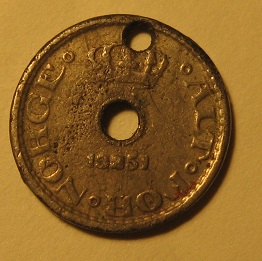 From the manual......Canon Digital IXUS 65 - White balance It is a good idea to set the white balance carefully in artificial light, or to make your own white balance. Of course, you must not forget to undo this if the circumstances change. The Canon Digital IXUS 65 can only record in JPEG format whereby a faulty white balance can soon turn out to be a disaster. |
|
Pillar of the Community
Canada
805 Posts |
Change the white balance until the background is the closest to white. Experiment with brass/copper/etc coins first. Silver is a little tougher but gets easier with indirect light, I find anyways.
|
|
Pillar of the Community
New Zealand
526 Posts |
Heres the same coin / same camera - just ambient light indoors. Still not brilliant, but at least its the right colour. The bigger coin is a GB Penny - image is too dark. Coin photography is a fickle art 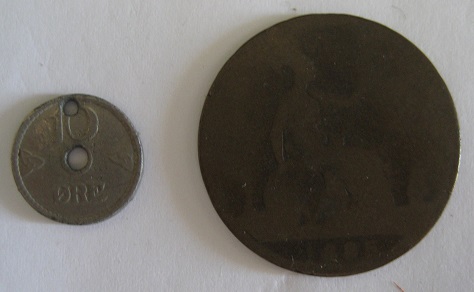 |
| |
Replies: 17 / Views: 5,122 |










 Posted 11/19/2014 4:03 pm


