| Author |
 Replies: 9 / Views: 1,098 Replies: 9 / Views: 1,098 |
|
|
Valued Member
United States
258 Posts |
|
|
|
|
Pillar of the Community
United States
7629 Posts |
Cannot tell at that magnification. Whatever it is, it is small...very small.
|
|
Valued Member
 United States
258 Posts |
Hi, Does not want to scan very good at all, but here go's.  |
|
Pillar of the Community
United States
7629 Posts |
Your image turned out very blocky - probably because you are optimizing it too much. You should attempt to save it at a higher quality and use it that way. There's no way anyone can determine what you have looking at an image that looks like a Picasso block painting...and it's image optimization that causes it.
Image optimization allows you to set the "save" function of your software to "forget" a certain amount of information about the original image at save time. What this does is enlargens the areas it remembers so it doesn't have to remember as much. For instance, if your image is 100X100 pixels, at full optimization it has to remember all the color and shade information for 10,000 pixels. If you save it at 50% optimization, the amount it has to remember is half as much as for full resolution because it doubles the areas it remembers, effectively covering four pixels per area. That turns your 10,000 pixel memorization into a 2,500 pixel memorization, taking the finished file size down by three quarters. If you remember it at the lowest quality, it can sometimes turn what started out as a one for one pixel memorization down to 1:20, effectively making the computer remember 20 times less than it would have, making your image 1/20 the file size as it had originally been. This could effectively turn a 150K image into a 7K image. Problem is, you get all this "blocking" and the detail goes away in the image.
If you have an issue with being able to upload images because they are too large in file size, try the following:
1. Crop out the unimportant parts of the image. This reduces the overall size of the image and still shows what you want. The end result could be an image that's less than half the size of the original, yet still serves your purpose.
2. Save it at 50% optimization. This is a good general level that prepares images for web size without forgetting too much of the original information in the image.
3. Try resizing the image to make it a little smaller. A 20% reduction in size can knock down the file size by 1/3 without losing any necessary detail.
4. Always save in JPG (JPEG) format. GIF and TIFF formats are very filesize heavy and do not optimize well at all.
5. If file size is an issue for uploading to message boards, go sign up with a free image hosting service and link to the image from the message board. This can increase your allowable upload filesize by double.
Optimally, you want file size to be around 75-100K with the image at or around 800 pixels by 600 pixels. Any less and you're cutting out useful memory information in the image. Any more and you start to affect the load time for people with slower connection speeds.
Hope this helps..
|
|
Pillar of the Community
United States
7629 Posts |
This will serve to illustrate my point. The following three images are the same photograph treated in three different ways. The first image is the original un-optimized image. It is 265K in file size, and is frankly too large for the web. This image may take some time for some of you to load...  The next image is the same one, same pixel size, but now it has been optimized to 45% of the original. Its file size is 67K, about 25% the size of the original image. The optimization worked pretty well, because at this level most of the detail still remains... 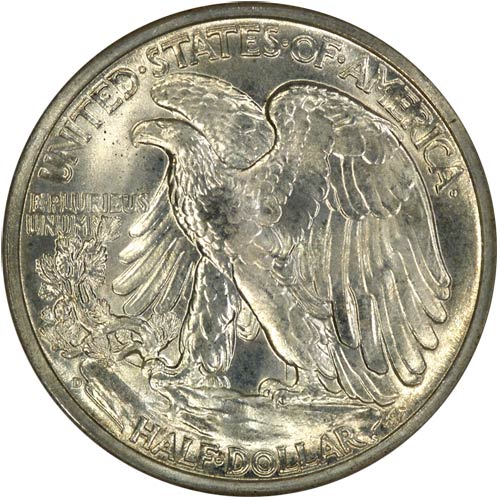 The next image was optimized fully (to zero) and is only 25K in file size, which is less than one tenth of the original file size. Unfortunately you can see an extreme loss of detail in this image, which is the point of this exercise. If I were trying to sell this coin, this image would not be acceptable. 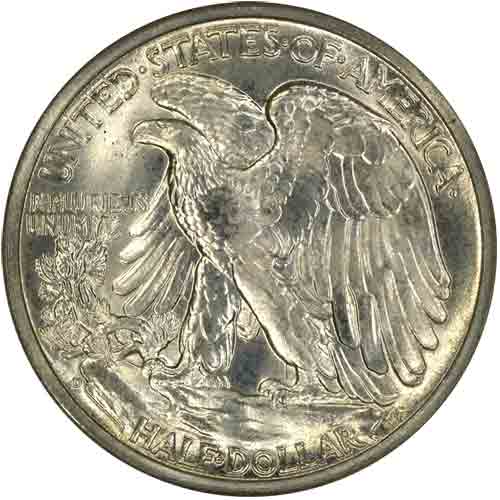 Edited by coppercoins
09/09/2007 11:55 am
|
|
Pillar of the Community
United States
7629 Posts |
Another problem that comes about frequently, and also may be your problem, is that reducing the size of an image is perfectly fine, but blowing up an image and making it larger often does not work well at all. The reason for this is simple...
If you are given a grid with 1,000 squares and told to fill the grid with 1,000 marbles, it would be simple...one marble per grid square. End result looks like a full box of marbles. If you were told to remove half the marbles, yet make the box look full, you'd have an impossible task on your hands. You are doing the same thing when you blow up images in a computer.
Making an image twice the size of its original forces the computer to take each pixel and double it wide and tall, effectively filling four boxes with each single box it started out with. When you do this, the computer tries its best to keep detail, but frankly it cannot make up information that wasn't there to start with, so it simply fills the three expanded boxes with the same thing it had in the one original box. Some software is smart enough to look at the box next door and create new pixels to stick between them that are a half-tone between the two original boxes, but even this produces often less than desirable results.
What we end up with when we expand the size of an image is a blurred image with less detail and less color properties than the original. What can we do to solve this problem?
1. Scan or photograph at a higher setting, so when we crop out our piece that we want, we don't have to blow it up to make it visible. On a scanner, this often means scanning at 600 or 1200 DPI instead of 150 DPI then blowing up the date area.
2. Buy proper equipment for the job...a microscope for $100, decent lighting for $100, a digital camera good for the job ($100-$200), and an adapter for the camera if necessary. Note that there isn't a scanner included in this list...scanners were not made for imaging metal in the first place, and the enlargement properties of scanners are terible at best. Basically, scanners are no good for this job.
3. Buy proper software for image editing. An old version of Adobe Photoshop costs $100 or less, and will go a long way toward giving you the power you need to properly handle your images. 99% of the "free" stuff or the cheap software that comes with digital cameras is crap, and doesn't work well. Photoshop is THE industry standard for photo editing and graphic production, and there's very good reason for it...it is very good at what it does. End of story.
|
|
Pillar of the Community
United States
7629 Posts |
Now...here's the deal...and this is rough.
One might say, "well, I don't know all that stuff about computers. Who could expect me to know this stuff?" One might also say, "yeah...you recommend I spend $500 to upgrade equipment. I cannot affrd that."
Well, my response is simple. Don't expect anyone to be able to help if you're producing images at half the quality necessary to receive help. If you want to get into imaging coins for the web, and you want people to be able to help identify them, you're going to have to go through a learning curve with your computer to learn better how to get your software to handle the job, or you're going to have to get better equipment. One way or the other, something would have to change.
|
|
Valued Member
United States
363 Posts |
|
|
Pillar of the Community
United States
1247 Posts |
Moonshine you made a good find. The dot above the 5 is called just that: a dot date, as long as it's not actually touching any digits. They were fairly common except for 54D. There's no listing for it that I can find. There's not much at all about die failure on 54D. Maybe Denver's supplier put some carbon in the iron that year.  There is also a break at the top of the 1. This was not very common at all. They usually broke to the right of the one and were called R-Dates. Again I don't see any listing for what you have. IMO, it's a very good find but may not be worth much. There doesn't seem to be a lot of interest at all in die failure. Even Cuds don't seem to have the same interest they once did. Edited by longnine009
11/05/2007 7:22 pm
|
|
Bedrock of the Community
United States
62064 Posts |
Coins in the 1950's had a lot of problems with the later die states. They literally struck ever Cent (Pun intended) they could with them to get the last one out of them.
|
| |
Replies: 9 / Views: 1,098 |
|




 Posted 09/09/2007 10:44 am





