| Author |
 Replies: 171 / Views: 19,136 Replies: 171 / Views: 19,136 |
|
|
|
Pillar of the Community
 United States
4048 Posts |
Can I send my wish list to Santa?
Seriously, I took these with same camera you will be using, same lens, a pair of Jansjos, and no post processing, so you should get exactly the same result.
edited to add: I am extremely interested in seeing what sort of results Dar will get with the newer camera using the same setup. They SHOULD be exactly the same except for higher resolution, but we shall see. The 24MP vs 10MP has an advantage for publishing of 800x800 pixel images. A 6000x4000 image can be downsized to 800 tall with an integer 5x downsizing, so Dar gets the advantage of 5x vs the 4x of a T2i (to get 864 pixels tall, needing cropping) or 3x of the XS (same 864 pixels). But I don't expect the difference between 5x to 3x to make a huge difference, so any improvement we see might be from the camera.
Edited by rmpsrpms
05/09/2015 8:23 pm
|
|
Pillar of the Community
 United States
1476 Posts |
Just an update. I just received the Nikon M5 in the mail and am still waiting on the adapter to arrive. It is supposed to be here may 19-Jume something. So it's just a waiting game. I haven't really been able to play as much as I want with the setup yet as we are in the final stages of closing on our house. Inspectors, ect. Can't wait till I can dedicate some real quality time to the rig.  I posted another picture of an off center cent I picked up in the modern errors area but I will post it here, just a sec, 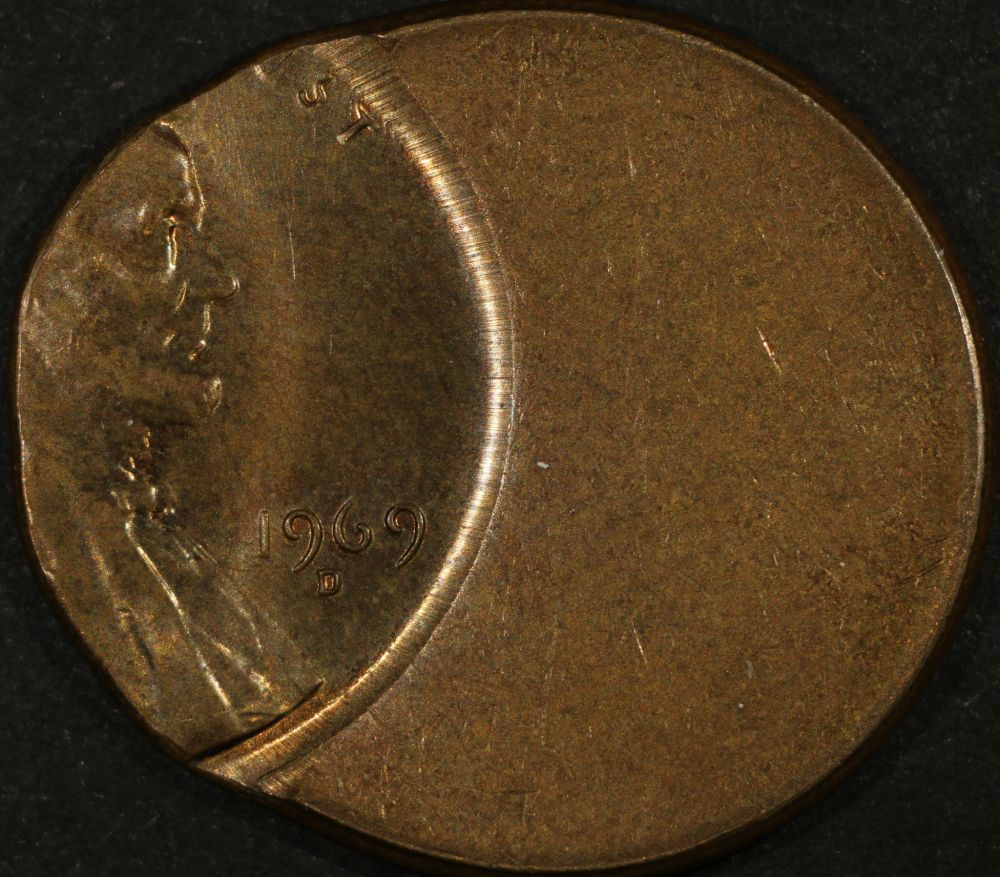 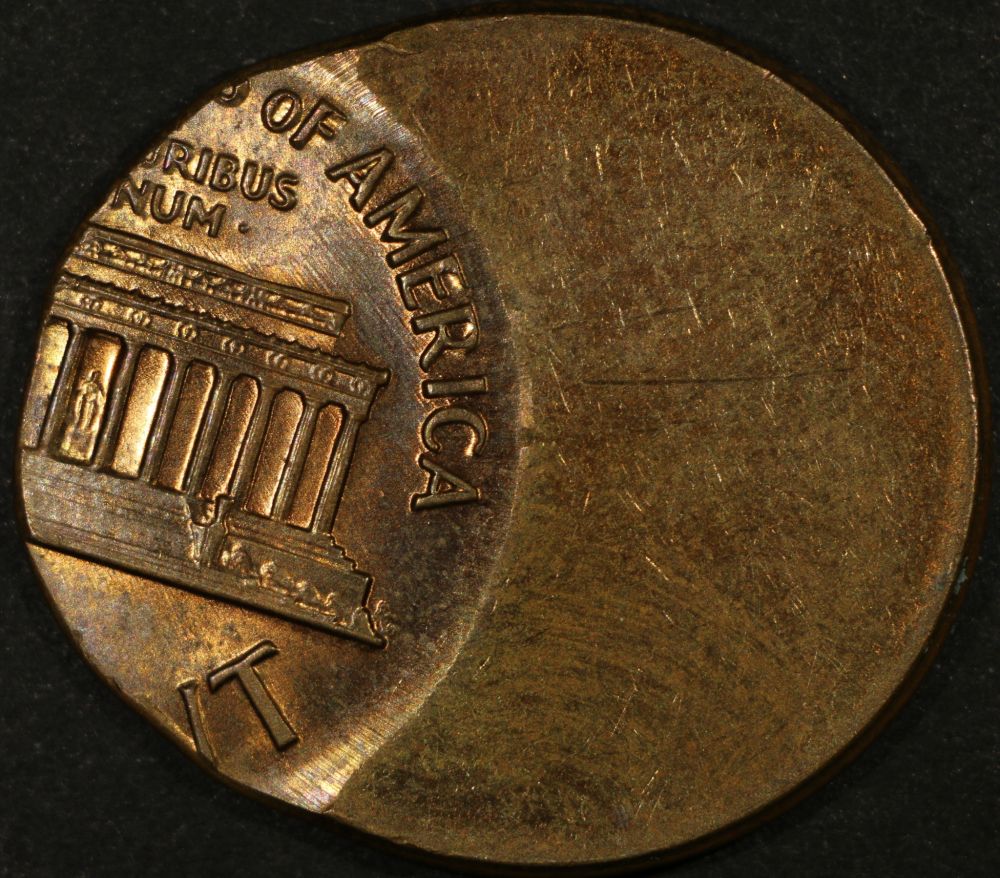 I have the camera set to Tv instead of Av because I like being able to adjust the shutter speeds. I might be doing something wrong but when set to aperture priority the images seem to dark. I am using janceos and have the WB set to tungsten. But when the camera is set to Av it jumps to 1/60 and they just seem to dark. The coin is sitting on a piece of Black construction paper. I still have a lot of learning to do and am still trying to figure out my way around the camera. Besides that, I have to figure out how to use the PP software as well. I downloaded Gimp as well as the software that came with the Canon and it's kind of confusing right now. I have ALONG way to go. Edited by Dar
05/11/2015 3:12 pm
|
|
Pillar of the Community
United States
1476 Posts |
Hey guys, can someone tell me about Lens aberration correction/peripheral illumination correction? Or lead me to a good source to learn more about it and what it does? I'm still trying to figure out all the settings for this camera. Thanks.  Charlie |
|
Pillar of the Community
United States
4048 Posts |
If you are using a lens that the camera recognizes, you can have it do these corrections. If you're using an unknown lens (camera can't read it or not in database) then it can't make any corrections.
Contact me for photographic equipment or visit my home page at: http://macrocoins.com |
|
Pillar of the Community
United States
1476 Posts |
ok, but What does it do? Will it help?  |
|
Pillar of the Community
United States
4048 Posts |
You will probably not see any differences in the center of the image, but at the corners (the background for a coin image) the colors will be a little crisper. Not very important features for coin photography.
Contact me for photographic equipment or visit my home page at: http://macrocoins.com |
|
Pillar of the Community
United States
1476 Posts |
Decided to try out a silver dime.  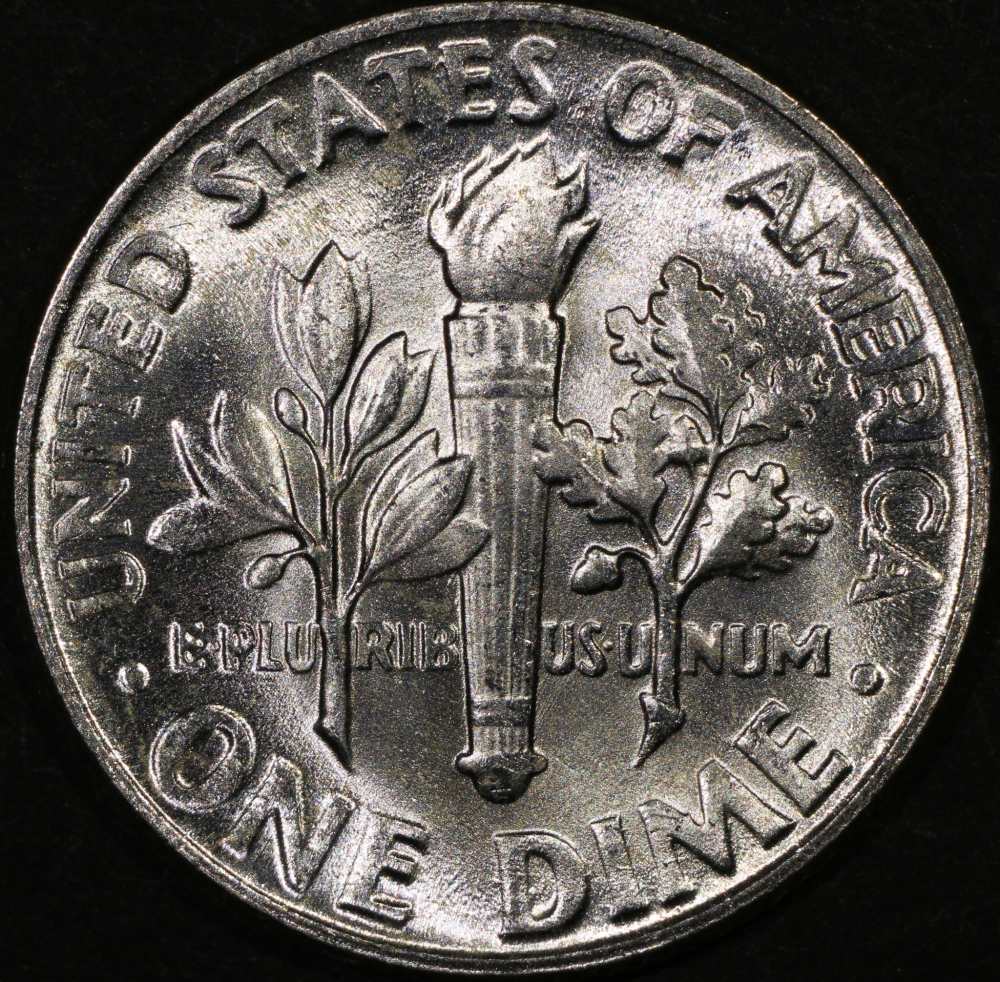 Something just doesn't seem right to me about the way these are coming out. I don't know if it's the lighting or settings. Can you guys see the meta data on these images? Just to check out my settings? Also, in order to be able to get these under 200k for uploading, I have to change the image quality to around 54-56 to get the size correct. Seems that it takes away from the image. Is there anything I can do on my end? If yes then what and how? Thanks for putting up with me. |
|
Moderator
United States
23522 Posts |
Quote:
Can you guys see the meta data on these images? Just to check out my settings?
Also, in order to be able to get these under 200k for uploading, I have to change the image quality to around 54-56 to get the size correct. Seems that it takes away from the image. Is there anything I can do on my end? If yes then what and how?
EXIF data is there. The only odd thing (Aperture isn't visible, of course, because you're setting that at a disconnected lens) is that you're shooting in Shutter Priority. Might as well go full Manual, although I don't see that changing anything. What aperture are you using? Have you gone into the camera's deeper settings (don't know where they'll be on yours) to have it shoot as close to Neutral (minimal in-camera processing) as possible? You're losing sharpness, and I'm seeing the same kind of chroma noise as I did with the T2i. That noise is what forced me to start shooting RAW, because the only way to filter it out I found is in Digital Photo Professional's conversion software. The chroma noise has 5 steps, and I usually used step 3. What sort of view are you using to focus? I always focus in the fullsize Live View image, as large as I can get it on the screen, using smaller letters on the coin as the field of view. May be time to play a little with diffusion too. Mind, though, lustrous Mint State silver is your worst-case scenario of all possible compositions. |
|
Pillar of the Community
United States
9395 Posts |
Quote:
Also, in order to be able to get these under 200k for uploading, I have to change the image quality to around 54-56 to get the size correct. Seems that it takes away from the image. Is there anything I can do on my end? If yes then what and how?
I had the same problem,so I reduced the size of my uploads to 700x700. This allows for less compression to reach 200K -- quality 5, 6, or even 7 with Photoshop will suffice. (For uploading old film shots when no modern DSLR photo is available, I reduce to 500x500 and 100K. The film shots are fuzzy anyway, and 700x700 wouldn't show anything more.) I'm also struggling with harsh lighting effects, especially with toned silver coins. I haven't found the solution, yet. One possibility is to go back to the very diffuse light I used for the film shots long ago. These look more natural, but less detailed. |
|
Moderator
United States
23522 Posts |
The below image started as a 7.15MB image from a T2i, 3450px in diameter (coin only). It's now 1000px and 250kb (the Uploader holds closer to 250kb these days), and I can see no difference from the original when both are the same size on my monitor. Saved at 70% Quality in the Gimp. Gimp's granularity in Sharpness and Save As Quality were both so superior to Photoshop that they are the reason I abandoned the Adobe software entirely even when I owned a current version. 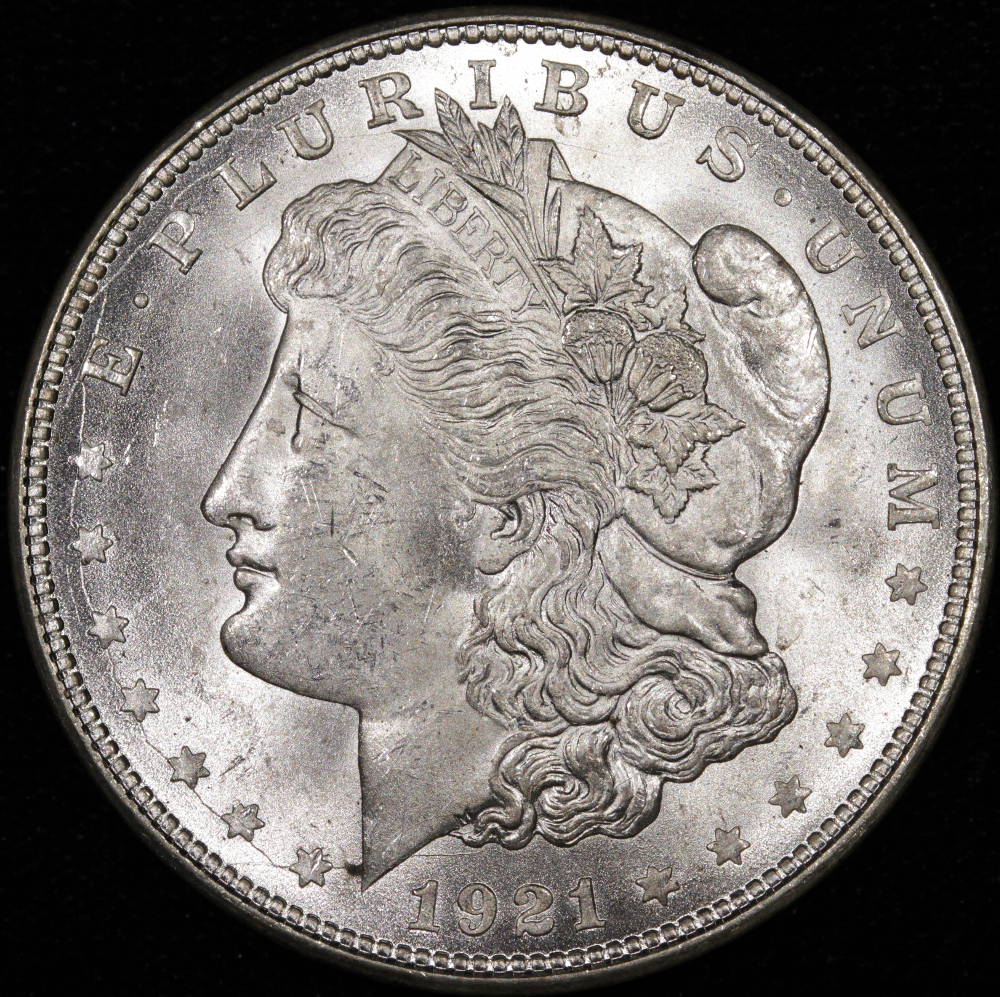 |
|
Moderator
United States
23522 Posts |
Quote:
I'm also struggling with harsh lighting effects, especially with toned silver coins. I haven't found the solution, yet. One possibility is to go back to the very diffuse light I used for the film shots long ago. These look more natural, but less detailed.
Speaking of granularity, for our purposes diffusion has it.  Diffusion is one of those adjustments where very minor differences can make a large difference in the final product. The very thinnest of diffusers - think, one layer of Kleenex - could be what makes the difference in your shot. I'm sure Ray hates me when I talk about diffusing with Kleenex. |
|
Pillar of the Community
United States
4048 Posts |
Hah! Diffusing with kleenex is OK long as you don't try it on halogens...
Contact me for photographic equipment or visit my home page at: http://macrocoins.com |
|
Moderator
United States
23522 Posts |
Quote:
Hah! Diffusing with kleenex is OK long as you don't try it on halogens...
It's actually not a problem using Kleenex on halogens. They vaporize it with such speed that there's never really visible fire, just an instant cloud of carbon spores. Of course, you don't actually get to shoot a shot.... |
|
Pillar of the Community
United States
1476 Posts |
The images were shot at;
f 11, 1/100 using spot metering and set at Tungsten WB.
ISO 100.
Noise reduction: Standard.
Picture style: Standard
Color space: sRGB
Image Quality: Fine
2 Jansco's with no diffusion.
I focused with live view at 200% zoom on the date and left everything the same to shoot the reverse.
Does this information help?
Do you need anything else?
EDIT: No post processing.
Edited by Dar
05/15/2015 2:24 pm
|
|
Moderator
United States
23522 Posts |
Open up the aperture. You are well into diffraction at a set aperture of f/11. Use no more than f/8, preferably f/5.6 if you can get focus. Whatever lens I have plugged in gets set to f/8 and then I completely forget about aperture.
Your zoom level onscreen is sufficient that you'll be able to tell how much depth of field you have by working the focus knob back and forth. If you keep the focus towards the tops of the lettering (close, but not all the way there), you can get away with a shot that probably should be stacked once you've downsized it to posting size.
Noise Reduction and Picture Style should have "Neutral" settings which I would normally recommend. These are, however, among the areas where we're interested in what your new model has to its' advantage. So, a set of a coin like this one at both Standard (which allows the camera software more involvement) and Neutral (which lessens camera involvement) with all other imaging settings being identical might help to illustrate what advantages it has.
|
| |
Replies: 171 / Views: 19,136 |








 First Page
 Previous Page


 Posted 05/11/2015 3:08 pm


