| Author |
 Replies: 171 / Views: 19,140 Replies: 171 / Views: 19,140 |
|
|
|
Pillar of the Community
 United States
1476 Posts |
ok, I'll set up and do a few comparison shots with them set at standard and then neutral and post them.
BTW: The shot of t6he Morgan, was that with diffusion?
Where do II get hooked up with some smilies?
Oh, yeah, anything about that gallery info you talked about?
Edited by Dar
05/15/2015 5:36 pm
|
|
Moderator
 United States
23522 Posts |
That one was undiffused, from the 2012 Philly show. Here's one with Kleenex from FUN 2013, with what I think was brighter ambient lighting (both were shot with no protection from overhead lighting): 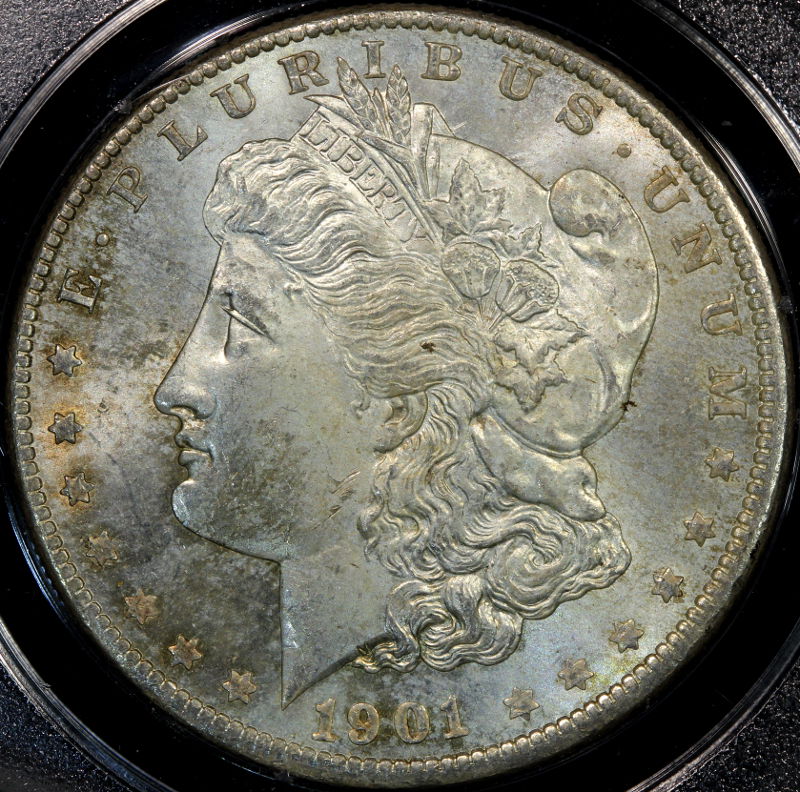 I just bumped my request for your Gallery; Bobby's been beyond busy wrenching on the site the last few weeks and I think it slipped through the cracks. Right now I *think* the Uploader has a greater size capacity than the Galleries do, but I may be wrong. |
|
Pillar of the Community
United States
4048 Posts |
I still have not evaluated CaptainFwiffo's smile system. I will do that when I return early next week. They might be just what you need.
|
|
Pillar of the Community
United States
1476 Posts |
Quote:
I still have not evaluated CaptainFwiffo's smile system. I will do that when I return early next week. They might be just what you need. Ok great. No rush. Stay safe.  Quote:
I just bumped my request for your Gallery; Bobby's been beyond busy wrenching on the site the last few weeks and I think it slipped through the cracks. Right now I *think* the Uploader has a greater size capacity than the Galleries do, but I may be wrong. Not a problem at all. I'm still figuring out the equipment I have as you well know.  |
|
Pillar of the Community
United States
1476 Posts |
Just to update you all, I'm still waiting on an adapter to arrive and have not had much time to actually do much but try to learn more about my camera and how to use PP software. LOTS of reading and watching videos. I did think about skipping the reading and videos and just dive in as it were but I tend Not to be that kind of person. I get more frustrated when I am not prepared. Maybe a character flaw but it's the way I'm wired I guess. Plus we are still trying to close on our house which I didn't know would be so time consuming. Oh well. It's gotta be done. I did get a Gallery set up here at CCF, Thank you very much,  although I have done nothing more then create 2 folders. Never enough time in the day.  |
|
Pillar of the Community
United States
1476 Posts |
This is just a quick test of me playing around with both quickly shooting an image and trying to figure out Gimp. I scaled the image using Gimp but had to still use the uploader here to get it under 250. 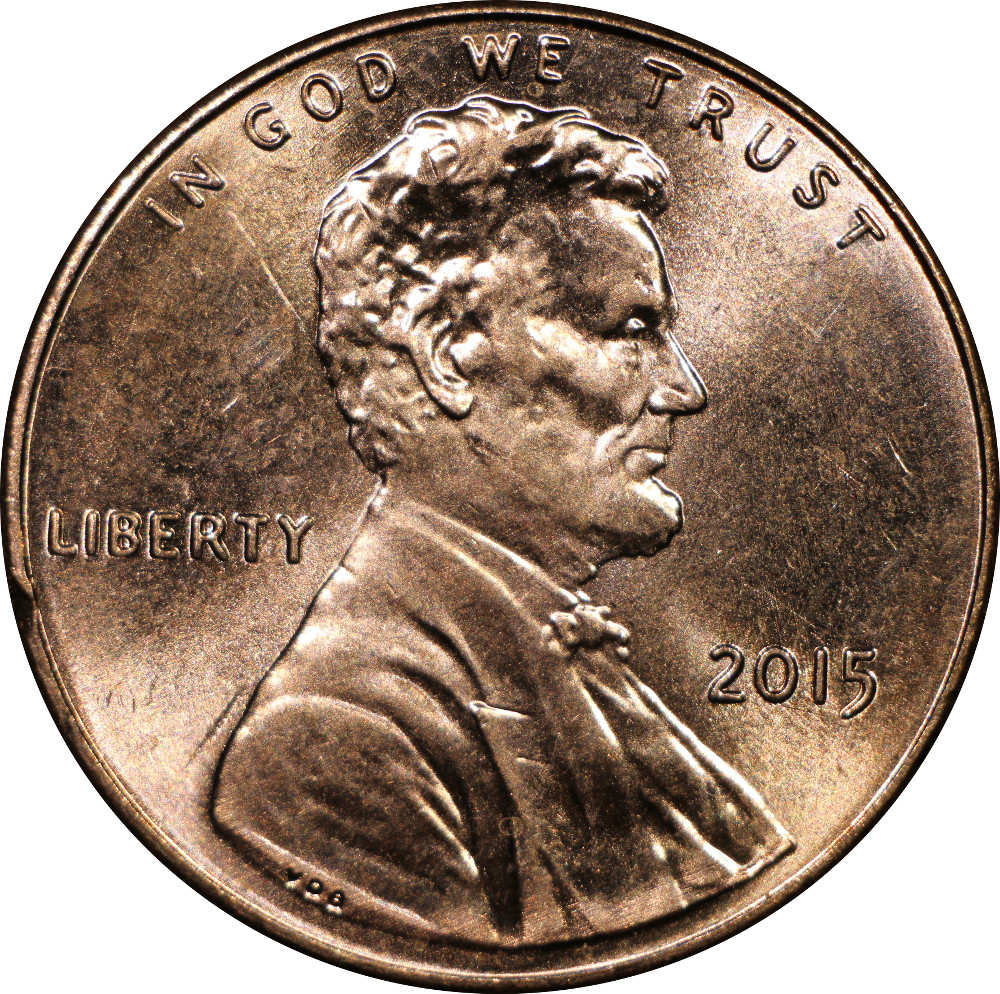 What do you think? Next I want to learn how to do a magnification of an area like the date and crop to that portion only. Any hints? Also, it looks like I need to add some contrast. Maybe only use 1 light or defuse? Hmmm...  Edited by Dar
05/18/2015 3:44 pm
|
|
Pillar of the Community
Canada
9661 Posts |
For a 2015 I think the colour is off, but we are both learning.
Waiting for Ray to get back home and than he can finish and send the rest of the parts.
|
|
Pillar of the Community
United States
1476 Posts |
I'm with you on the color. I think I have to find the correct white balance and set it for these lights. What I need to find out though is if I set the WB and move the lights around, will I have to re set the WB? Or, do I just have to reset the WB only if I change the lights. Like to different ones. Or even if I add another or take one away? But at least I can do a circle crop now. That is, IF I can remember how to next time.  Edited by Dar
05/18/2015 4:08 pm
|
|
Pillar of the Community
Canada
9661 Posts |
Quote:
That is, IF I can remember how to next time That's my problem, the more I read the more confused I get.  Have you tried to defuse the lights? |
|
Moderator
United States
23522 Posts |
Let your background tell you if the coin is the right color, not the coin itself. Digital imagery can make a coin appear too bright - you may find yourself slightly increasing Saturation in postprocessing to compensate for the in-hand look. You've two problems in this regard with lustrous copper - Brightness and Saturation. Lighting refinements will eventually bring you closer in the initial shots, but a little color play in postprocessing is not morally bankrupt. It's quite possible that changing light positions will affect White Balance. If your lighting pattern, as thrown onto the background with no coin, doesn't change in the viewfinder then you're probably OK. If you can see shadows in the corners of the viewfinder and/or those shadow locations change when you rearrange the lighting, a new Custom setting might be in order. Even if you're shooting on a black background, do the White Balance with a white or grey surface which you then remove for the coin shots. True black won't change the correct setting. Dar, can you send me this one, full-size? I want to massage it a bit in the Gimp and see what I can come up with for downsizing procedure to help out a bit. You should be able to Export As at a Quality level of 70-75% in the Gimp without artifacts noticeable on a monitor. Are you by chance shooting JPG + RAW? If so, send me the RAW file too; I'd like to see what I can remove of the chroma noise I'm seeing in your pic. You can't do that easily with a .jpg but it's a standard function in postprocessing RAW files. I'm seeing downsizing artifacts in the Lincoln image, but chroma noise has a similar appearance. What's your postprocessing workflow? |
|
Pillar of the Community
United States
1476 Posts |
Email sent. I don't know if it will work. The only addy I have for you is through CCF so we shall see. Quote:
Are you by chance shooting JPG + RAW?
I am only shooting in Jpg right now but am going to change that to Jpg + RAW right now. I wanted to try playing with that anyway. Quote:
Even if you're shooting on a black background, do the White Balance with a white or grey surface which you then remove for the coin shots. True black won't change the correct setting. I'm shooting on a backround of Black construction paper at the moment. Don't know if it 'true' black and I kind of doubt it. It is the back round that is in the FULL size I emailed you. I just got a cloth that is also supposed to be 18% gray and am going to try to set that up. Quote:
What's your postprocessing workflow? I really don't have one yet. The only thing I have gotten to play with so far is circle crop and resizeing the image, (pixels). Nothing with saturation or color or anything yet. I am still trying to figure out everything so bare with me please. Thank you for all the help. |
|
Moderator
United States
23522 Posts |
Hey, you're the one who jumped right in. Digital Photo Professional is Canon's RAW conversion software. It's rather basic, and I usually only count on it for the aforementioned chroma noise filter and perhaps Levels adjustments. With the fine-tuning of lighting position and highlights via Metering points (Ray just outlined the method in another active thread), it should be possible to completely bypass major brightness alterations in post. So I run the chroma filter - you'll trade a slight bit of ultimate sharpness for it, but not enough to cramp anyone's style - and export the result full-size to .jpg. This bears research anyway, to see if we can eliminate that noise from higher-density dSLR sensors with photographic process rather than post. |
|
Pillar of the Community
United States
1476 Posts |
Quote:
Hey, you're the one who jumped right in I Know, it's my own fault! There is SO MUCH and I just LOVE learning this and the results I'm getting so far, even knowing NOTHING right now. I'm going on 48 and feel like a schoolboy! I just reset up the camera and am going to try some shot's with the new settings. I set everything to Neut that I could find and we'll see what happens. By the way, how can I include all the image data when I post them here on the board so you guy's can see what I'm doing? Also, I don't know if you heard but I did get set up with my Gallery. Thank you all! Now to get some pictures up. As soon as I like them enough that is. Edited by Dar
05/19/2015 4:28 pm
|
|
Pillar of the Community
United States
1476 Posts |
After shooting images in Both Jpg and RAW and doing comparison. The Jpg doesn't even COME CLOSE to the RAW format. Now what to do... Dave, I'll send you a copy of the RAW format, No PP Edit: How can I get this image to you in RAW. Keeps telling me it's to big. (256 Mb)? Edited by Dar
05/19/2015 5:26 pm
|
|
Moderator
United States
23522 Posts |
It occurs to me that I've no software capable of manipulating a Nikon RAW file anyway.  |
| |
Replies: 171 / Views: 19,140 |







 First Page
 Previous Page


 Posted 05/15/2015 6:36 pm


