| Author |
 Replies: 195 / Views: 19,453 Replies: 195 / Views: 19,453 |
|
|
|
Moderator
 United States
23522 Posts |
Sorry, man, I just caught up to what you're actually asking.  You want to see it on the camera's LCD, right? I was thinking you were already hooked to the computer and wanted to see on your monitor. OK. You'll only have to do this part once and it'll remember the setting. Hit the menu button, top left on the back. Using the arrow keys, move right to the middle of the three yellow icons on the top row. Arrow down to "Live View function settings," hit the Set button to choose it. First on the list you see will be "Live view shoot." Hit Set to choose that one, then arrow down to "Enable" and Set to choose that. You've just enabled it to use Live View. Punch the Menu button a couple times to get out of the menu system. From this point on, whenever you hit the Set button without actually having some menu function on the LCD, it will go into Live View on the LCD. You'll hear the mirror lock - a mechanical snap - when you do that. Hit Set again to exit Live View, and you'll gear the mirror unlock. |
|
Pillar of the Community
 Canada
9776 Posts |
I have all that working, BUT it will not do that when I Full Auto, is that normal?
|
|
Moderator
United States
23522 Posts |
Quote:
BUT it will not do that when I Full Auto, is that normal? Yes, that's normal. This is a dSLR, not a point-and-shoot. Full Auto means you don't want to make any decisions at all, so you don't need Live View for any purpose whatsoever. You can see the image to frame it in the viewfinder, which also makes the camera a ton easier to hold steady. Auto basically defeats the entire purpose of a dSLR. Live View was invented simply because point-and-shoots didn't have viewfinders, and only came to dSLR's late in the game when their LCD screens started getting good enough for you to see what you were doing to the image with settings changes. Full Auto on a dSLR is rather like a literbike with an automatic transmission.  |
|
Pillar of the Community
Canada
9776 Posts |
Thanks SDave that's what I was looking for and couldn't find it in the manual. What would this forum do with out you guys and gals.
Now to hook it up to the computer.
|
|
Pillar of the Community
Canada
9776 Posts |
This is with a 18-55 lens on a tripod that is not straight (so it can shot on the desk)and no deadicated lights. This took me all afternoon to do one good shot. Can't wait to get the rest of the equipment. 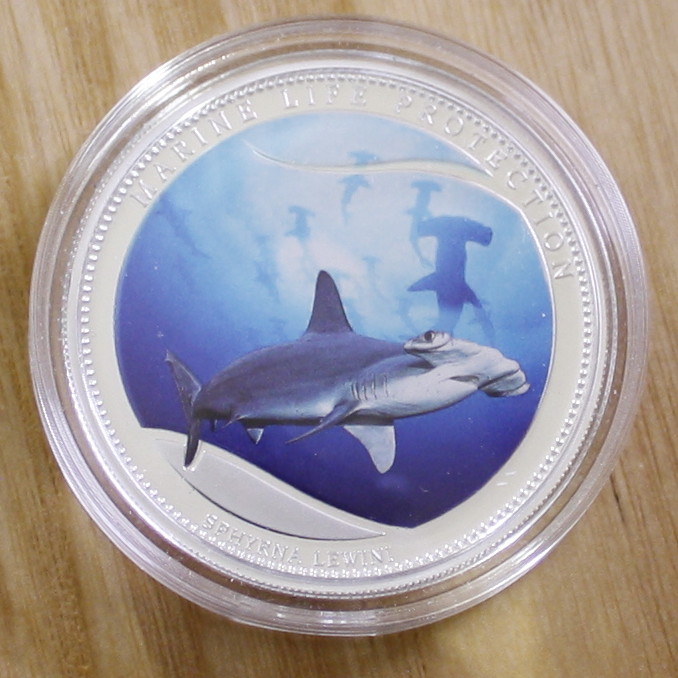 I don't think it's to bad, OK now let me have it, what do you think. |
|
Moderator
United States
23522 Posts |
The finish of the coin is your biggest problem, although leaving it the capsule certainly doesn't help. There's no contrast to be had in the design, so although there looks like things to critique it's the coin and not the technique. So we're not going to worry about this particular shot, as whatever your next lens is, will make that 18-55 look like a cheap piece of plastic. |
|
Pillar of the Community
Canada
9776 Posts |
Is there a way to put the rev. and obv. side by side using ZoomBrowser if not how do you do it?
|
|
Pillar of the Community
United States
4051 Posts |
The side by side presentation is all done in post processing using your favorite photo editing tool.
Contact me for photographic equipment or visit my home page at: http://macrocoins.com |
|
Rest in Peace
United States
4078 Posts |
Mike, still following and trying to learn. Thanks.
|
|
Pillar of the Community
Canada
9776 Posts |
OK I downloaded Paint.net and I now have side by sides with arrows :)
|
|
Moderator
United States
23522 Posts |
Every little piece builds on the other pieces. There are three or four members all going through this process at once; they're the top three threads in the subforum. Keep track of all three if you can, there's a lot going on. |
|
Pillar of the Community
Canada
9776 Posts |
OH, I have been reading all of them.  It looks like I will have to get an AC adapter, the battery last 2 days taking 2-3 pics each day then playing with them. With the camera just sitting on the tripod the battery is 1/2 dead in 2 days. Canon (US) LP-E5 battery $56 Canon (US) ACK-E5 AC adapter $68  Canon (Canada) ACK-E5 $119 Now what I did notices when you look at the pics on Canon and then somewhere else, the somewhere else ones are cheaper, but different, missing a piece, different configurations, be careful. |
|
Pillar of the Community
Canada
9776 Posts |
OK lets see if I can phase this right,
What is the right (about) # of pixels that you want to shot for in your own editing software (Paint.net)
Then when done it should be about ?kb
This would be so you would NOT have to change anything to post on CCF or anywhere else.
|
|
Moderator
United States
23522 Posts |
Phrased right. Your goal is a file size of 250kb or less, and an image size (to display here) of 1000 pixels in diameter with the background cropped to the coin. This is quite doable with current PC graphics editing software, although I don't know Paint.net well enough to explain exactly how to make it happen in that software. It's a lot smoother process done on the computer at home.
|
|
Pillar of the Community
Canada
9776 Posts |
Quote:
1000 pixels in diameter So that would be width 1000 x length 1000 |
| |
Replies: 195 / Views: 19,453 |







 First Page
 Previous Page


 Posted 05/14/2015 9:49 pm





