| Author |
 Replies: 9 / Views: 1,806 Replies: 9 / Views: 1,806 |
|
|
Pillar of the Community
United States
1944 Posts |
i am an architect. I have need of some sort of editing function - which would allow me to add text and symbols, like arrows. I have a specific photograph that I would like to add an arrow - indicator. (photo attached). i know the image is a bit grainy - but in the right side image - there is a nail - mear the toop of a metal connector. I would like to "point" to it - to highlight it as part of a report. i would appreciate any suggestions or assistance. thanks 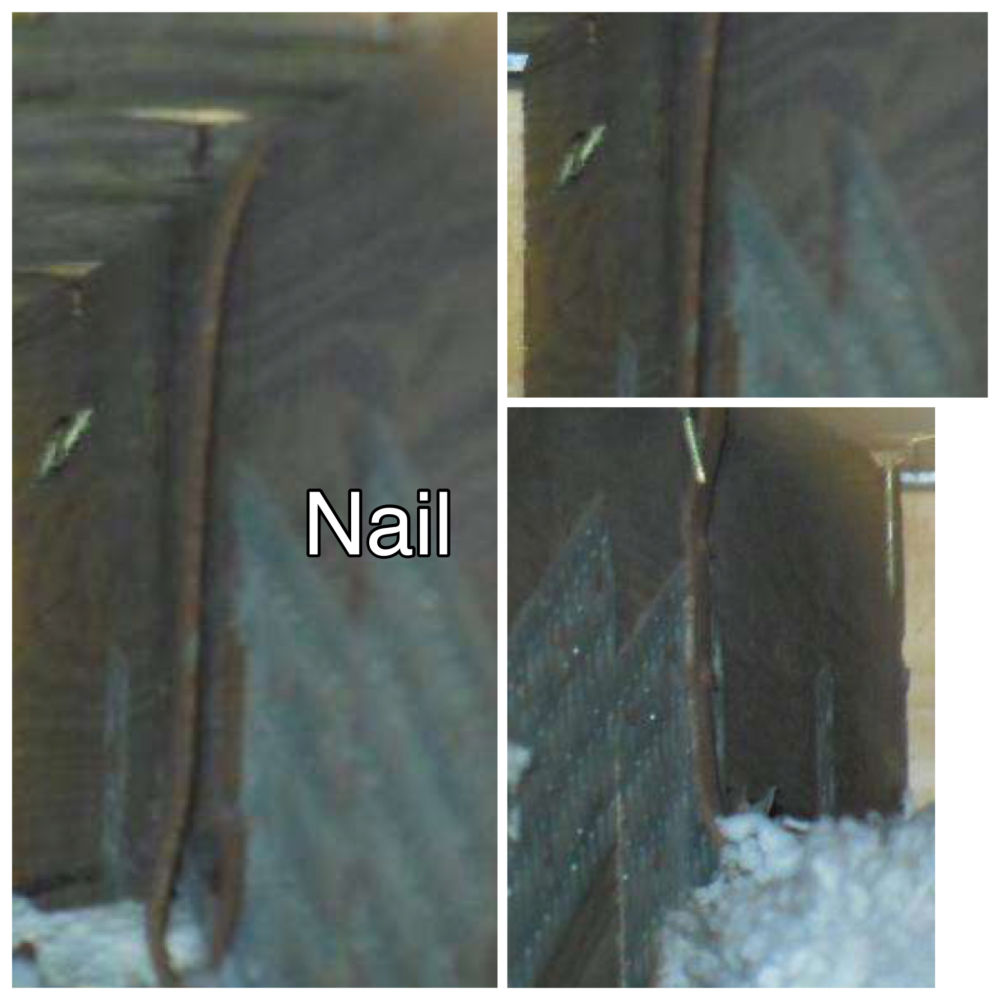 |
|
|
|
Pillar of the Community
Canada
2784 Posts |
hello dbrablec if you open your pictures in word. go to the top of the header. first insert a text box type in the words you want to add in the text box. then move over to insert. click on the drawing tab place your arrows. this looks almost like a roof truss and some one using and air nailor. have a great one
|
|
Pillar of the Community
 United States
5828 Posts |
Microsoft Paint has everything you need
|
|
Bedrock of the Community
United States
10065 Posts |
I use a free program called Skitch. Google it to find it and download it.
You drag the pic to the Skitch window, and there are very obvious tools to the left side (like an arrow for making arrows etc.). I use the first version b/c when they brought out the "new and improved" version, they pulled a "Microsoft" and "simplified" it by making it less intuitive and added an extra click to access some functions.
I use it on a Mac, but there is a Windows version. Its fast, small, free, and easy.
|
|
Bedrock of the Community
United States
62064 Posts |
Here you go:  |
|
Pillar of the Community
 United States
1944 Posts |
|
|
Bedrock of the Community
United States
10065 Posts |
I apologize for somehow missing you wanted it done on these pics. I would have done it for you. Thanks to Coop for stepping up. I guess I was just concentrating on the title making me think your primary need was software. You still might want to look at the software. The price is right  How much squash could a Sasquatch squash if a Sasquatch would squash squash? Download and read: Grading the graders Costly TPG ineptitude and No FG Kennedy halveshttps://ln5.sync.com/dl/7ca91bdd0/w...i3b-rbj9fir2 |
|
Pillar of the Community
United States
4616 Posts |
There are several good, FREE programs for doing this kind of work - Paint.net is the one I like ( http://getpaint.net) also "The GIMP" gets a lot of love from it's users. As was mentioned above, Microsoft's Paint (comes free with Windows) is good enough for the very occasional annotations. -----Burton 50+ year / Life / Emeritus ANA member (joined 12/1/1973) Life member: Numismatics International, CONECA Member: TNA, FtWCC, NETCC, EveryCountry (online) coin club Owned by three cats and a wife of 40+ years (joined 1983) Author: 3rd Edition of the Sample Slabs book, https://www.sampleslabs.info/ |
|
Bedrock of the Community
United States
10065 Posts |
@BStrauss3
I agree with what you said. The Gimp is also a great Adobe replacement, but just like what it replaces for free, it takes a good deal of work to understand how to use it if someone is a novice with graphics. It also is a large program with almost infinite capabilities.
Skitch is small, fast, and designed to be pretty much self explanatory by just using it. Its is great for quick arrows and text. Just click the arrow icon, drag to make the arrow as long as you want, and release. Hit the text icon and a box opens for your text. Lines, shapes etc. are included. After an object is place it can be repositioned anytime by dragging. Colors are easily editable for any object by clicking the color icon on the right and making a quick selection (or you can customize the color). The font is also editable like this. The size of every object is editable with a dragging slider icon.
I use professional graphics programs all the time for a column and other items I write. But I use Skitch when I don't need a lot of options and I want the job done fast.
It makes a good companion program.
How much squash could a Sasquatch squash if a Sasquatch would squash squash? Download and read: Grading the graders Costly TPG ineptitude and No FG Kennedy halveshttps://ln5.sync.com/dl/7ca91bdd0/w...i3b-rbj9fir2 |
|
Pillar of the Community
United States
1944 Posts |
thanks for the comments..
i wasen't actually asking for anyone to do anything for me...
i did email coop directly - after seening one of his posts - with precisely the type of arrows that I was seeking to put into my photo image. coop was generaous enough with his time and knowledge to assist me. I am still aattempting to accomplish things like this on my onw.
thanks again - everyone...
|
| |
Replies: 9 / Views: 1,806 |
|







 Posted 08/25/2015 10:34 pm





