| Author |
 Replies: 14 / Views: 1,761 Replies: 14 / Views: 1,761 |
|
|
Bedrock of the Community
United States
10284 Posts |
Why do I get this? The only way for me to avoid it coming back after closing, is to be quick on clicking on Coin Forum tab on left side. This does not come up on any other web site. Is there a way to block this using Microsoft Edge browser? Thank you! 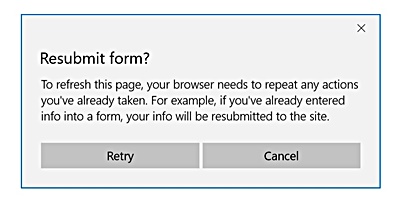 |
|
|
|
Pillar of the Community
United States
2023 Posts |
That usually happens when you use your browser to "Refresh" or go "Back" to a page that was originally shown by submitting a form, or doing something on the page that acts like submitting a form (such as selecting "Active Topics Since..." from the dropdown on the New Posts page).
There's no way to prevent the browser from showing that except by changing how you navigate the site. Use links on the page to surf around or use bookmarks to go directly to the page you want.
|
|
Bedrock of the Community
 United States
10284 Posts |
It happens when I hit  It locks up everything behind the pop-up. I click on the X or Cancel and I have to be quick to close the browser tab. |
|
Pillar of the Community
United States
2023 Posts |
That...surprises me. Locking the page is standard behavior when that message comes up, but someone more knowledgeable about the site behavior will have a better explanation.
|
|
Rest in Peace
United States
2668 Posts |
Never problem have.  |
|
Forum Dad
 United States
24234 Posts |
When you click "logout" the page is refreshed to process the logout. If the page you are on involved a form to get to it, you will get that warning. The warning is your browser, not CCF.
|
|
Bedrock of the Community
United States
10284 Posts |
The only form I fill out is the Log In section with my user name and password. This is a brand new HP PC tower. When I filled in those the first time logging in, the PC asked me if I wanted Windows to remember my log in and password. I clicked "yes". Now when I go to the link in my favorites for CCF, I hover over and click the member name box and my name appears below. I click that and then it appears in the box as well as my ........... < ( password ) If I drag my feet clicking on Coin Forum http://www.coincommunity.com/forum/that pop-up will appear. When I log out, same thing. I visit many other places where I have saved log in and passwords. This is the only place in my travels that it has happened so far. I only wondered if this happened to others and how did they get rid of it? I am not pointing a finger at CCF forum. Edited by TNG
02/20/2017 7:42 pm
|
|
Moderator
United States
196572 Posts |
Edge has issues.  My best suggestion is to try Firefox or Chrome. |
|
Pillar of the Community
Canada
955 Posts |
CCF is probably my most response site I visit on a daily basis. No issue's ever.  Browser |
|
Bedrock of the Community
United States
10284 Posts |
Just to let everyone know. I recently got a major update to Windows 10 from my factory installed Windows 10 PC which isn't all that old. It tried to install and failed many times. One day it finally made it all the way in. Since that install the pop up for me has stopped. Coincidence? I don't know, but maybe the update fixed this for me. That problem has ended.
|
|
Forum Dad
United States
24234 Posts |
Not a coincidence, as suggested it was likely a bug and they fixed it.
|
|
Moderator
United States
196572 Posts |
|
|
Rest in Peace
10197 Posts |
Know a fellow that hung out with the "gurus" of tech in SF early days of computer development. He once told me that ALL software from the beginning has inherent bugs that will NEVER be "de-bugged". He also postulated that to develop a truly functioning Artificial Intelligence with these inherited defects would produce the dangerous interjection of possible robotic insanity. Sure you want one as a household servant/assistant?  |
|
Moderator
United States
14463 Posts |
somewhat related to Crazyb0's post:
years ago, had a manager in IT that would never install a new version of the Operating System Software until after the first set of PTFs (Program Temporary Fixes) came out. He didn't want to be on the bleeding edge of software updates.
|
|
Pillar of the Community
Canada
5297 Posts |
@TheNickelGuy, I had exactly the same problem. I finally started accessing the site via Google Chrome, and there is no issue. I have had many updates of my operating system but that problem was never solved. incidentally, Edge gives me trouble with my email and other sites, which is not the case with Chrome. You can install Chrome for free. It just takes a few minutes.
|
| |
Replies: 14 / Views: 1,761 |
|









 Posted 02/20/2017 12:14 pm


