| Author |
 Replies: 42 / Views: 4,241 Replies: 42 / Views: 4,241 |
|
|
|
Forum Dad
  United States
24233 Posts |
What browser are you using? Works perfectly every time for me in Firefox. I even did 10 at one time and they all saved perfectly.
|
|
Pillar of the Community
United States
2815 Posts |
Microsoft Edge. Is there some way to fix this in my browser settings?
|
|
Forum Dad
United States
24233 Posts |
I have no idea. I've never had Edge.
|
|
Bedrock of the Community
 United States
12923 Posts |
I stay away from Edge if at all possible - not a fan of the interface at all and it's not compatible with certain things. Using it is like taking a giant step backwards.
Note - also using FireFox with no issues. Haven't tried with Chrome.
Edited by CelticKnot
06/01/2017 10:02 pm
|
|
Forum Dad
United States
24233 Posts |
I've tested FF, Chrome, and IE and they all work perfectly.
|
|
Pillar of the Community
United States
2815 Posts |
Quote:
I stay away from Edge if at all possible - not a fan of the interface at all and it's not compatible with certain things. Using it is like taking a giant step backwards.
Yeah, I've had similar problems in the past.  Bobby- I just tried it with Chrome, and it worked fine. I'm still going to try to figure out what's going on with Edge. |
|
Pillar of the Community
Russian Federation
5186 Posts |
Problems with the new optimizer:
1) rotations are in a very unexpected place (and my photos are 90 degrees off more often than not due to how my smartphone is set up)
2) I can't select a target height (instead of width)
3) when I did manage to rotate, I was still unable to select a width of 1836 (which would have given me the original image size)
4) there's no darn instruction, anyway
5) I have to think of a new file name every single darn time - there's no default at all (while the old default was fairly convenient)
- probably others that I haven't yet found as well
I used it on my Yemen coin photo, which is 3264 by 1836 pixels, but most of that is empty space. Best I could do was a 300 pixel result (in the old system I could have a 600 pixel resulting photo just fine).
I really don't want to have to crop my photos manually in Paint or something before I can use the optimiser - but at this point it's either that or I'm limited to only photographing large and very large coins (and many of my favorite coins are tiny).
[EDIT: actually, it doesn't really matter whether I have to crop or not - I will have to downsize my photos a lot either way. But at least when the coin was very large and filled most of the photo I can still end up with maybe 800 pixels even after that...]
Google Chrome, by the way. For all I know it works perfectly in Internet Explorer.
...Do you know of any place online where I can use (something resembling) the old CCF image optimizer? I'm pretty sure I've seen it somewhere, but I can't recall where.
It doesn't have to be related to CCF (but it should preferably be something where I don't have to register on an unrelated forum).
Edited by january1may
06/02/2017 12:12 am
|
|
Pillar of the Community
Canada
3049 Posts |
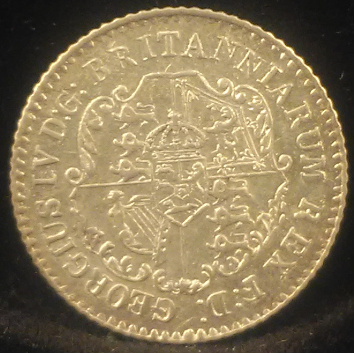 I just tried this coin.... it's a pretty tiny coin I don't think it did bad on the picture quality and rotating it 90 degrees wasn't difficult.. over all I think this optimizer is pretty good.... Thank you for all of your hard work on this Bobby (and any others who may have been involved!) |
|
Moderator
United States
56855 Posts |
Can you run Edge in compatibility mode? John1  |
|
Moderator
United States
56855 Posts |
I was just playing with the optimizer on the sample pic. When I lower the quality the pic gets smaller,is that normal? John1 Edited by John1
06/02/2017 06:42 am
|
|
Forum Dad
United States
24233 Posts |
Problems with the new optimizer: Quote:
rotations are in a very unexpected place Sorry but I have no idea what that means. Quote:
I can't select a target height (instead of width) For the purpose of the optimizer, that is irrelevant. Quote:
when I did manage to rotate, I was still unable to select a width of 1836 I upped the max so they can be set back large for cropping. Didn't think of that. Any final image though over 1200 is serious overkill and completely unnecessary. Quote:
there's no darn instruction, anyway There most certainly is. Quote:
I have to think of a new file name every single darn time Files should have unique names anyway. That's just common sense. If you upload the same file name the same day you will overwrite previous one anyway. The optimizer just adds -opt to the end of the original name so you don't overwrite your original when you download. Quote:
probably others that I haven't yet found as well Sounds to me like you want it to fail. Quote:
I used it on my Yemen coin photo, which is 3264 by 1836 pixels, but most of that is empty space. Best I could do was a 300 pixel result (in the old system I could have a 600 pixel resulting photo just fine). Well if the actual coin is only 300 pixels wide in the image that's all your ever going to get. The optimizer doesn't make anything smaller when you crop. It automatically resizes to 1200 wide by default when you open it but you can now change it back to the original size with a couple of keystrokes. Maybe that was your issue. This optimizer is far and away better than the original, you may just need to get used to it. |
|
Forum Dad
United States
24233 Posts |
Added the change back to original size note to number 2 in the instructions.
|
|
Forum Dad
United States
24233 Posts |
Highlighted thumbnails a little better and made them a bigger. Also fixed it so they will remain proportional instead of forced to a square.
|
|
Pillar of the Community
United States
2189 Posts |
I used the new optimizer earlier today for the 1921 Peace dollar topic. I am no tech savvy person but it only took me a few tries before I got the hang of it. I like it better than the old. |
|
Rest in Peace
10197 Posts |
Sounds like its a good'un to me. Altho, I am glad I don't have to use it(crop/edit my own). Just listening to this banter has fried my old muddled brain! Take it easy on us old guys, when I graduated electronics tech school I knew how to fix such vacuum tube devices as the new and improved color TV's. Some of the newer Zenith's even had transistors...punch-card computers were the upcoming business advancement.  |
| |
Replies: 42 / Views: 4,241 |





 First Page


 Posted 06/01/2017 9:31 pm





