| Author |
 Replies: 18 / Views: 3,829 Replies: 18 / Views: 3,829 |
|
Pillar of the Community
United States
887 Posts |
It's sort of like the old Capital holders, and it's still a work in progress. In the working file, the coins are 1:1 (life size). My goal is to reconfigure it so that it will fit on a 19x13" sheet, at life-size, then maybe frame it once it's complete. Also considering doing a second page for the reverses. Whaddya think? 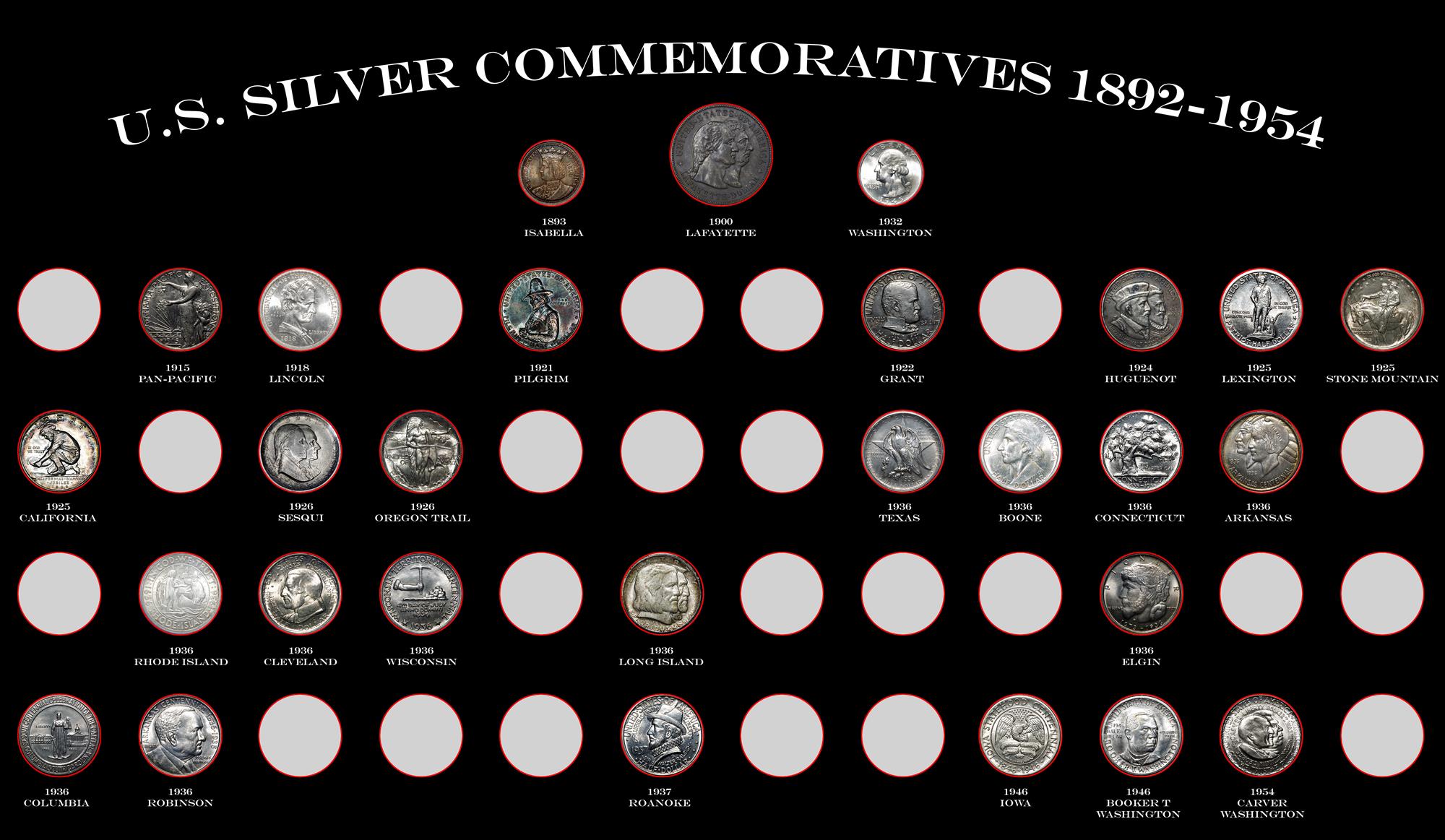 |
|
|
|
Pillar of the Community
United States
3344 Posts |
"Nummi rari mira sunt, si sumptus ferre potes." - Christophorus filius Scotiae
|
|
Pillar of the Community
United States
917 Posts |
It would be great to click on a coin and then see the coin in full detail
|
|
Pillar of the Community
 United States
887 Posts |
Quote:
I think it looks great Beef! I'd like more details on how you did this so I can steal the idea ...
I'll tell you this - it was a big PITA, and took way too long to do. I worked on it for about 6 hours last night, and that doesn't include the editing of the individual coins. I use Photoshop, but I think Adobe Illustrator would have cut the time down considerably. Getting 53 holes lines up the way I wanted them took me about 2 hours in PS. I think in Illustrator it's a couple of clicks. I got the idea from another member, who did an Ike digital album, and it seemed like it would be somewhat easy. Even after having done this, doing another one would be a tedious task. |
|
Pillar of the Community
 United States
4051 Posts |
What's the deal with the red circle around the coins?
Contact me for photographic equipment or visit my home page at: http://macrocoins.com |
|
Pillar of the Community
United States
9395 Posts |
Quote:
Whaddya think? Looks like a nice set of US commems. With a virtual holder like this, you can have the obverse and reverse side-by-side on the same page. That's what I did with my virtual 7070 album (which is drawn by a control program reading a script, not by Photoshop). |
|
Pillar of the Community
United States
887 Posts |
Quote:
What's the deal with the red circle around the coins? Yeah, I'm not too keen on them myself. Like I said, it's still a work in progress. I was going to do a bevel on the circles, but tried the red, and then saved it, and I was too lazy to go back and re-do it. But the final product most likely will have a bezel if I can figure it out. |
|
Bedrock of the Community
Australia
21792 Posts |
This sort of virtual display allows you to show slabbed coins as if they are NOT slabbed.  Really a great idea to be able to show obverse and reverse alongside each other. The alternative is to show in two printed sheets back to back in a reversible picture frame. The choice is yours, and even BOTH approaches would provide an excellent presentation. Add stick on pictures over the 'holes' of each new coin, as you add it your collection. Perhaps you may provide a solid cardboard insert of appropriate thickness between the printed sheets, to add a bit more realism. You may need the services of a good printing shop to cut the holes. I have done this sort of thing with a sheet of aluminum. |
|
Moderator
United States
15911 Posts |
Very interesting concept ... I like it.
PCGS has done this as well .... you can create a digital 'album' of your coins that is the electronic version of a Dansco ... flip between the pages to view both the obverse and reverse.
Take a look at my other hobby ... http://www.jk-dk.art |
|
Pillar of the Community
United States
1261 Posts |
Great job Beefer! I really like it. It would be cool if you could click on the coin and it would flip to show the reverse side. I wish I could create something like this for my type set.
I love the look of those commems!
|
|
Rest in Peace
United States
17900 Posts |
Historically speaking, arranging them by date is interesting, rather than by type name order.
I'd also vote for obverse reverse next to one another and losing the red circles.
It's a very appealing set up as is, but since you asked...
|
|
Pillar of the Community
United States
887 Posts |
I just went in the order of the Dansco type album off their website. It makes it much more difficult to find a coin, for sure! I may change it to type name.
|
|
Pillar of the Community
United States
992 Posts |
So why print it out and frame it? It's digital, use the technology. Put a monitor in a size you want on the wall, put your SD card in the slot, and watch your digital images transition in and out during your slide show.
|
|
Pillar of the Community
United States
1376 Posts |
Very nice! Looks like your PS skills are improving quite nicely.
Did you add the '32 Washington for balance? or am I missing something about it being a commemorative?
|
|
Pillar of the Community
United States
887 Posts |
Quote:
Did you add the '32 Washington for balance? or am I missing something about it being a commemorative? From what I understand, originally the Washington quarter was intended to be a commemorative celebrating the bicentennial of the birth of GW, but it was decided to make it a regular issue. So there is a technical aspect of it being a commemorative. The one I used is actually a 1945-D, as I haven't photographed my '32. It's a placeholder for now. |
|
Pillar of the Community
United States
1376 Posts |
From what I've read (afraid I wasn't around back then) about the inception of the Washington quarter, it was never meant to be commemorative coin per se. I believe that the Washington Bicentennial commission wanted a commemorative Half Dollar, but neither President Hoover or Congress would go along with that. My understanding is that Congress authorized the new quarter as a way both to honor Washington on a permanent basis, while at the same time replacing what they considered to be a difficult coin to mint, the Standing Liberty quarter. Of course, I could have it all wrong. Like I said, I wasn't around back then  |
| |
Replies: 18 / Views: 3,829 |







 Posted 09/29/2017 9:38 pm





