| Author |
 Replies: 14 / Views: 1,517 Replies: 14 / Views: 1,517 |
|
|
New Member
United States
20 Posts |
I'm finding quite a few " Cuds" on my 2023 JFK coins. I "assume" they would be called "errors"; but not so sure they'd be worth anything extra. I'll attach 3 photos of some of the one's I found, and would appreciate your thoughts  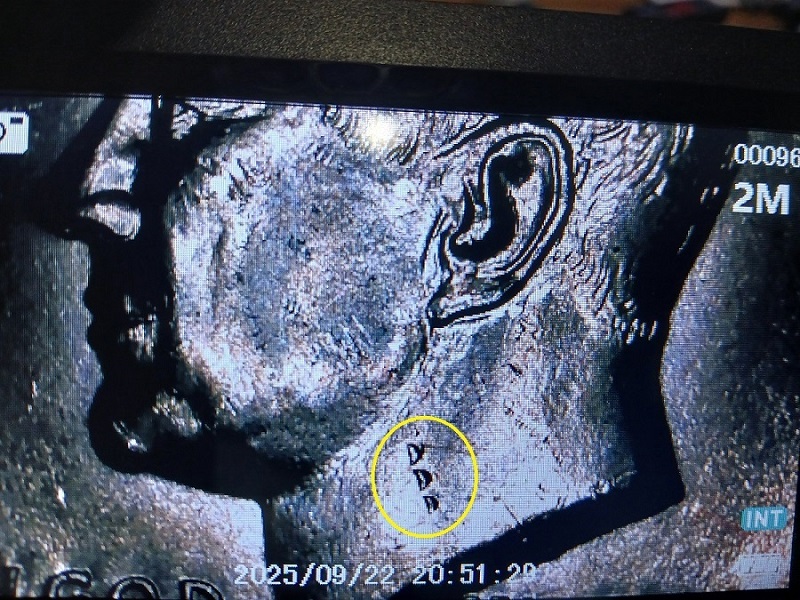 |
|
|
|
Bedrock of the Community
United States
78484 Posts |
|
|
New Member
 United States
20 Posts |
Thanks for the clarification - So they are " Reed Marks". They caused upon stamping or what makes them, and do they create any value? They are in various places, on obverse and reverse. Just didn't want to pitch them aside until I checked. |
|
Bedrock of the Community
United States
78484 Posts |
Click on the blue highlighted link. It will tell you what they are and there's pictured examples. There's no premium for it at all since it's just damage. It's not an error. From the highlighted blue link. Quote:So we probably average about one damaged coin like this a week on the forum. They are damaged by other coins in the Ballistic Bag. The coins are damaged when the Ballistic Bags are moved around by forklifts. They weigh thousands of pounds. We most commonly see them on quarters, but can happen on any coins with reeding. Errers and Varietys.
Edited by Errers and Varietys
09/22/2025 5:59 pm
|
|
New Member
United States
20 Posts |
Thanks. I find it odd that it would be "raised" places on the coins, and not indentations. Live and Learn I guess.
|
|
Bedrock of the Community
United States
19533 Posts |
Nice instances of reeding hits--not that uncommon.
|
|
Moderator
 United States
105748 Posts |
|
|
Bedrock of the Community
United States
10601 Posts |
Quote:
I find it odd that it would be "raised" places on the coins, and not indentations There is going to have to be some raised metal around them as the metal from the incuse areas has to go somewhere - and that somewhere is up. |
|
Bedrock of the Community
United States
10601 Posts |
The RED arrows point to the incuse areas and the GREEN arrows point at the raised metal directly behind the voids. 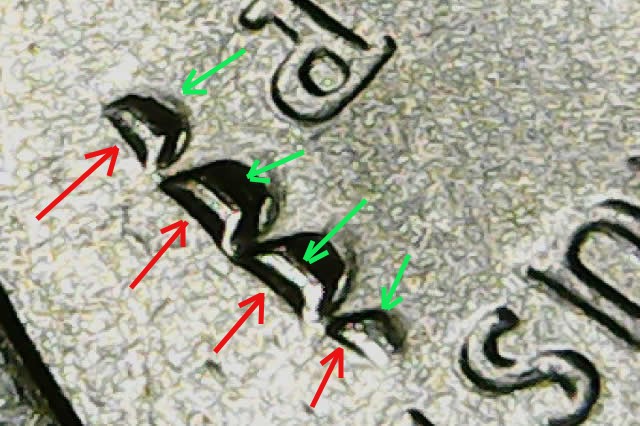 |
|
Moderator
United States
105748 Posts |
that is a great diagram Marve!
|
|
Bedrock of the Community
United States
10601 Posts |
Quote:
that is a great diagram Thanks Dearborn. |
|
Moderator
United States
15871 Posts |
 to the CCF |
|
Moderator
United States
194952 Posts |
In the future, please do not post photos of scope screens. Use the memory card or a USB cable to transfer images.
|
|
New Member
United States
20 Posts |
Someone would have to explain to me how to do that. I have no clue. Sorry if I did it wrong, but I did it the only way I knew how.
Would be happy to do as requested, but someone would have to teach me how and explain it thoroughly. Maybe there's a link somehow that show how?
|
|
Moderator
United States
194952 Posts |
Quote:
Someone would have to explain to me how to do that. I have no clue. Sorry if I did it wrong, but I did it the only way I knew how. You can use a memory card (usually an SD card) in the scope to save the image. Then use a card reader (for example: this) on your computer or phone to load the file. Some scopes allow USB cable attachment to a computer, but the memory card is probably easier. |
| |
Replies: 14 / Views: 1,517 |
|










 Posted 09/22/2025 5:47 pm


 these are


