|
This page may contain links that result in small commissions to keep this free site up and running.

Welcome Guest! Registering and/or logging in will remove the anchor (bottom) ads and the security checks. It's Free!
To participate in the forum you must log in or register. | Author |
 Replies: 18 / Views: 3,973 Replies: 18 / Views: 3,973 |
|
Valued Member
United States
327 Posts |
Hello. I would like to get started in photographing my coins. I use a program called Exact Change that allows me to catalog my coin collection. As well, I would like to post photos of coins in the forum but so far, quality suffers and so I would like to get some tips before I embarrass myself.
I currently have a Canon 20D with several lenses but the only macro I own thus far is EF 100mm 1:2.8 This lens has a manual setting of 0.31m or 0.48m. Any suggestions on which setting to use? I have been told that I need some type of stand which I would agree since my photos are blurry. The 20D has a built in flash but I also have a 580 EX but not sure if I would even need to use this.
I'm an amateur for sure so any suggestions would be appreciated. Edited by johnstac
07/24/2010 5:19 pm
|
|
|
|
Valued Member
United States
211 Posts |
The Canon 20D is a mighty fine camera. That 100mm lens should do the trick. You should be able to put the lens about 6 inches from a Quarter and get quality focus.
Experiment with the lens setting until you get focus. Forget the flash, its easier to use continuous lighting like a table lamp.
You need a tripod. Can be a cheap one, it can be a little one. Set the camera on the tri-pod so it is looking directly down on the coin sitting on a table. The tripod will make sure you don't shake the camera. In macro photography the slightest camera movement translates to blur.
Ideally you have two lights on either side of the coin. Two table lamps will do. If you use incandescent lights you will need to color balance your shot or it will look orange. The camera manual will explain that. If you get daylight balanced fluorescent lights it will save you that step.
Thats a start.
|
|
Valued Member
 United States
327 Posts |
I was looking for "copystands" on google tonight and found many but at B&H they started at around $300 for stands that support a DSLR. and of course adding lights ups the price considerably. I don't mind paying for quality. I'm just not sure if I should buy the type that have the two light arms already mounted. Recommended brand?
For some reason, I can't picture a tripod working. I have seen a tripod but the camera is on top. Can they be reversed? If I will need a couple of lights, do they get in the way of the tripod arms? Thanks.
|
|
Valued Member
United States
420 Posts |
|
|
Valued Member
United States
420 Posts |
i should mention, I've gotten a lot of great info from the photography section http://www.coincommunity.com/forum/...?FORUM_ID=81I'm a low budget guy, I have less than 100.00 invested in a desktop tripod,2 halogen desk lamps that I use, including a 7.1 mp Kodak I picked up on ebay for 50.00 shipped the biggest thing when you find something that MIGHT work.. practice I'm still learning , and for every 20 pictures I take, I might be happy with 1 or 2.. then I go again.. let me try this, or that.. my main problem with my set up.. parallel camera and coin- of course people would laugh if they knew how I take my pics i know people who swear by a copy stand, others use a regular tripod and the coin in a holder, holding it vertically play around with what you have, sounds like you have a great camera to start with - yes play, as frustrating as coin photography is, you gotta make it fun.. play with your camera, the settings, which lens you use, how far away you take the shot- when I get really frustrated with a series of shots, I call my dog over.. she's a poser LOL .. don't let a few fuzzy coins get you down |
|
Moderator
 United States
23522 Posts |
Your 20D, in combination with (in my personal opinion) the finest Macro lens on the market, should allow you to create images of a quality equaling anybody's. Your approach to professional-quality coin pictures needs to be two-forked. First, acquiring good images. Second, processing them for optimal use online. The cardinal rules of acquiring good images: 1) Solid, secure camera mount. Tripod, copystand, either way you do not shoot handheld. 2) Exact parallel orientation between camera and coin. That's easiest-done with the camera pointing straight down, and the coin on a flat surface. This cannot be overemphasized - macro depth of field is very tiny, and any out-of-parallel will leave parts of the coin out of focus. 3) Delayed/remote shutter. Very few of us (I ain't one of them) can finger-activate a shutter without introducing shake into the shot. Canon's Zoom Browser/EOS Capture software is superb - I don't leave home without it - allowing you to control every aspect of the shot from keyboard/mouse. As near as I can tell, it works well with your 20D. 4) Manual control. Like it or not, you're going to have to learn manual camera settings to maximize your shots. With your kit, you'll get better shots on Auto than 99% of coin photographers can at their best, but you'll have not even touched the quality it's capable of. 5) Appropriate lighting. A lens of the quality of yours is less-sensitive to specific lighting than more-compromised glass, but there are certain truths about lighting coins which should be followed to maximize results. The cardinal rules of posting good images: 1) Good post-processing software. I use the Gimp. It's free, enormously capable and has a pretty steep learning curve. Not for the computer/graphics faint of heart, but the small portion of its' capabilities you will use can be taught to even the computer-illiterate. 2) Good photo hosting. I use Photobucket. I can save images there of enough size and quality to satisfy pretty much everyone: 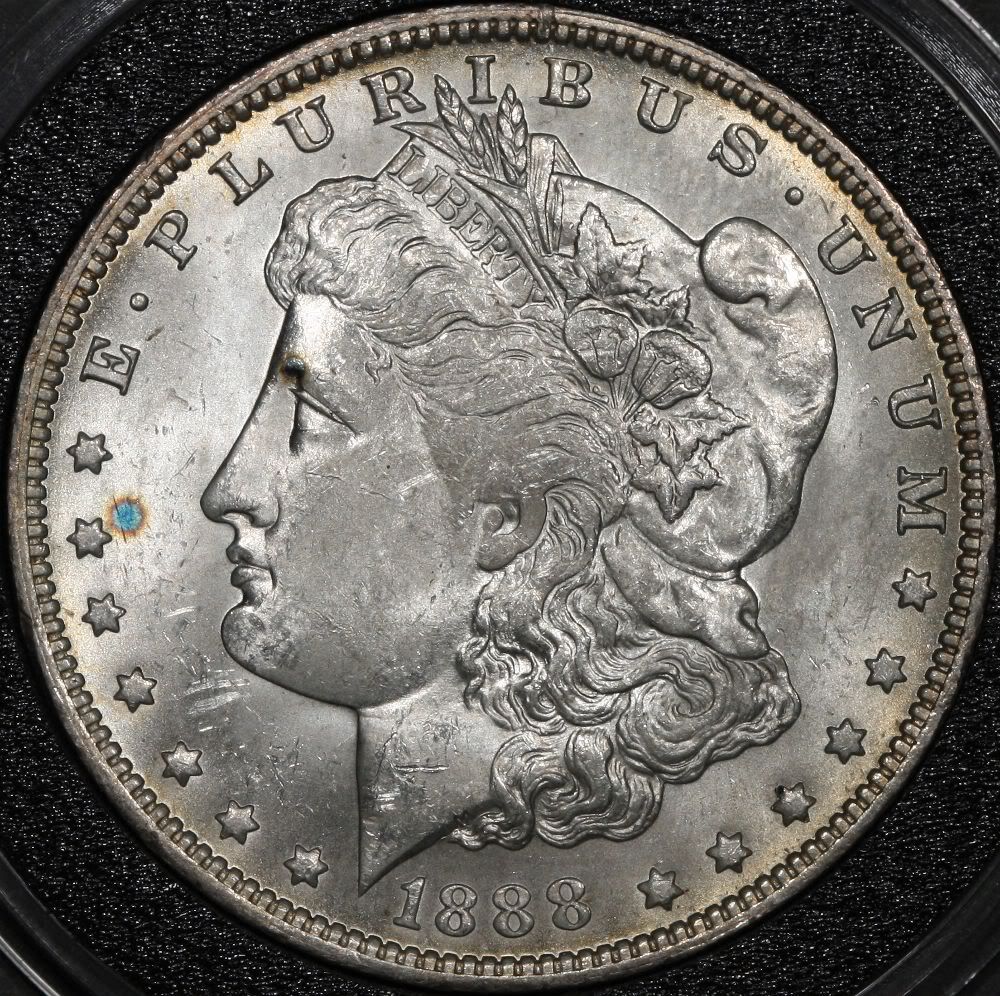 3) A basic knowledge of filesize and Quality settings, allowing you to post big, pretty images. This, too, can be taught. I own, use and swear by the same Macro lens you own. I've shot thousands of coin images with it, and I have its' needs pretty well figured out. Have a look at my Gallery, here: http://www.coincommunity.org/galler...hp?cat=10003Just about every coin image was shot with a 100mm f/2.8 Macro. You should expect equal quality to these, at the very least. I will be happy to help you get there. To begin, if you aren't already comfortable with the terms, Google and learn the basics of Aperture, Exposure and ISO. Then we'll talk.  |
|
Valued Member
United States
327 Posts |
Thanks for the responses. Dave, thank you for all of the information. I have heard your name around the forum and I am honored that you took the time to respond with such great info. The last part of your post made me laugh as I have not taken photography too seriously and thus I have to continually refer back to info online about aperture, exposure, iso, etc. While it is easier to just shoot on auto, there are just times that it doesn't work. For example, I had a 200g saltwater reef tank and it absolutely required that I use more complicated settings like determining the proper white balance with halogen, fluorescent, and LED lighting. Nonetheless, I have a long way to go as every situation is different. I have a couple of initial questions. Post-processing software. Is it really called, "The Gimp"? Excuse my ignorance. Have just never heard of it. I use photoshop mainly but even then, I use only the basics necessary to get the desired effects. Regarding lighting, I have heard that some use daylight fluorescent and others use halogen, and I read another piece about coin photography here: http://www.sigma-2.com/camerajim/cjgcoins.htm where he uses a 150w tungsten bulb and I'm not sure what kind of bulb that is. Since I have not bought a tripod or stand yet, I'm not sure if I should be looking for a stand with lights or just a stand and than lights separate? Is Canon's Zoom Browser/EOS Capture software used to remotely trigger the shutter? I wasn't sure if I was supposed to use some kind of timer so as to press the shutter release while the timer runs down to eliminate shake or does this software you mention do that? Thanks for all of the info thus far. I will see what kind of info on copy stands I can find on the search here. John |
|
Moderator
United States
23522 Posts |
The Gimp is an open-source equivalent to Photoshop - yeah, that's its' actual name. If you already have Photoshop, you're all set. The only features you'll really need are color correction, cropping, levels, sharpening and saving at reduced Quality - that's the key to getting images which will post online. I save the images I plan to post at 80% Quality - the pic I posted is 1000 pixels in diameter but only 343kb, small enough for just about any photo hosting site. I place less importance on bulb type than is usually seen around here. Custom White Balance settings mean you really don't have to care about color temperature. The size, shape and placement of the lighting is more important. For me, it's MR16 halogens - their small size lets me get them very close to vertical above the coin, right next to the lens - on track-light gooseneck fixtures. The ability to change the location of the lighting is important, so I'd strongly advise not buying a rig which includes the lights, unless they're very manipulable. A cheap tripod will do fine, honestly. I have a copystand, but I rarely use it these days as I lack the space to leave it permanently set up where I live. The pic above was taken from a tripod. "Tungsten" bulbs are the "standard" light bulb like you'd buy for your lamps. The software lets you tether the camera to your computer via USB cable. You then do everything from the keyboard/mouse - all camera settings and triggering the shutter. When I go to shoot coins, I only touch the camera at the very beginning, to set it up and get it parallel to the shooting surface. That's the only time I touch it - the rest is done from the computer. Just for the record, here's my postprocessing workflow: I open the original image, crop it to just the coin and immediately save it under a new filename. That way, I always have the original, untouched pic for archiving. If I need to correct color, that's the next step. Next is levels if necessary - sometimes the image I like best is a little over- or under-exposed, and changing Levels by 10% or so brings it more in line with "pretty." I then Sharpen if necessary, and contrast adjustment is last. I Save after every step, a habit I formed years ago working in the graphics industry. Finally, I resize the image to posting dimensions, and save it under yet another filename. If you're comfortable with postprocessing technique, a lot of the pressure to get the shot "perfect" is relieved. |
|
Moderator
United States
23522 Posts |
Oh, yeah: Use the "0.31m" setting with the lens. The "0.48m" setting introduces a focus limiter to keep the lens from "hunting" for autofocus at macro distances when you're shooting at normal ranges, so it focuses faster. Figure on needing about 12" between lens and a Morgan Dollar-sized subject. Minimum focus distance is about 6", at which point you'll think you're using a microscope. |
|
Valued Member
United States
327 Posts |
"Figure on needing about 12" between lens and a Morgan Dollar-sized subject. Minimum focus distance is about 6", at which point you'll think you're using a microscope"
Wow, thanks for that insight. I would have hated to buy something to short.
SuperDave, great info as usual. I will start looking for a cable compatible to the camera on one side and USB on the other. The postprocessing info is great. I will get to use a little of my website development knowledge where the images on the site also need to be saved to the smallest file size possible without sacrificing how it looks.
I have a habit of overkill when it comes to equipment. But in this case, I am going to try and relax my wallet and just see what I can get by on. My wife has a tripod from years ago. I will get it out and see if I can hang a camera from it upside down. I will have to buy the lights and other small things.
Dave, if you get a chance, I would love to see a picture of your setup.
Thanks everyone.
|
|
Valued Member
United States
327 Posts |
I was wondering it anyone knew of any particular brand of tripod that I should look for. I was googling macro tripod and they definitely get spendy when I was looking at Manfrotto with the different heads that are available. I don't mind spending some money on the tripod because they definitely hold their value. I was thinking that I will need something sturdy with this big 20d and lens. I saw some that flip completely over. That might be nice instead of fighting gravity, maybe I can use it to my advantage. Anyway, something maybe around $200 or so.
|
|
Pillar of the Community
 United States
5953 Posts |
$200 would seem a little excessive for a tripod. My $30 from ritz camera does fine for me. My camera is nowhere near as hi spec as yours and I don't have a dedicated macro lens.  |
|
Moderator
United States
23522 Posts |
$200?  Mine cost $25.
|
|
Valued Member
United States
487 Posts |
My tripod, $20. Craigslist purchase and I love it.
|
|
Pillar of the Community
United States
5953 Posts |
|
|
Valued Member
United States
327 Posts |
Wow, I guess I was way off my estimate. I read a lot of info and many people out there indicate that the tripod needed to be very sturdy etc. Actually the $200 I mentioned was much less than some of the ones I saw for sale. Anyways, I bought the one that Richard mentioned. I can't go wrong for $15! lol
|
| |
Replies: 18 / Views: 3,973 |
To participate in the forum you must log in or register.
Disclaimer: While a tremendous amount of effort goes into ensuring the accuracy of the information contained in this site, Coin Community assumes no liability for errors. Copyright 2005 - 2026 Coin Community Family- all rights reserved worldwide. Use of any images or content on this website without prior written permission of Coin Community or the original lender is strictly prohibited.
Contact Us | Advertise Here | Privacy Policy / Terms of Use
|
| Coin Community Forum |
© 2005 - 2026 Coin Community Forums |
| It took 0.41 seconds to rattle this change. |
 |
|
| |
| |




 Posted 07/23/2010 03:57 am


