Coin Community Family of Web Sites Join Thousands of Coin, Bullion, & Money Collectors
Vancouvers #1 Coin and Paper Money Dealer Coin, Banknote and Medal Collectors's Online Mall Join Thousands of Coin, Bullion, & Money Collectors Royal Canadian Mint products, Canadian, Polish, American, and world coins and banknotes. Specializing in Modern Numismatics 300,000 items to help build your collection! Royal Estate Auctions - $1 Coin Auctions


Username:
Password:
Save Password
Forgot your Password?


This page may contain links that result in small commissions to keep this free site up and running.

Welcome Guest! Registering and/or logging in will remove the anchor (bottom) ads. It's Free!

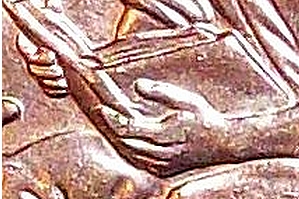
2009 Penny, Finger/Book Error...

To participate in the forum you must log in or register.
Author Previous TopicReplies: 6 / Views: 4,816Next Topic  
New Member
chrism420's Avatar
United States
41 Posts
 Posted 12/07/2010  10:00 pm Show Profile   Bookmark this topic Add chrism420 to your friends list Get a Link to this Message Number of Subscribers
Found this recently and wanted to share and get some opinions on if this is an accurate error. Found this info. on it as well. http://www.varietyvista.com/2009PFY...5%20cent.htm
It has all the errors such as a small die crack on his shoulder and boot, etc. My camera sucks so this is the best pic I could get of the book/finger error.

----and if anyone could tell me how to upload a bigger picture I would greatly appreciate it.

2009-Penny,-Finger/Book-Error...

Pillar of the Community
cladhunter13's Avatar
Canada
1161 Posts
 Posted 12/08/2010  12:00 am  Show Profile   Bookmark this reply Add cladhunter13 to your friends list Get a Link to this Reply
When I use pictures in this forum here is what I do.

1. Take a picture of what I want to upload with my old 4 MegaPix Kodak camera. Some use a scanner. Use whatever you feel comfortable with.

2. Upload the pictures to a folder on my desktop.

3. I use a freeware online program to edit most photos. Do a search in your favorite search engine for Paint.NET. Very simple to use. Or also do a search for PhotoScape. PhotoScape is another great free downloadable photo editing software. PhotoScape also allows for round cropping of pictures which is great for coins.

4. Use the photo editor of your choice to make any adjustments and crops that you desire.

5. Use your photo editor to re-size your photos as desired. For most websites 500x500 is the largest aloud. Some websites also regulate the allowable size of pictures by the pictures file size. Point to the file with your mouse cursor and right click on the files icon. Click on properties to see how large the file is. You may need to re-save it at a lower quality.

6. After you save your edited photo (I usually save it in the same folder on my desktop as where I saved the original (Be sure to save it as a JPeg file)). I upload them to photobucket.com (free web storage of photos that is free to use for a basic account).

7. When the pictures are uploaded to photobucket.com you can hover your mouse cursor over the picture you want to upload. When the mouse is over the picture it will open a window like the one in the red box here:
2009-Penny,-Finger/Book-Error...

8. In the box...choose the last option "IMG Code" (shown in the red box). Hover your mouse cursor over the area shown until for a few seconds then click the left button on your mouse. The word "copied" will appear for just a few seconds. This will copy a direct link to your picture.
2009-Penny,-Finger/Book-Error...

9. All you have to do is when your are creating a post in the forum and you want to put the picture in is copy the direct link from photobucket for the picture you want (see lines 7 & 8) and then paste it in the body of your post where you want it to be. Its as easy as that. Well...It will be once you get the hang of it.

Good Luck.

Bedrock of the Community
coop's Avatar
United States
62064 Posts
 Posted 12/08/2010  06:54 am  Show Profile   Bookmark this reply Add coop to your friends list Get a Link to this Reply
It is actually an extra thumb.
http://coppercoins.com/lincoln/dies...ie_state=eds
See if markers match? What source did you find this? Most of the MANY found that year were in the two roll sets from the mint on the LP-2's.
Valued Member
quiquelo's Avatar
Colombia
86 Posts
 Posted 12/08/2010  2:04 pm  Show Profile   Bookmark this reply Add quiquelo to your friends list Get a Link to this Reply
Great info, Cladhunter!
Pillar of the Community
cladhunter13's Avatar
Canada
1161 Posts
 Posted 12/08/2010  2:18 pm  Show Profile   Bookmark this reply Add cladhunter13 to your friends list Get a Link to this Reply
Thank you. I hope the info will help some. If more info is needed just drop me a line and I will help where I can.
New Member
chrism420's Avatar
United States
41 Posts
 Posted 12/08/2010  4:39 pm  Show Profile   Bookmark this reply Add chrism420 to your friends list Get a Link to this Reply
I found it in a bank roll. I checked and all the markers match but they seem to all match this one perfect.
http://coppercoins.com/lincoln/dies...ie_state=eds
Pillar of the Community
coppercoins's Avatar
United States
7629 Posts
 Posted 12/08/2010  5:54 pm  Show Profile   Bookmark this reply Add coppercoins to your friends list Get a Link to this Reply
Doubled dies are NOT errors. They are die varieties.
  Previous TopicReplies: 6 / Views: 4,816Next Topic  

To participate in the forum you must log in or register.


Disclaimer: While a tremendous amount of effort goes into ensuring the accuracy of the information contained in this site, Coin Community assumes no liability for errors. Copyright 2005 - 2026 Coin Community Family- all rights reserved worldwide. Use of any images or content on this website without prior written permission of Coin Community or the original lender is strictly prohibited.
Contact Us  |  Advertise Here  |  Privacy Policy / Terms of Use

Coin Community Forum © 2005 - 2026 Coin Community Forums
It took 0.25 seconds to rattle this change. Forums