| Author |
 Replies: 29 / Views: 4,402 Replies: 29 / Views: 4,402 |
Page 2 of 2
|
|
|
|
Pillar of the Community
United States
711 Posts |
Rar file or any software should be on the CD or better on their website. We can find it. What is the brand of usb microscope? Do you have a link to the Amazon listing or one like it? From your posts it sounds like you plugged it in and your computer said the device is ready to use. The software may be installed already (go to start bar, all apps, and look in there). May even be a shortcut type icon for it already even. Assuming Windows, check the icons by the time and date in the lower right corner on your computer. One of them may be the USB microscope and the software. That would be too simple, but I like simple. Not likely but worth a shot. |
|
Pillar of the Community
United States
538 Posts |
I have a number of USB scopes.. Like Buckeye said, which one do you have?
|
|
New Member
United States
11 Posts |
JC Stevens - can you or others help me know about them? I want to take photos of whole coins and stamps and also of dates and mint marks (close-ups). I have an iMac, iPad, and iPhone. Will these work for that? Which one or type would you recommend? Are the Amazon ones in the $30 range adequate for this? I really know nothing about them except what little I picked up here and a photo I saw of a date and mint mark on a penny. Thanks - Rick |
|
Pillar of the Community
Canada
2784 Posts |
|
|
New Member
United States
11 Posts |
Rocky - are you talking to me? I tried to send you an email to ask but you don't accept them.You said ricki ta so I am not sure.
If so, what should I read up on?. The link sent me to the main contents page. Always willing to learn. Thanks - Rick
|
|
Pillar of the Community
Canada
2784 Posts |
rickyc sorry my mistake. its just that you mention that you have a cellphone. well there is a member here named wade. he has a thread. he does a really good job with a cellphone. his pictures are excellent. I will see if I can attach it here.
|
|
Valued Member
United States
280 Posts |
I bought one, with the same purpose in mind. It was a disappointment. I get acceptable results using my scanner. It is also very quick & easy. Not the best results, but the lighting was never adequate with the microscope. Scanner images look better to me.
|
|
Pillar of the Community
Canada
2784 Posts |
this is a good thread for iphone. I would read this one plus the attached link. these guys get great results with a cellphone. https://goccf.com/t/256800 |
|
Valued Member
 United States
84 Posts |
I'm sorry it took me so long to reply I got this Microscope (with a loop added for 30.00 dollars) I still haven't been able to find the link on the computer. 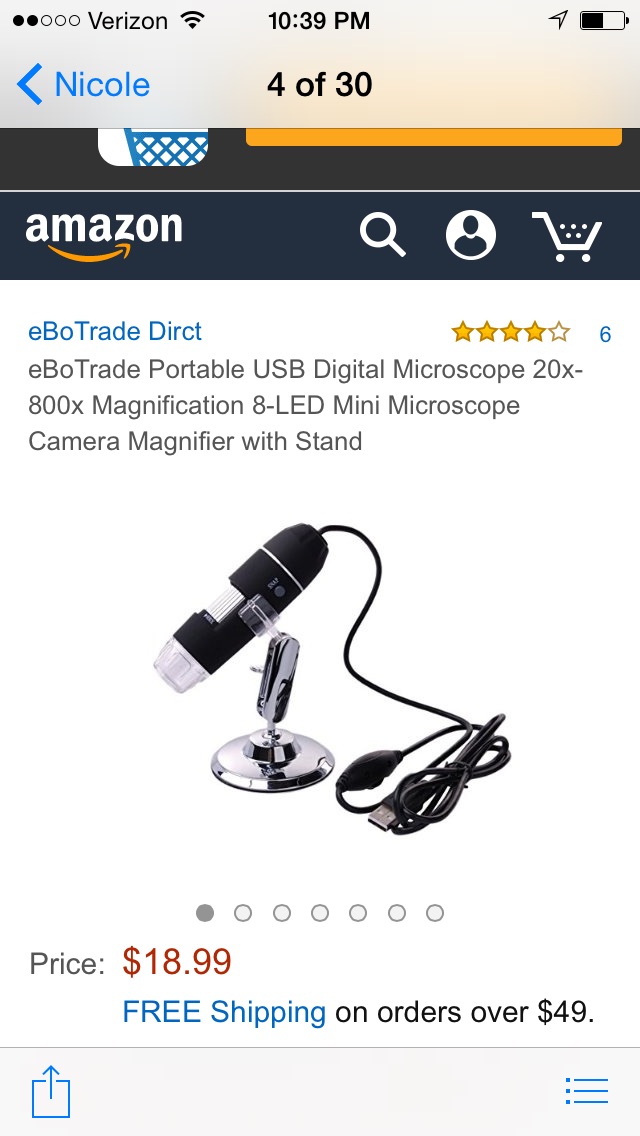 |
|
New Member
United States
11 Posts |
Mr. J.C.Stevens - I tried to send you an emai but it said I was too new to be trusted with that. When you get a chance I would like your advice on getting a USB Microscope. I'd like to photo !$ size coins and PGCS holders, and also mint marks, cracks, dates, bag marks, etc. I have an IMac running OSX and an IPad running IOS. I have a complete collection of commems I'd like to photo - some with small "spit marks" and the beginning of "toning", and some other odds and ends. I also have some stamps including plate blocks. I saw excellent date closeups using some $25 rig from Amazon but don't know if that would also take plate blocks. I see they run in several magnification ranges and some have terrible reviews as to steadiness. All help appreciated. Thanks - Rick |
|
Pillar of the Community
United States
538 Posts |
Hi Rick, I use a Dino-Lite AM-411T with a Dino-Lite MS35B Rigid Table Top Pole Stand. http://www.microscope.com/digital-m...s/dino-lite/I purchased this long before the cheap USB scopes started showing up on the market. I've played with some of the new ones. They are getting better all the time. You just have to research them and find one that will do the things you want to do. One of the neat things I'm seeing is that you can use them on PCs, phones and tablets and they have more megapixels than the old models. The more megapixels the better, the magnification ranges are often from the software and not the scope. The magnification problem they talk about is most likely a pixilation issue. It works very well for what I'm doing. Check out some of my images on Cuds-on-Coins in the Spike Head and Lincoln Cent Die Breaks Called "BIE" sections. But if you want great pictures of your coins and stamps I suggest you talk to some of the forum members who have images you see and like. I've seen some very good images from the cheap USB Scopes. But the key in using them is lighting and focus. Most will let you image the large $ size coins. The problem is most come with an Articulating Stand. To get good images you need a rigid stand. One that you can fine adjust is best. The long pole type allows you to get close "mintmark" or long "full coin" images. For long shot images you may need to rotate the scope so it is over the edge of your table to a lower table that has the coin. First use the focus on the scope to get the clearest image possible. Then the fine adjusts on the stand to focus on the point on the coin you are keying on. If you are imaging the same type of coin you shouldn't have to refocus. Put the coin on a piece of paper and slide the coin under the scope. Once you get the focus then add the lighting to get the highlights you want. You might need to adjust the colors in a software imaging program. JC |
|
Rest in Peace
United States
7075 Posts |
Sadieangel2 - I just looked up your particular model and found it on Amazon. Part of the sales copy reads: Quote:
Note: please contact with customer service for driver installation. So maybe that's what you have to do next.  |
|
Valued Member
United States
84 Posts |
Thank you Buddy. I had not seen that. Thank you I will try to contact them.
|
|
Pillar of the Community
United States
2256 Posts |
try this website--touptek.com
Edited by mikev50
08/27/2016 7:50 pm
|
|
Rest in Peace
United States
7075 Posts |
|
|
Page 2 of 2
|
Replies: 29 / Views: 4,402 |
Page 2 of 2
|






 First Page


 Posted 08/25/2016 3:34 pm





