| Author |
 Replies: 199 / Views: 23,621 Replies: 199 / Views: 23,621 |
|
|
|
Pillar of the Community
 United States
1301 Posts |
Thanks for the kind words ray and rocky. Here is the setup with 2 1/2" tube on the coin and the 2" and 3" in the background. 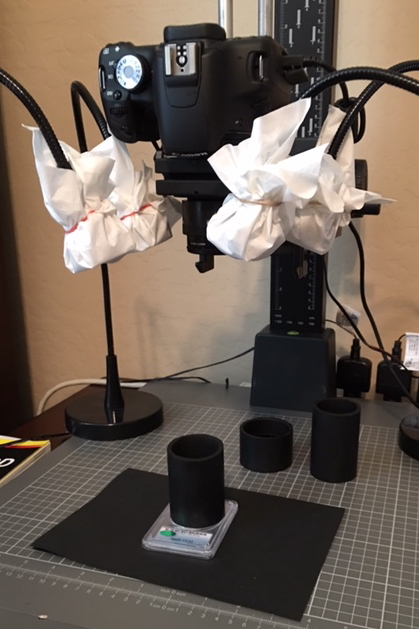 |
|
Pillar of the Community
Canada
9821 Posts |
Very nice pic ham, can you please tell us the set up, how far inside the tube is the coin, where are the lights and what is the set up on the camera?
edit, sorry didn't see the next page.
Edited by mcshilling
12/31/2015 5:52 pm
|
|
Pillar of the Community
United States
1301 Posts |
mcshilling, I use the software that comes with my Canon T1i so I can do most all with a computer, and do some post processing with DPP. The tube is 2 1/2 inches from the coin slab. I use 4 Jansjo lights with plastic half dollar caps covered with one sheet of Kleenex. You can see the lights and their positions (about 2-4 and 8-10 o'clock) in the setup photo posted earlier. Below are the camera settings.
File Name 1881CC
File Size 9.2MB
Camera Model Canon EOS REBEL T1i
Firmware Firmware Version 1.0.9
Shooting Date/Time 12/31/15 07:09:19
Owner's Name
Shooting Mode Aperture-Priority AE
Tv(Shutter Speed) 1/60
Metering Mode Evaluative Metering
Exposure Compensation -2/3
ISO Speed 100
Auto ISO Speed OFF
Image Size 3049x3043
Image Quality Fine
Flash Off
FE lock OFF
White Balance Mode Custom
White balance compensation A2, 0
AF Mode Manual focusing
Picture Style Standard
Sharpness 3
Contrast 0
Saturation 0
Color tone 0
Color Space sRGB v1.31 (Canon)
Long exposure noise reduction 0:Off
High ISO speed noise reduction 0:Standard
Highlight tone priority 0:Disable
Auto Lighting Optimizer 0:Standard
Peripheral illumination correction Disable
Drive Mode Single shooting
Live View Shooting ON
Camera Body No.
Comment
Edited by Ham1947
01/01/2016 08:12 am
|
|
Pillar of the Community
Canada
9821 Posts |
Great info Ham, so even with the coin caps you still have to cover them with tissue, interesting.
Your camera set up is the same as mine. So I guess I will have to tweak my lighting.
|
|
Pillar of the Community
Canada
623 Posts |
I have been following this thread and I must say Ham1947 you seem to have figured out what to do to take some great photos. Great job!
|
|
Pillar of the Community
United States
1301 Posts |
Is there a way to crop a circle around the coin images (photos) with DPP? I think by cropping a circle would look better than a square or rectangle. Hamm
|
|
Pillar of the Community
 United States
4051 Posts |
Yes, just select circle crop in the pull-down menu.
|
|
Pillar of the Community
United States
1301 Posts |
I have found the circle in Start Trimming/Angle Adjustment Tool, but cannot figure out how to save the image with the circle around it.
|
|
Pillar of the Community
United States
4051 Posts |
Same way you save with any other change you make in DPP, using the batch process tab.
|
|
Pillar of the Community
United States
1301 Posts |
I must be doing something wrong. Saved images in batch process look the same-with square crop. I must be missing a step somewhere?
|
|
Pillar of the Community
United States
4051 Posts |
Are you hitting the OK button bottom of screen?
|
|
Pillar of the Community
United States
1301 Posts |
Yes, I have hit the OK button. Here is what I have. Maybe the black background is suppose to be there. 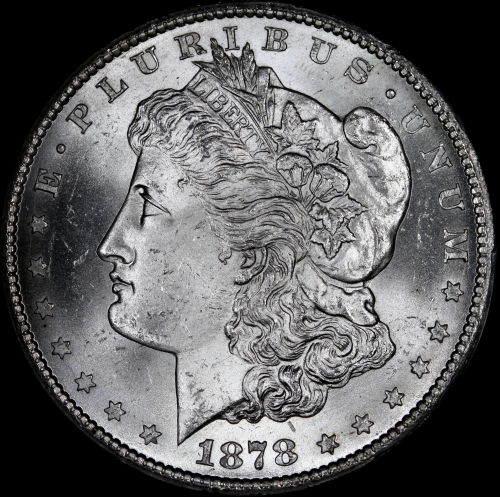 |
|
Pillar of the Community
Canada
2784 Posts |
that is it ham see you have circle cropped. but the square is always there. you can hide it with a white or whatever back ground. I was told this because mister gates. there will always be a square. I am not sure how to make it invisible. I know of a way to do it and make it invisible. but it is a real pain you have to use word. but you have your circle crop
|
|
Pillar of the Community
United States
1301 Posts |
Ok, thanks rocky. After doing the batch processing, I couldn't see any difference. I went back to change the circle to show only the bottom half of the coin and saved it and sure enough, the photo had the circle showing only the lower half of the coin. Thanks to both you and ray for your help. By the way, how do you change the background?
Edited by Ham1947
01/06/2016 7:22 pm
|
|
Pillar of the Community
United States
4051 Posts |
Like a model T, you can have the background any color you want as long as it's black. Nice 1878 BTW.
|
| |
Replies: 199 / Views: 23,621 |








 First Page
 Previous Page


 Posted 12/31/2015 5:50 pm


