| Author |
 Replies: 90 / Views: 7,475 Replies: 90 / Views: 7,475 |
|
|
|
Pillar of the Community
United States
4132 Posts |
I recommend learning to shoot in RAW. That lets you make adjustments to exposure, white balance, contrast, etc. non-destructively. Every time you edit a jpeg, you lose some information because it's only 8 bits per channel, and rounding errors start adding up (resulting in amplification of noise and/or banding). And if you save it as a jpeg, then it loses some information because the format is lossy, so if you go back and edit again, you'll start amplifying compression artifacts.
If you start with a RAW file, it's the exact information from the camera's sensor, uncompressed and unmodified, and something like 14-bits per channel (depends on the camera.) All that information is retained in the RAW file as long as you keep it around. Any adjustments you make to the raw file don't actually modify that data - they add instructions to the raw file that list a series of transformations to perform on the original sensor data. That way you never lose information and always retain the maximum possible quality. Then you can export it to JPEG for general use. Later if you decide you didn't get it quite right, you can go back into the RAW, adjust the white balance or contrast or whatever, and then re-export the JPEG without losing quality.
You also don't have to be as picky about getting things like white balance right when you take the shot. All that does is provide instructions on how to adjust the underlying RAW data. You can fix it in post without worry.
|
|
Pillar of the Community
 United States
1304 Posts |
OK Captain, I will follow your recommendation and start shooting in RAW. Do you have a preference in an editing program. I have Photoshop Elements 7 installed on my computer and the software that came with the Canon T1i. As mentioned earlier, I am just learning, so most of the terminology and concepts discussed here take time for me to understand, try, practice, and learn. If you can get me pointed in the right direction with a program that is not too complicated, I can spend some time working with my setup (getting the lighting correct) along with adjusting RAW image files.
|
|
Pillar of the Community
United States
4132 Posts |
I've only been using my camera a couple weeks, and while I'm experienced with Photoshop, a lot of this stuff is still new to me, so take what I say with a grain of salt.
Elements should be fine, but I haven't used it, so I can't give you specific tips. I have been using Creative Suite 5 (I have it for my job, otherwise it's absurdly expensive). You can also try the Canon software - make sure you get the latest version from their web site. I don't know if Elements includes Adobe Camera Raw, Adobe Bridge or any sort of equivalent. You can use whatever the Canon raw software is too, I haven't tried it yet (I've only used the tethering software).
I suggest just playing around with whatever you have. More than what software you use, what matters is experience and practice. Take lots of pictures and play around with the software you have to learn how it works and how to get pictures looking how you want.
|
|
Pillar of the Community
United States
1304 Posts |
I need a professionals input. After several hours of trying different lighting positions, working with processing, I have this for your opinions. 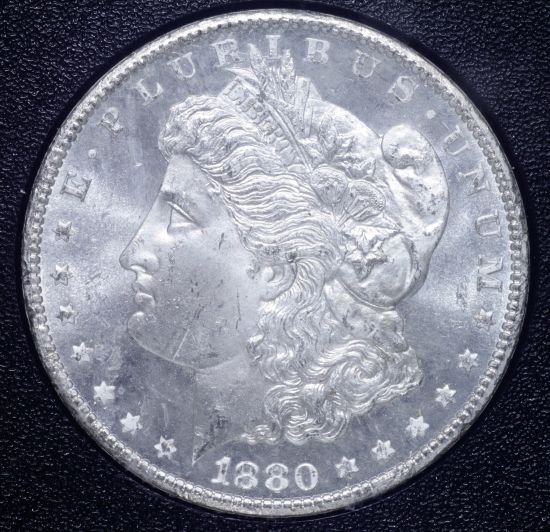 |
|
Pillar of the Community
United States
4132 Posts |
That's a huge improvement from your initial images. To my eye it looks a little blue, so the white balance might need to be tweaked back in the other direction a smidge. It's easy to make that error because blue-white tends to look "whiter than white" to our eyes. You've definitely captured the minty-fresh frostyness of the coin though.
Some of the earlier images showed more contrast between the field and the devices; that might be a lighting position thing, it might be a processing thing. But then again, this might be a more accurate image of the coin.
You've done a very nice job of eliminating glare from the holder; it's hard to even tell that the coin is being shot through that layer of plastic.
|
|
Pillar of the Community
United States
1304 Posts |
Thanks, Captain. I appreciate the positives. You are right about the blue tint. Should be easy to correct. I think I can improve on the constast between the devices and the field. I'll have to take a closer look at the coin and decide what needs to be done to get an accurate looking image.
|
|
Pillar of the Community
 United States
4051 Posts |
Now we're talking Ham! you've got the right areas lit up. Now it's just a matter of taste and aesthetics as to the angles of the lights to produce luster bars where they look best, etc.
BUT...remember the top 3 priorities:
1) Composition. You need to get the coin straight to the lens. Notice the tilt in the date? The date should be flat at the very bottom of the coin for Morgans. On the top, the tip of tiara between I and B should be pointed straight up. I use a grid on my Live View and put the center line on the tip of tiara, and have it split the date
2) Focus
3) Exposure / Lighting
|
|
Pillar of the Community
United States
1304 Posts |
Thanks, Ray. Excellent tips. I see what you have pointed out, and will work on correcting them.
|
|
Pillar of the Community
United States
1304 Posts |
I have done some more work and have this image for your review and comments. I have straightened the coin, and have it properly focused. 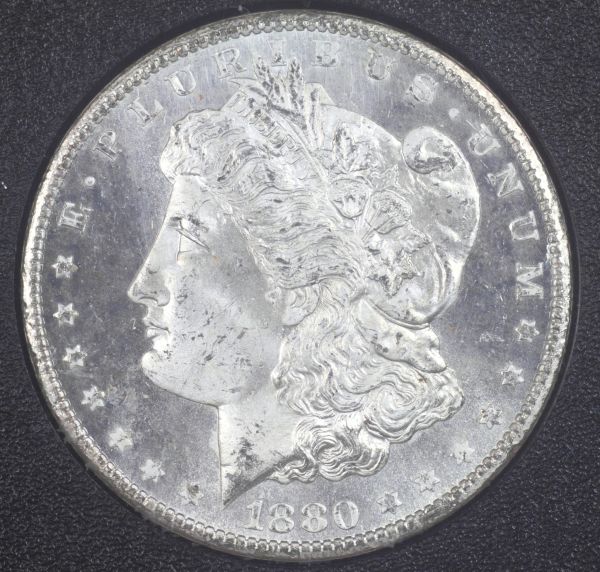 |
|
Pillar of the Community
United States
4051 Posts |
Ham...a few things:
- Image is overall too bright, and is over-exposed. There are quite a few blown-out areas. I suggest reducing exposure by about 1EV
- None of your shadows go to black. Reducing 1EV will help with this but you can also postprocess effectively for this esp in RAW
- Your luster bars are on top of each other, so are not going to give best luster
I like the overall illumination on the face and how the shadows are outlining features...Ray
Contact me for photographic equipment or visit my home page at: http://macrocoins.com |
|
Pillar of the Community
United States
1304 Posts |
Ray...Did another shot, Changed the exposure, adjusted the lights (closer to 10 and 2 and directed them more vertical), changed the custom white balance, and image shot in RAW. Didn't do any PP except crop. 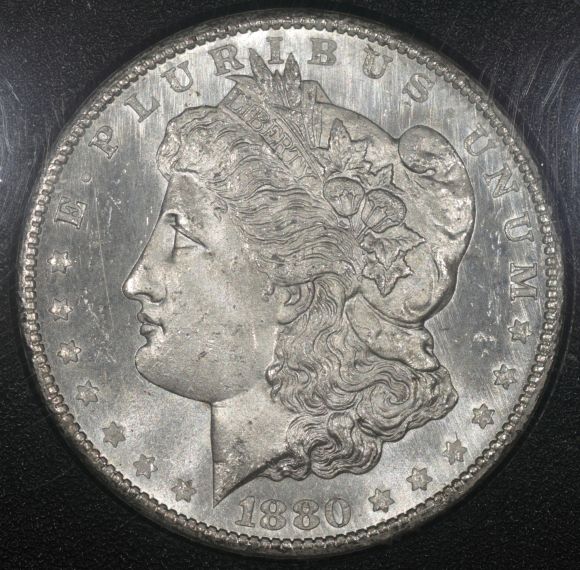 |
|
Pillar of the Community
United States
4051 Posts |
WOW, now that's a nice image of your Dollar! I might go a little more toward 10:30 and 1:30 but from here on it's all nitpicking. Nice work.
Contact me for photographic equipment or visit my home page at: http://macrocoins.com |
|
Pillar of the Community
United States
4132 Posts |
The only problem I see is some glare on the holder is starting to obscure the coin. Might be time to look into Ray's smile director technology.
|
|
Pillar of the Community
United States
1304 Posts |
Thank you, both! You have no idea how good that makes me feel. I have been working "overtime" on this one dollar shot. Now I believe I can finally turn the holder over and see what I can do with the reverse, and then go on to another coin. I will post the reverse and other coins as I progress.
|
|
Pillar of the Community
United States
1304 Posts |
I have some PL and DPL GSA dollars that I am having some difficulty in getting a shot just right. These coins are just beautiful, and trying to get the mirrors of the field and the frost on the devices has been a challenge. Any special tips or suggestions. I've tried tilting the slab, using (3)&(2) Jansjo's, all angles and positions I can think of, and keeping the slab flat and trying all the previous angles and positions. Just cannot get the PL or DPL look of the coin. One other issue. How do you safely remove scratches from the GSA plastic holders?
Edited by Ham1947
08/16/2012 8:50 pm
|
| |
Replies: 90 / Views: 7,475 |








 First Page
 Previous Page


 Posted 08/07/2012 09:48 am


