| Author |
 Replies: 90 / Views: 7,477 Replies: 90 / Views: 7,477 |
|
|
|
Pillar of the Community
 United States
4051 Posts |
My post-processing usually is done in RAW. I use RAW since dynamic range is so much wider than jpg so you can shoot backed-off 1EV or so to not lose any highlights, and still recover the shadow detail, as long as you shoot at a low ISO. I shoot with Standard profile, with all settings (sharpness, contrast, hue, and saturation) set to 0. I adjust levels and white balance as needed in RAW, then downsize to jpg, where I do any required sharpening and saturation adjustment.
For Ham's image, since it was already downsized to jpg, there was no other option but to adjust levels after downsizing. But jpg's are only 8-bit, while RAW is up to 16-bit, so you have a bunch more stops to work with in RAW, which is why folks recommend RAW processing.
|
|
Pillar of the Community
United States
4132 Posts |
To get a bit further into the weeds, I think current generation Canons (and probably Nikons too) have 14-bit per photosite RAW files. It's a linear gamma though, so the 8-bits per channel in a JPEG (or other 8-bit format) file are used more efficiently. You need roughly 11 bits in linear gamma to match 8-bit sRGB. Still, 14 bits gives you a huge amount of wiggle room for correcting exposure (and since you have a still subject, there are tricks for getting even more).
Also, since RAW is generally lossless, you don't have to worry about adding and amplifying compression artifacts with each round of adjustments.
|
|
Pillar of the Community
 United States
1304 Posts |
I thought I try one (1883CC GSA NGC MS64*) with some color. I think it turned out real nice (maybe a tad too dark), what do you think? 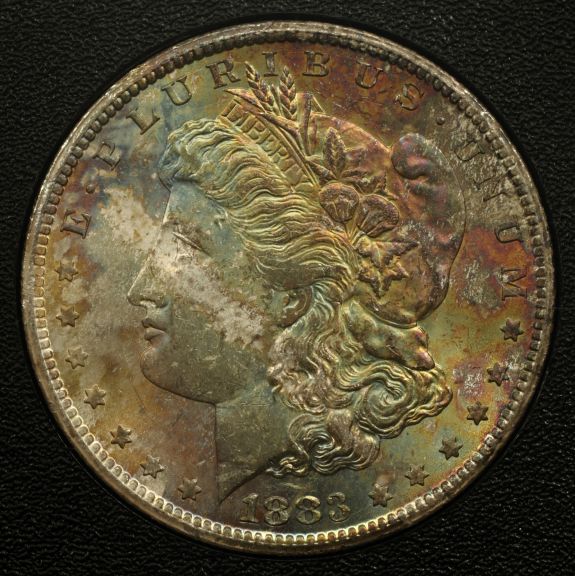 |
|
Pillar of the Community
United States
4051 Posts |
Wow, nice coin, and the image is excellent, though I do think it's a bit dark. I took the liberty to adjust it a bit. Goosed the gamma to brighten the shadows, but same time lowered the overall brightness a bit and added just a touch of sharpening.  Contact me for photographic equipment or visit my home page at: http://macrocoins.com |
|
Pillar of the Community
United States
1304 Posts |
Thanks Ray, that's the coin. Beautiful job! I have another one (1881CC GSA) on the way with more aqua blue and sea green toning I'll share.
|
|
Pillar of the Community
United States
1304 Posts |
I received the 1881CC GSA in the mail today. Did a quick photo shot with my setup. Are things looking better? I seem to lose quality from the RAW image to the JIF image shown here. It is not as sharp, the seperation from field to devices seems to run together, and the color seems bland (just doesn't jump out at you like the RAW image does). The RAW image is so much superior! 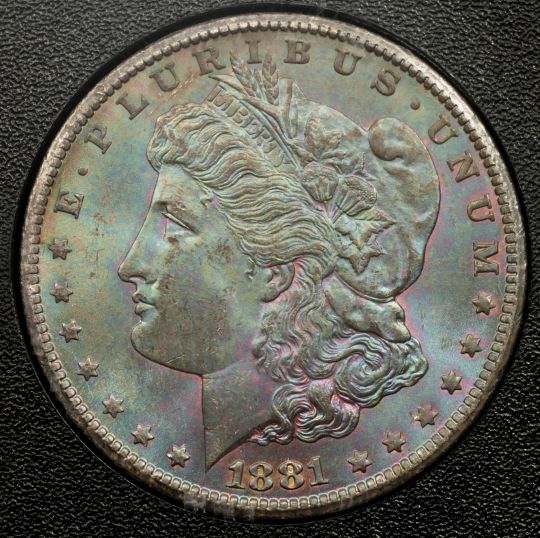 |
|
Pillar of the Community
United States
4051 Posts |
Ham...beautiful coin! But the image needs a bit of sharpening. My recommendation is do your levels compensation in RAW, then your saturation, sharpening, and any levels fine-tuning in jpg after conversion and downsizing. Here's what I'd do to that image:  Edited by rmpsrpms
08/25/2012 9:58 pm
|
|
Pillar of the Community
United States
1304 Posts |
Again, very nice Ray. Thanks for the tips! I'll see if I can use the Canon DPP program after I convert and save the file to jpg.
|
|
Pillar of the Community
United States
4051 Posts |
Ham...I noticed your two photos are different sizes. Are you moving the magnification around, or are you doing the down-sizing differently, or ? I'm curious because how you downsize has a small effect on sharpness, though all downsizing algorithms with any sizing factor seem to cause some loss of sharpness...Ray
|
|
Pillar of the Community
United States
1304 Posts |
Ray, I do some resizing (use Microsoft Office Picture Manager) to get the image the required less than 5mb for uploading, then use the Image Optimizer tool. The resizing is not always consistant with each image.
|
|
Moderator
United States
23522 Posts |
Quote:
Ray, I do some resizing (use Microsoft Office Picture Manager) to get the image the required less than 5mb for uploading, then use the Image Optimizer tool. The resizing is not always consistant with each image. That's odd. The last steps of my postprocessing involve downsizing to an arbitrary 1000px - yeah, I know it's not geometrical, but the difference in quality for a full-face image is negligible - and save as a .jpg at 80% Quality in the Gimp. PS, I think, renders "Quality" on a steeper slope and should be around 90%. The resulting image is usually around 250kb. Just for the fun of it, I saved a full-size image (3100px in diameter) of my latest Cent at 80%. It was 2.34Mb, and indistinguishable on my monitor from the 100% original.  |
|
Pillar of the Community
United States
4051 Posts |
SD...that pic is 1893x1897, not 1000x1000. Did you upload wrong image?
Contact me for photographic equipment or visit my home page at: http://macrocoins.com |
|
Moderator
United States
23522 Posts |
No, that's the 2.34Mb original. Photobucket resized it - my original upload was 3100px in diameter.
|
|
Pillar of the Community
United States
1304 Posts |
O.K. Being the novice that I am, I will try to explain what I have been doing. 1.) Take the shot in RAW. 2.) Do some PP with the RAW image, save the RAW image, and also convert and save the image as an 8bit tif & jpg file. 3.) Resize the jpg image to less that 5mb. 4.) Use the Image Optimizer Tool and upload the image to post. While doing PP, I experimented with several different tools, could that of caused the differences in image sizes you have noticed? And, I manually crop each photo, which I notice gives a different size everytime.
|
|
Pillar of the Community
United States
4051 Posts |
Ham...can I suggest a small change to your workflow?
1) Take shot in RAW
2) Do levels PP with the RAW image and save it
3) Downsize image to a fixed image pixel size and save as jpg
4) Crop to a fixed display pixel size
4) Add a tiny bit of sharpening and do any touch-up levels adjustment on the small jpg
5) Use the Image Optimizer Tool and upload the image to post
For fixed display pixel size, probably anything from 600-1000 pixels on a side is OK.
|
| |
Replies: 90 / Views: 7,477 |







 First Page
 Previous Page


 Posted 08/22/2012 12:39 am


