| Author |
 Replies: 17 / Views: 3,263 Replies: 17 / Views: 3,263 |
|
Valued Member
Australia
428 Posts |
 help needed in getting clear photos downloaded on to this forum taken by my usb light and camera , camera no trouble but usb light and camera , I am always told to big , so I need to know what is best program to download on to my pc then transfer over to this forum with a good clear pic ,. thank you for any help offered.. ,, kel ,, Edited by keldaw2222
11/29/2012 5:12 pm
|
|
|
|
Pillar of the Community
Australia
908 Posts |
If you mean size reduction you could use the free image optimiser on this site
|
|
Pillar of the Community
Australia
674 Posts |
I am going through the same process. My usb seems best suited to extreme close ups (die cracks etc.) whilst a camera suits full shots of coins.! Nancy put me onto a editing programme called 'Photoscape' (free download from CNET.) that works well but requires a great deal of practice. Whist usb cameras are great the images have such a narrow 'depth of field' what looks well focused on the screen can looked terrible when posted.!  I have spent more time on photographs lately than I should have but everything is a learning curve and the beauty of digital is the unlimited number of shots you can take to get the right one.! Hopefully the members who take those great shots we have seen lately will share their secrets with us.!! |
|
Pillar of the Community
Australia
750 Posts |
Edited by The Unicorn
11/29/2012 6:08 pm
|
|
Pillar of the Community
Australia
877 Posts |
Plenty of ways to do it. The Windows Powertoys resizer only works with XP. If you have Vista, 7 or 8 then try the one found here http://imageresizer.codeplex.com/. This is Microsoft's open source project page. MS never ported the XP version to other Windows versions but the one here is as good (and more features to come). Has a right click option for images from My Computer/Windows explorer pages. Jeff Edited by Jeff
11/29/2012 6:47 pm
|
|
Pillar of the Community
Australia
762 Posts |
Or you can just use "Paint" which is already in windows. Just open up the image in "paint" and choose the resize option. Thats what I do
|
|
Valued Member
 Australia
428 Posts |
thanks guys , my brain is like this  just now , I will try the lot and see which one is best, I have tried the one on here free image optimizer ,i get a good shot then when I hit save it , I lose it most times , so I will try some others and see if I can get a good one for me to work easy on . thanks again . ,, kel ,, |
|
Valued Member
Australia
428 Posts |
i forgot to mention I have 7
,, kel ,,
|
|
Valued Member
Australia
428 Posts |
this is my problem,
how do I get the picture over to paint , or anywhere else , and when I reduce the size of it , how do I get it onto this forum ,
,, kel ,,
|
|
Pillar of the Community
Australia
1607 Posts |
Hi Kel, bring the pic up on your computer,then right click on the pic,a list of things will come up,you want the open with tab,hover over open with & another drop down will appear & in that list choose PAINT,the picture will automatically open in the paint window.  |
|
Pillar of the Community
Australia
1607 Posts |
As for the forum uploader,i have no idea sorry as I've never used it.
|
|
Moderator
 United States
14463 Posts |
Edited by Fuzzy317
11/30/2012 01:53 am
|
|
Valued Member
Australia
428 Posts |
 thank you all for your help and tips .. ,, kel ,, |
|
Valued Member
Australia
428 Posts |
|
|
Valued Member
Australia
428 Posts |
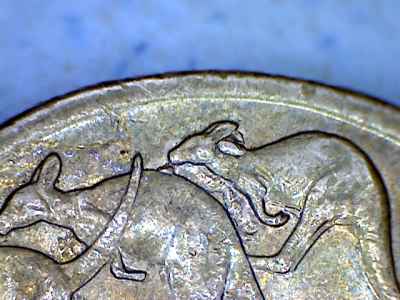
ok thanks all, i may have it now , this is my new find , just for practice, it is a dollar coin with rabbit ears and also a spew roo because of the Cud on the 2nd roo,s back . ,, kel ,, Edited by keldaw2222
11/30/2012 04:19 am
|
|
Pillar of the Community
Australia
4411 Posts |
I like that coin. I havent found a spew and rabbit double before.
|
| |
Replies: 17 / Views: 3,263 |








 Posted 11/29/2012 5:54 pm