Coin Community Family of Web Sites Join Thousands of Coin, Bullion, & Money Collectors
Vancouvers #1 Coin and Paper Money Dealer Join Thousands of Coin, Bullion, & Money Collectors Coin, Banknote and Medal Collectors's Online Mall Specializing in Modern Numismatics Royal Canadian Mint products, Canadian, Polish, American, and world coins and banknotes. 300,000 items to help build your collection! Shop for APMEX Bullion on eBay!


Username:
Password:
Save Password
Forgot your Password?


This page may contain links that result in small commissions to keep this free site up and running.

Welcome Guest! Registering and/or logging in will remove the anchor (bottom) ads. It's Free!

Tips For Using USB Microscope?

To participate in the forum you must log in or register.
Author Previous TopicReplies: 18 / Views: 3,692Next Topic
Page: of 2
New Member
silver00lt's Avatar
United States
32 Posts
 Posted 02/15/2013  8:53 pm Show Profile   Bookmark this topic Add silver00lt to your friends list Get a Link to this Message Number of Subscribers
I am about to just take this and chuck it at the wall. It is a pain to get setup. Thinking about building me a stand on my reloading desk and mark sections on where to clamp the stand to while doing different size coins.

It is a 25x microscope...should've gone for a 10x+.
Pillar of the Community
robster's Avatar
Australia
674 Posts
 Posted 02/15/2013  10:25 pm  Show Profile   Bookmark this reply Add robster to your friends list Get a Link to this Reply
As with any style of microscope there is a incredibly narrow depth of field which makes it tough to get a good focus on the subject.! I use mine for discovering small die cracks, doubling etc. but always go back to a good camera to capture the image.! Stay Steady.!!
Pillar of the Community
robster's Avatar
Australia
674 Posts
 Posted 02/15/2013  10:27 pm  Show Profile   Bookmark this reply Add robster to your friends list Get a Link to this Reply
Try clamping the usb and shifting the coin into focus.!
Moderator
Learn More...
Fuzzy317's Avatar
United States
14463 Posts
 Posted 02/15/2013  10:36 pm  Show Profile   Bookmark this reply Add Fuzzy317 to your friends list Get a Link to this Reply
the stand that came with my USB microscope was small, so I built one able to take shots further from the subject. Sometimes I could never get the focus just right, so I bought a camera with macro. Then I found a commercial stand for the microscope that allows for finer detail adjustments to get the pictures in focus
New Member
silver00lt's Avatar
United States
32 Posts
 Posted 02/15/2013  11:36 pm  Show Profile   Bookmark this reply Add silver00lt to your friends list Get a Link to this Reply
Fuzzy do you have a link to where you purchased yours? A stand with a adjustment handle(like a tripod) would be GOLDEN.

robster - I was trying to avoid my fingers in the shot. :)
Moderator
Learn More...
Fuzzy317's Avatar
United States
14463 Posts
 Posted 02/15/2013  11:47 pm  Show Profile   Bookmark this reply Add Fuzzy317 to your friends list Get a Link to this Reply
I got it from Amazon. Here is one example, but mine had a plain base.


UPDATE - sorry, that was another purchase, the stand for the microscope came from Lighthouse
http://www.lighthouse.us/epages/lig...roducts/DMST
Edited by Fuzzy317
02/15/2013 11:54 pm
Moderator
Learn More...
Fuzzy317's Avatar
United States
14463 Posts
 Posted 02/15/2013  11:56 pm  Show Profile   Bookmark this reply Add Fuzzy317 to your friends list Get a Link to this Reply
the microscope goes in the clamp, I get the focus close with the adjustment on the microscope, then use those knobs on the side of the stand for finer adjustments.
New Member
silver00lt's Avatar
United States
32 Posts
 Posted 02/16/2013  12:04 am  Show Profile   Bookmark this reply Add silver00lt to your friends list Get a Link to this Reply
By the way...how did you edit your post?
Moderator
Learn More...
SsuperDdave's Avatar
United States
23522 Posts
 Posted 02/16/2013  12:09 am  Show Profile   Bookmark this reply Add SsuperDdave to your friends list Get a Link to this Reply

Quote:

By the way...how did you edit your post?


In the row of icons above your post, it's the third one from the left - the one that looks like a piece of paper with a pencil on it.
New Member
silver00lt's Avatar
United States
32 Posts
 Posted 02/16/2013  12:40 am  Show Profile   Bookmark this reply Add silver00lt to your friends list Get a Link to this Reply
THANK YOU!(mine was 2nd from left...weird)

I LOVE EDIT
Moderator
Learn More...
Fuzzy317's Avatar
United States
14463 Posts
 Posted 02/16/2013  12:46 am  Show Profile   Bookmark this reply Add Fuzzy317 to your friends list Get a Link to this Reply
it was 2nd icon for you, because in your profile you don't have your "Allow Forum Members to Send you E-Mail?" turned to yes
Edited by Fuzzy317
02/16/2013 12:47 am
New Member
silver00lt's Avatar
United States
32 Posts
 Posted 02/16/2013  12:56 am  Show Profile   Bookmark this reply Add silver00lt to your friends list Get a Link to this Reply
Yep sure do. They can just PM me. :)
Moderator
Learn More...
Fuzzy317's Avatar
United States
14463 Posts
 Posted 02/16/2013  01:05 am  Show Profile   Bookmark this reply Add Fuzzy317 to your friends list Get a Link to this Reply
I don't think it is turned on
Moderator
Learn More...
John1's Avatar
United States
56855 Posts
 Posted 02/16/2013  05:46 am  Show Profile   Bookmark this reply Add John1 to your friends list Get a Link to this Reply
It's not, I just checked.
John1
New Member
silver00lt's Avatar
United States
32 Posts
 Posted 02/16/2013  12:27 pm  Show Profile   Bookmark this reply Add silver00lt to your friends list Get a Link to this Reply
Word...
Pillar of the Community
52Raymo's Avatar
United States
8516 Posts
 Posted 02/16/2013  2:06 pm  Show Profile   Check 52Raymo's eBay Listings Bookmark this reply Add 52Raymo to your friends list Get a Link to this Reply
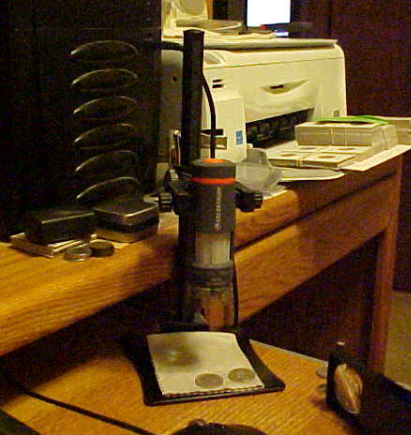
Here's my little set up.(pic using my old Mavica)


Tips-For-Using-USB-Microscope?
Oregon coin geek.....*** GO BEAVS ! ! ! ***
  Previous TopicReplies: 18 / Views: 3,692Next Topic
Page: of 2

To participate in the forum you must log in or register.


Disclaimer: While a tremendous amount of effort goes into ensuring the accuracy of the information contained in this site, Coin Community assumes no liability for errors. Copyright 2005 - 2026 Coin Community Family- all rights reserved worldwide. Use of any images or content on this website without prior written permission of Coin Community or the original lender is strictly prohibited.
Contact Us  |  Advertise Here  |  Privacy Policy / Terms of Use

Coin Community Forum © 2005 - 2026 Coin Community Forums
It took 0.33 seconds to rattle this change. Forums



