| Author |
 Replies: 10 / Views: 2,523 Replies: 10 / Views: 2,523 |
|
|
Pillar of the Community
Canada
2786 Posts |
dark toning in the center of the coin is the reflection of the camera lense, any tricks on how to get rid of it? if I pull the camera back "out of site" I cant seem to get a good focus (macro setting) and I hate taking shots on an angle 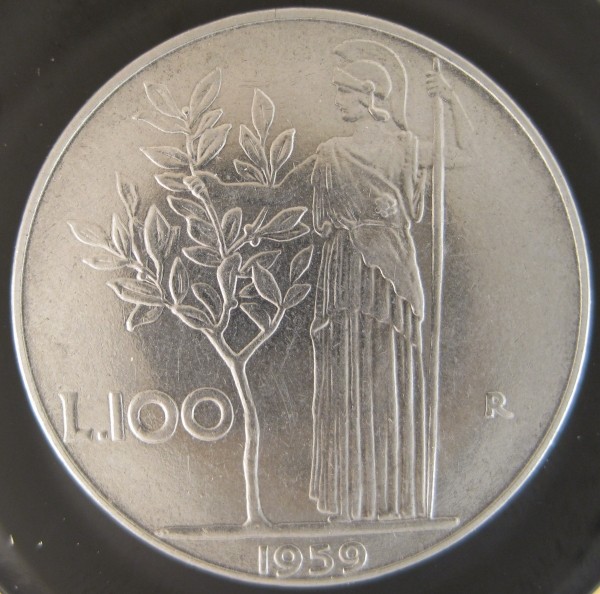 |
|
|
|
Pillar of the Community
 Canada
2786 Posts |
might have solved my own problem, instead of trying to lighten or removed the dark reflection I blacked out the rest of the camera. I think it provideds an even contrast and really pops the edges of the details 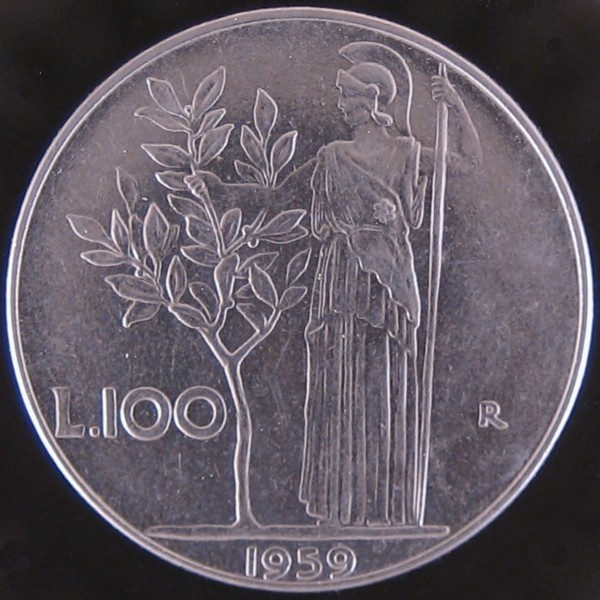 |
|
Pillar of the Community
United States
4132 Posts |
How are you lighting the coin?
|
|
Pillar of the Community
Canada
2786 Posts |
i have 2 LED track lights at 9 oclock and 3 oclock almost level with the coin itself, with a frosted light shade to diffuse the light. the track lights can swivel to angle to light differently and it also has a dimmer to vary the intesity. the light shade also acts as the tripod. for brass/bronze/copper I remove the shape and go "natural". its a really amature rig, the camera is an old canon selphy 600 (wife has a 1200 but I dont find the macro settings as friendly). any hints on lighting or distance or iso settings would be appreciated. 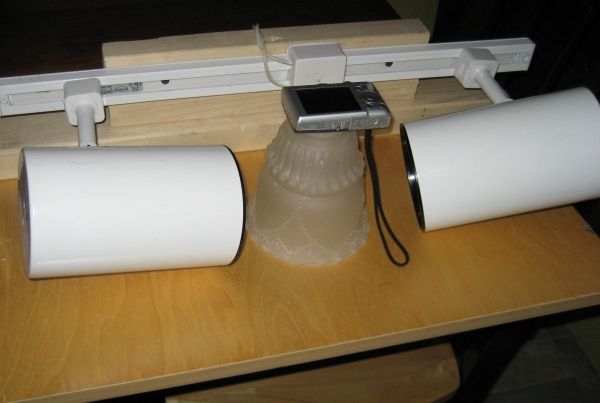 |
|
Pillar of the Community
United States
4132 Posts |
The lights are at much too low an angle. The lights should be at as high an angle as possible. Here's my setup:  Smile Director in Use Smile Director in Use by CaptainFwiffo, on Flickr You can see that the lights are actually in front of the lens so that they're as close to vertical as I can get them without actually having them in the optical path (I also have them shining through a specially-shaped diffusion thing, but you can ignore that for now). And here's a picture taken with that setup:  1934-D Mercury Dime 1934-D Mercury Dime by CaptainFwiffo, on Flickr For ISO you want to use the lowest setting, and use an aperture setting just high enough to keep the whole coin in focus. Your setup should be stable, so you can tolerate very slow shutter speeds. |
|
Pillar of the Community
 United States
4051 Posts |
You'll get better contrast with your lighting setup if you try to limit the light hitting the coin from the side. Put a ring of black paper around the light shade from ground level, and adjust the height until you get the best effect. I'd recommend at least 1-2 inches wide strip, but you'll likely find the best overall look is to block out most of the lower part of the shade and then move your lights up to shine on the upper parts only, maybe pointing downward at the angled area of the shade. This will also have the effect of minimizing the stray light that hits the lens, further improving contrast.
|
|
Pillar of the Community
Canada
2786 Posts |
i'll try moving the tracks to a higher angle, but they might be a bit too bulky to get below the camera lense so as not to cast a shadow. that or look into getting some of those stretchy lights but I'm aiming to spend as little as possible (so far $0.00)
|
|
Pillar of the Community
United States
4132 Posts |
Lighting is everything in photography, so if you're going to spend any money, that's where to put it first.
|
|
Pillar of the Community
United States
4051 Posts |
Moving the lights to a higher angle will help, but you need to eliminate the light that is hitting the coin from the sides. You can see why by comparing your shots with the Captain's. Notice on the Captain's shots, all the devices (head, fasces, letters, etc) are lit on their surfaces, and their outlines are shadowy. This is the correct "look" to the coin. On your shots, all the devices are darker on their surfaces and show a halo of illumination around their edges, almost like a negative of what you are trying to achieve. This is because your setup is shining more light from the sides than from above the coin. Moving the lights up higher will change the balance, but in reality you want very little or no light shining from the sides. You may actually do OK leaving your lights right where they are, and just blocking the light from hitting the shade down low near the coin. You can test this out by blocking the light with your hands on both sides, letting it hit only the upper portion of the shade.
Contact me for photographic equipment or visit my home page at: http://macrocoins.com |
|
Pillar of the Community
Canada
2786 Posts |
do you also use the same set up for copper and brass coins? all of my (circulated) coppers turn out in a wash of orange for some reason (BUs turn out just fine). or do you use different lighting etc?
|
|
Pillar of the Community
United States
4132 Posts |
It's important to set your white-balance correctly to get good color. If you can't get good color even after white-balancing, the quality of your light might just be too poor (can happen with fluorescent lights, for instance).
|
| |
Replies: 10 / Views: 2,523 |
|






 Posted 02/25/2013 09:22 am





