| Author |
 Replies: 24 / Views: 3,880 Replies: 24 / Views: 3,880 |
|
Bedrock of the Community
United States
11951 Posts |
I have been checking out the new camera, trying to learn the basic operation of the camera. Thought I would try a couple coin pictures. Set up the tripod Two jansco lights Set camera on auto, with 100MM lens Hand pressed the shutter button. Looking for some honest feedback, good or bad. Image started out 7.05MB. Used Picasa3, reduced file size to 147KB First coin 1879 S Morgan If I had to send it in, I think it would come back MS 63PL The fields are mirrored obv/rev, does not show on pictures. 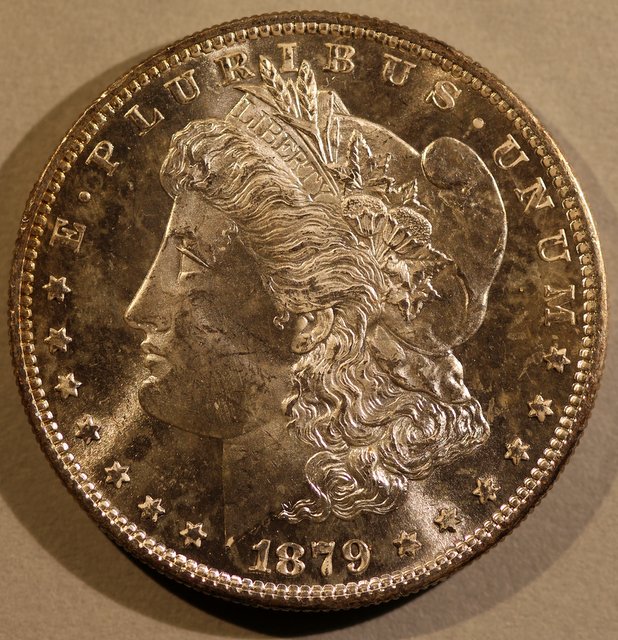 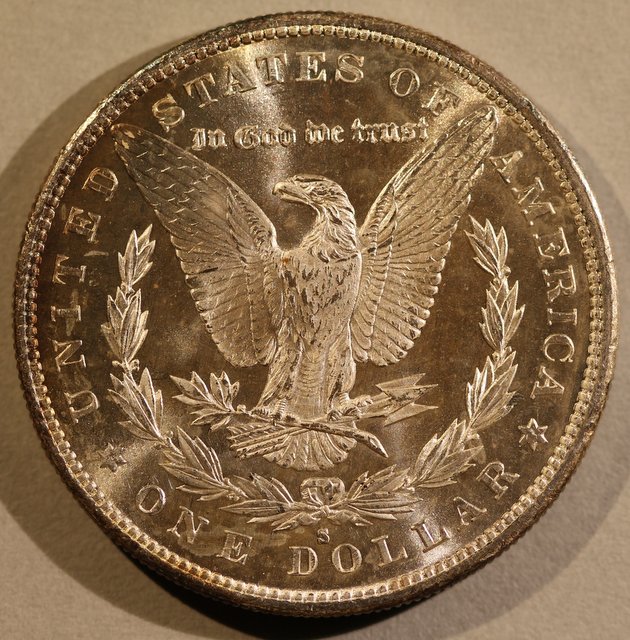 |
|
|
|
Bedrock of the Community
 United States
11951 Posts |
Second coin 1898 O I think it is a nice Morgan, with good luster. It does have a mark on the reverse, that has held me back from sending it in to be graded. Same setup as previous coin .. 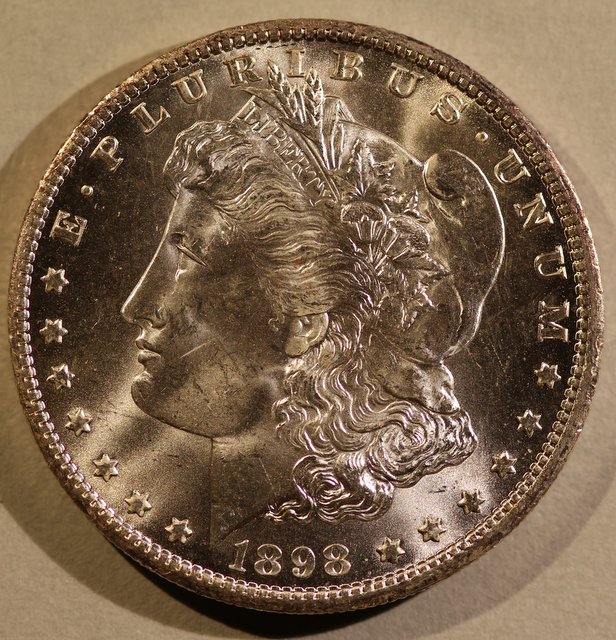 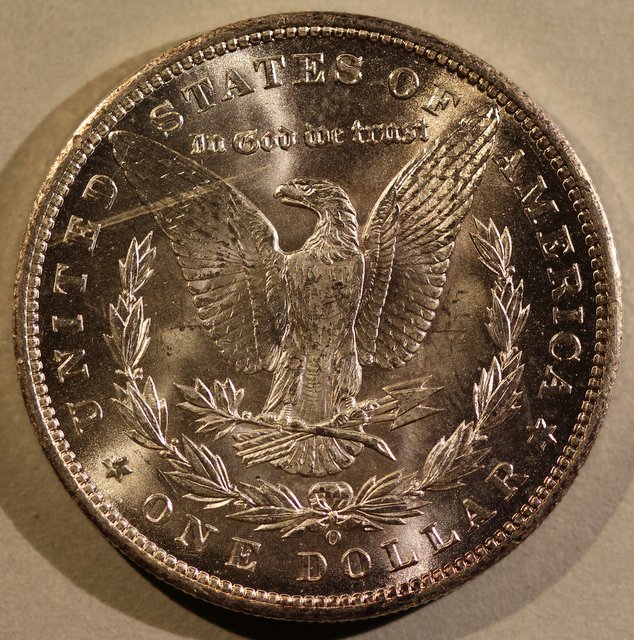 |
|
Forum Dad
 United States
24228 Posts |
White balance is way off.
|
|
Pillar of the Community
 United States
4618 Posts |
Definitely fix the white balance.
It could be just from downsizing, but I think there's a little too much grainness/diffraction. Can you post the full sized image somewhere (like PhotoBucket or any of the competitive hosting sites) so we can pick it apart? That will also give us the EXIF data...
-----Burton 50+ year / Life / Emeritus ANA member (joined 12/1/1973) Life member: Numismatics International, CONECA Member: TNA, FtWCC, NETCC, EveryCountry (online) coin club Owned by three cats and a wife of 40+ years (joined 1983) Author: 3rd Edition of the Sample Slabs book, https://www.sampleslabs.info/ |
|
Bedrock of the Community
United States
11951 Posts |
Quote:
White balance is way off. Thank you ... Looking up how to set that ..... |
|
Pillar of the Community
United States
9395 Posts |
The lighting used here gives a nice-looking image with good luster. Based on the shadows, it looks like the Jansjo lights were at a relatively low angle, with not too much diffusion?
|
|
Pillar of the Community
United States
597 Posts |
use a white lightbulb or go outside with white paper background
|
|
Pillar of the Community
United States
4051 Posts |
I hope you're planning to connect to a computer. Setting WB is much easier when tethered. Everything is easier.
|
|
Pillar of the Community
Canada
4944 Posts |
Don't worry too much about the white balance. Get it as close as you can, and the rest can be adjusted in post-processing. Here's an example: After adjusting the red and yellow channels in hue saturation.  Overall the images look pretty good, I think you could use just a touch more light on the coin. |
|
Valued Member
United States
430 Posts |
Your getting bombarded with suggestions. Here is another. It's obvious but in the beginning you try to fix everything at once. Your shots are good but need tweaking. only adjust 1 thing and then compare. You will learn to be self critical and find a better technique faster. Don't rely on post production adjustments. It is a pain and takes much more time. So get the white balance right 1st. If you look at the corrected shot above the white card the coin sits on is...white. that's what you need with every shot. Ray is right, it's much faster to get the right white balance when you are tethered. Get a standard white card and use the eye dropper tool to auto adjust a custom white balance.
Then you can work on the lighting. lighting is hard to standardize. The raw coin above will forgive low lighting angles. A slabbed coin won't. Nice 1st shots you're 85% there.
|
|
Bedrock of the Community
United States
11951 Posts |
Thank you all for taking the time to respond. All the suggestions are great. Quote:
I hope you're planning to connect to a computer. Setting WB is much easier when tethered. Everything is easier. I was thinking I would learn some of the setting on the camera, before I tried learning the live tether setup. But maybe I should just go right to the tether. I knew I could color correct with software, but thought I should just show what I was getting without that, to get better suggestions on what I might be doing wrong. I am not sure what I should be doing with the White Balance (WB). I read that the camera is set on Auto WB, but that I can change that setting. As posted .. I guess live tether would be the best way to get the correct setting. I will try some more shots today, with some adjustments. I did have the coins sitting on gray paper. I thought gray was they correct background. Should I be using white? The lights were at 10 and 2 O'clock position, just the bare lights. |
|
Pillar of the Community
United States
946 Posts |
I think you are referring to the 18% grey paper I have seen mentioned a few times. I am also trying to pick up on becoming a better coin photographer and I enjoy reading all of these threads. Now if I can somehow convince myself to spend a 1k on a new setup rather then coins.
|
|
Valued Member
United States
430 Posts |
I bought a white card set on Amazon for $6.. It's a white ,black, and 18% grey card. But a white piece of paper will work. I use the black card as my background on raw coins. Diffusion on the lights help avoid bright "blown out" spots. I use a ping pong ball with a hole on the jansco lights. Ray has a "smile director" system to get light just where you want it. I bumped that thread a day or 2 ago. |
|
Valued Member
United States
430 Posts |
I don't recommend auto white balance. Since you will be using the same lights over again it's better to set it. Use the white point setting while tethered is quick. Also be aware of the ambient light in the room
|
|
Bedrock of the Community
United States
11951 Posts |
I switched to a white paper background. Before putting the coin under the lens. I followed the instructions for a custom WB. It would not let me set it in AUTO had to switch to aperture priority mode. With the coin in place I made setting 2.8 ISO 400 camera selected 1/400s 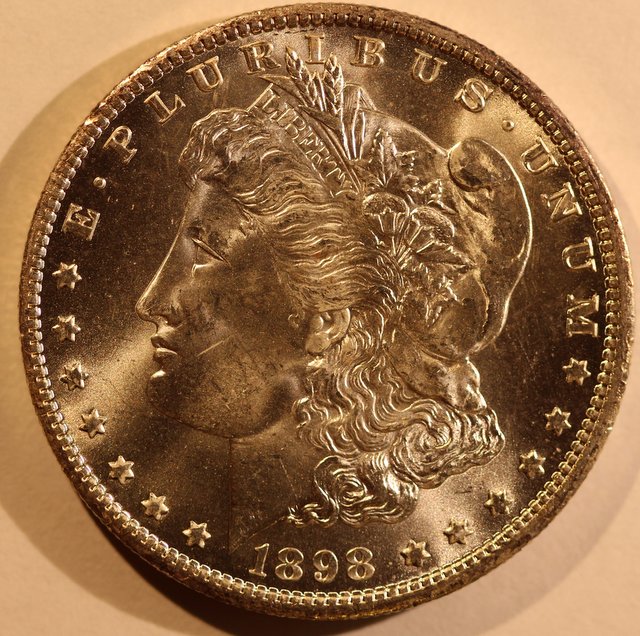 I am not sure what better way I could set WB. There are some pre set options. Here is same photo with Picasa3 auto color 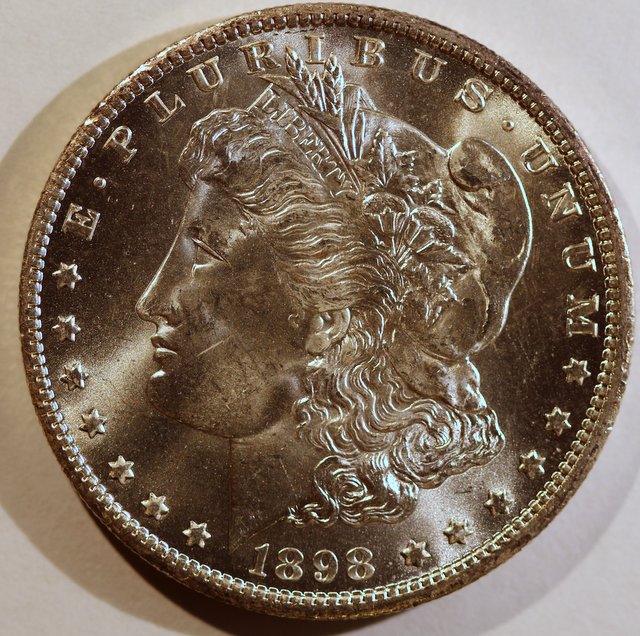 |
|
Valued Member
United States
430 Posts |
If you are not tethered, take a out of focus picture of a white sheet of paper. Then select custom white balance from the menu screen. this gets you to the SET screen. here you select the photo you just took. then press SET. This selects that image as your custom white balance. then use custom as your setting for other shots. This process is on page 90-91 of my manual.
If not then you can post production correct every shot as you did above.
|
| |
Replies: 24 / Views: 3,880 |







 Posted 06/27/2015 1:23 pm





