



Coin Community Family of Web Sites Join Thousands of Coin, Bullion, & Money Collectors
Royal Canadian Mint products, Canadian, Polish, American, and world coins and banknotes. Vancouvers #1 Coin and Paper Money Dealer Coin, Banknote and Medal Collectors's Online Mall Specializing in Modern Numismatics Join Thousands of Coin, Bullion, & Money Collectors 300,000 items to help build your collection! Royal Estate Auctions - $1 Coin Auctions


Username:
Password:
Save Password
Forgot your Password?


This page may contain links that result in small commissions to keep this free site up and running.

Welcome Guest! Registering and/or logging in will remove the anchor (bottom) ads. It's Free!

2000 D Sacagawea Dollar Error? Please Help Never Seen Before

To participate in the forum you must log in or register.
Author Previous TopicReplies: 9 / Views: 16,955Next Topic  
New Member

United States
1 Posts
 Posted 07/23/2015  1:52 pm Show Profile   Bookmark this topic Add Christy62 to your friends list Get a Link to this Message Number of Subscribers
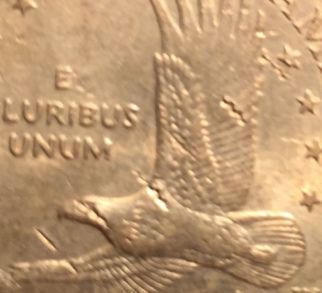
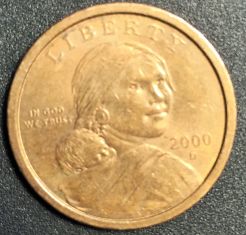
Hello I have tried researching this 2000 D Sacagawea dollar to see if any similar errors have been reported on this particular coin and I came up with nothing. Their is what looks like to be, deep tiny wavy or zig zag marks/cracks on 2 parts of the upper wing, one on the face and one where the wing connects to the body. I am trying to determine if this is a true mint error. Please see photos attached. Any help would be greatly appreciated. I am new to coin collecting so all the different errors is still a learning process for me. Thank you

2000-D-Sacagawea-Dollar-Error?-Please-Help-Never-Seen-Before

2000-D-Sacagawea-Dollar-Error?-Please-Help-Never-Seen-Before

2000-D-Sacagawea-Dollar-Error?-Please-Help-Never-Seen-Before
Valued Member
Young Lincoln Collector's Avatar
United States
62 Posts
 Posted 07/23/2015  2:00 pm  Show Profile   Bookmark this reply Add Young Lincoln Collector to your friends list Get a Link to this Reply
I'm no expert but, that just looks like some weird PMD.
Pillar of the Community
tapapple65's Avatar
United States
538 Posts
 Posted 07/23/2015  2:12 pm  Show Profile   Bookmark this reply Add tapapple65 to your friends list Get a Link to this Reply
Welcome to the forum, Christy. I too believe it is post strike damage. The affected areas appear to be sunken into the coin. If they were raised then they could have been caused by a damaged die.Enjoy the forum and keep looking.There are alot of members on here willing to help out. Good luck.
Pillar of the Community
Cascade's Avatar
United States
7390 Posts
 Posted 07/23/2015  2:20 pm  Show Profile   Bookmark this reply Add Cascade to your friends list Get a Link to this Reply
Another coin smashed it and left an impression of its reeding I believe
Moderator
Learn More...
John1's Avatar
United States
56855 Posts
 Posted 07/23/2015  2:36 pm  Show Profile   Bookmark this reply Add John1 to your friends list Get a Link to this Reply
to CCF.
John1
Pillar of the Community
jdiablo30's Avatar
United States
946 Posts
 Posted 07/23/2015  3:03 pm  Show Profile   Bookmark this reply Add jdiablo30 to your friends list Get a Link to this Reply
welcome and as mentioned above that looks like the reeding in the edge of a half dollar or quarter that got tossed against the dollar a bit.
Valued Member
rayof315's Avatar
United States
241 Posts
 Posted 07/23/2015  9:13 pm  Show Profile   Bookmark this reply Add rayof315 to your friends list Get a Link to this Reply
This is interesting to me because I've seen quite a few other coins with that same damage patteren and have always wondered about the cause. Could this then be what is considered "post strike" as opposed, to "post mint" damage? For example, something that maybe occurred during the sorting and shipping stage of the minting process - so, although still in a way "mint related", not therfore adding any value to the coin?

This is one of the things I think is great about this community forum. Questions you thought you would never get answered at least get brought up and discussed.
Edited by rayof315
07/23/2015 9:18 pm
Bedrock of the Community
coop's Avatar
United States
62064 Posts
 Posted 07/23/2015  9:18 pm  Show Profile   Bookmark this reply Add coop to your friends list Get a Link to this Reply
It is PSD. It happen after the coin was struck. Not a mint error. It is actually damage to the coin. It would be like saying, because you car has a dented finder, it was a factory error. It happened to car after it was made. So it is not a factory error.
Pillar of the Community
CoinHuntingDrew's Avatar
United States
4932 Posts
 Posted 07/23/2015  11:40 pm  Show Profile   Bookmark this reply Add CoinHuntingDrew to your friends list Get a Link to this Reply
PMD, took a hit.
Pillar of the Community
Finn235's Avatar
United States
6130 Posts
 Posted 07/24/2015  12:20 am  Show Profile   Bookmark this reply Add Finn235 to your friends list Get a Link to this Reply
Looks like somebody gave this a good squeeze with a pair of heavy duty pliers. They might have been trying to make an impression of the obverse in something (like clay or plaster), or any number of other reasons. PMD.
  Previous TopicReplies: 9 / Views: 16,955Next Topic  

To participate in the forum you must log in or register.


Disclaimer: While a tremendous amount of effort goes into ensuring the accuracy of the information contained in this site, Coin Community assumes no liability for errors. Copyright 2005 - 2026 Coin Community Family- all rights reserved worldwide. Use of any images or content on this website without prior written permission of Coin Community or the original lender is strictly prohibited.
Contact Us  |  Advertise Here  |  Privacy Policy / Terms of Use

Coin Community Forum © 2005 - 2026 Coin Community Forums
It took 0.28 seconds to rattle this change. Forums