| Author |
 Replies: 30 / Views: 2,411 Replies: 30 / Views: 2,411 |
|
Bedrock of the Community
United States
10284 Posts |
A lot of members have cable and in an instant they get images to fit the browser pages and there is no delay in getting around.
Then there are us who have a dish on the house, I imagine cell phone people have this issue too. ( I don't have a cell phone )
I find a topic to look at a coin or grading question that catches my eye and I get locked up as the image must be coming from an outside link. The scroll bar at the bottom is about 1/8 across so I know the image is 8 times wider than my screen.
Then to make things worse, there might be more than one or two images and I actually get locked up or it takes so long, I close the page if my back page doesn't work.
When they do load completely, the CCF page magically makes them appear "normal size" anyway.
Yes, you can click on this huge image and a new page opens where it shows the gigantic image since it is downloaded but this seems like overkill to me.
So .... My post is a complaint that these football field size image/links from already hosted https take up time and probably bandwidth and are inconvenient and frustrating to some of us.
Here on CCF if we want to upload an image it must be under 300KB.
I think there should be a similar rule.
If I use an image that is large from outside CCF, I first download it and resize it in my photoscape program and replace it so it fits within under 300KB.
Well, there ya go, my rant for the day. Thanks for thinking about this pet peeve if mine.
|
|
|
|
Bedrock of the Community
 United States
10284 Posts |
53 views and no comment?  |
|
Forum Dad
 United States
24234 Posts |
I get hounded every single day that 300 KB isn't big enough, which is absolutely absurd, but I cannot lower it. People just do not understand images on the internet and no matter how much I try to educate them I'm the bad guy that has no clue what he's talking about. We have members who insist on making every jpg image's compression 99%. Absurd. It's rare that the human eye can even distinguish between 80 and 99. But 80 will make the file size usually almost 50% smaller. I even set the image optimizer to default to 85 and they move it back to 99.  |
|
Moderator
United States
196572 Posts |
Quote:I even set the image optimizer to default to 85 and they move it back to 99. Maybe we should set the max to 85.  |
|
Forum Dad
United States
24234 Posts |
|
|
Moderator
United States
14463 Posts |
|
|
Moderator
United States
196572 Posts |
|
|
Pillar of the Community
United States
3344 Posts |
 I am one of the people who do not understand imaging on the internet. I barely understand the internet... Anyway, I edit my pictures in MS Paint, make sure that they are jpegs and less than 300 kB. I haven't used the optimizer and I generally only use my Android phone for posts. Hope I'm not pushing any limits when I post pictures. "Nummi rari mira sunt, si sumptus ferre potes." - Christophorus filius Scotiae
|
|
Forum Dad
United States
24234 Posts |
Bump I just looked and your pics are fine. Most are under 200KB which is terrific!
|
|
Pillar of the Community
United States
5905 Posts |
At one point wasn't the limit to upload image 100kb max?
But I would advice that pictures need to be crop and rotated properly, oh my neck! LOL.
Edited by macmercury
08/08/2017 6:45 pm
|
|
Forum Dad
United States
24234 Posts |
Yes it was, when we started and were on limited shared hosting.
Not cropping ins the main issue here. Tons of images are uploaded with 70-80% dead space.
|
|
Bedrock of the Community
United States
10284 Posts |
Thank you so much for the response. I am sure you are on top of these things and I appreciate it. I'm not sure where some images come from. There's no telling until you click on a topic and know it isn't from CCF. I wasn't talking about any where we "Upload image" in the Full Reply. Those images get automatically rejected if they are exceeding the 300KB. I am wondering what can be done about people innocently enough, post an image link. By posting a URL in that Insert image button that looks like this.  (I could post an example. I can find one easy enough, (I could post an example. I can find one easy enough,
but that would not be very nice to pick out a members image where this happens.)
You could post a barge of an image in there. Yes it will eventually resize to a normal picture but the actual size is perhaps 10 times larger. Click on the small resized image in the post and it will show actual size, huge. For cable internet users, this resizes in a flash and is not an issue. For us people out in the woods on satellite internet. That huge image takes time to load and appears as big as it is until it finishes downloading. When it's done, Abra Ca Dabra! The images is small as any other. Most times if I get an image on the internet, I check out the size before inserting a URL. I'll save it and resize it in my photoscape and upload it as my own. Images from my camera SD card, which take images 5000KB+ have to be resized to under 300KB and saved in a folder so I can upload them. Sometimes I notice that there is a little forgiveness in size, maybe a 312KB might get through. It is unintentional. |
|
Rest in Peace
10197 Posts |
TNG, I was always using Photoshop to crop my scope pix down to size. Only problem I ever had was it would kick it back if file size was over a max of 335kb. I have found too, if I crop size down too much will lose some resolution, but most often doesn't matter.
|
|
Pillar of the Community
United States
5905 Posts |
Crazy,
I am not sure if you know there's a Save For Web in Photoshop, from there you can adjust the size easily after you have done all the other things first. (Ex. Cropping. Rotating)
|
|
Forum Dad
United States
24234 Posts |
Quote:
I have found too, if I crop size down too much will lose some resolution, but most often doesn't matter. Cropping is just removing the space around the coin you're imaging. It does not affect the resolution of what's left. Here is an example of tremendous waste....... This image was uploaded recently 282KB, sure it's under 300KB as required but still a tremendous waste of space.... 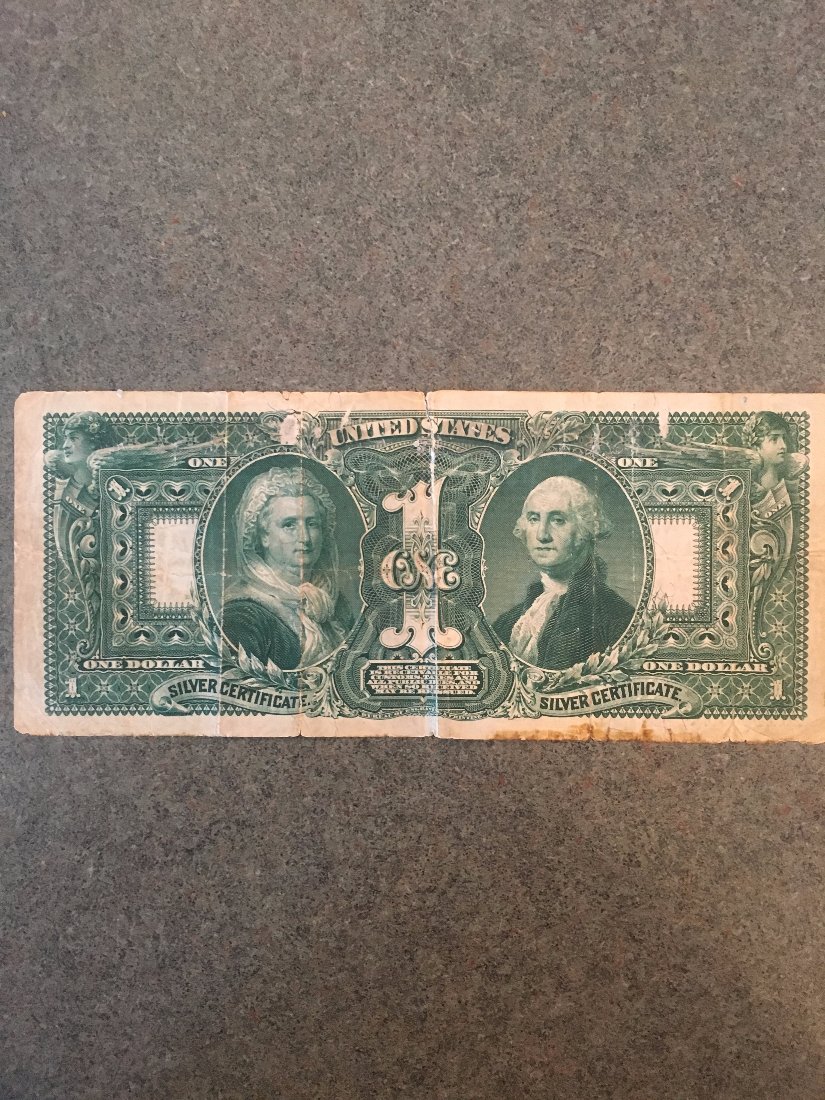 All I did was crop it, changed nothing else,128KB. 55% smaller. This user even ran it through our optimizer where cropping is the first step after uploading and they completely ignored it...  |
|
Bedrock of the Community
United States
10284 Posts |
Here is what I am talking about http://wallpaper-gallery.net/images...ey-hd-23.jpg ( an example of an image via http / URL that will re-size to fit screen after it has downloaded ) If this works as I'd like to explain ... It will take a bit for this to completely download. Then it will resize itself to fit in the forum webpage. Maybe even smaller than the one I uploaded. insert using   Here is the same image resized to under 300KB ( 278KB ) and uploaded from my desktop using Upload Image in Full Reply  |
| |
Replies: 30 / Views: 2,411 |










 Posted 08/08/2017 2:07 pm


