Coin Community Family of Web Sites Join Thousands of Coin, Bullion, & Money Collectors
Vancouvers #1 Coin and Paper Money Dealer 300,000 items to help build your collection! Specializing in Modern Numismatics Join Thousands of Coin, Bullion, & Money Collectors Royal Estate Auctions - $1 Coin AuctionsRoyal Canadian Mint products, Canadian, Polish, American, and world coins and banknotes. Coin, Banknote and Medal Collectors's Online Mall


Username:
Password:
Save Password
Forgot your Password?


This page may contain links that result in small commissions to keep this free site up and running.

Welcome Guest! Registering and/or logging in will remove the anchor (bottom) ads. It's Free!

Mint Mark Location Graphing Teachings!! Newbies Take A Look!!

To participate in the forum you must log in or register.
Author Previous TopicReplies: 9 / Views: 1,428Next Topic  
Pillar of the Community
Coppergold's Avatar
United States
939 Posts
 Posted 06/27/2018  03:05 am Show Profile   Bookmark this topic Add Coppergold to your friends list Get a Link to this Message Number of Subscribers
Okay, I am going to give this a shot, hopefully someone uses this, and this is not just wasted information! If you decide to try this, please let me know.
You can only use this method with any coin that was made from 1989 and below with a mint mark.
What I am going to teach you, you must have a photo editor that can produce straight lines. I use Paint for windows. If you cant find paint, then search it in the windows search bar at the bottom.
Reasons why this is a good thing to learn.
In my experience I have had a lot of unanswered questions, that I probably could have answered myself had I known about how to do this. There are a lot of times where people see one thing, and you see something different than them. Using this location graph, This will not only help you attribute things without having to send them in, and pay money, or wait for answers that you aren't going to get plainly because they cant tell, or there are too many RPMS/doubled dies to look at. But you can also use this to attribute Doubled dies, BIES, Cuds, and other varieties.

For example. I will take you to the most recent post that someone by the name of Bates had a question about.

Lets just say this is your coin in the picture below.
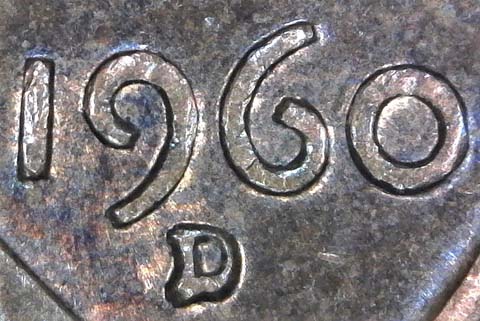
Mint-Mark-Location-Graphing-Teachings!!-Newbies-Take-A-Look!!
As you can see, this is an RPM. Alright so you go to variety vista and look at all the rpms (there are 113 RPMS listed for the year 1960 Denver) It is also a large date (every large date has LG at the beginning of the title, so that narrows it down to 99 rpms that you have to look at, SD will be small date) Find the closest ones that you think is your RPM on variety vista/coppercoins/doubleddie.com
Save that picture to a folder that you can find easily.

First, you go to paint. Now when you are in paint, you want to load the picture, to do that, follow these steps.
At the top left hand corner, you will see a clip board with "Paste" written on it. Click the small arrow that points down on the clipboard. (Click Paste from, in the drop down menu) Find the picture that you took from variety vista.

I chose LG 1960 D RPM- 068 because it looked very similar( You need to pay very close attention to detail) Also RPM 38 looks similar too. But later I will show you why it is not RPM 38.
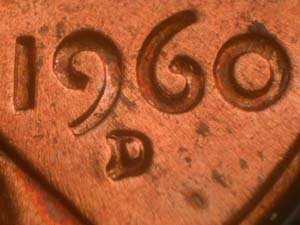
Mint-Mark-Location-Graphing-Teachings!!-Newbies-Take-A-Look!!
After you loaded that picture, you will see a box up top in the middle called "shapes", in the box you will see a straight line, click that.
Then, use all of the mint marks straight lines, and insert lines to make a graph.
Like this.
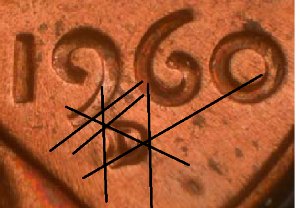
Mint-Mark-Location-Graphing-Teachings!!-Newbies-Take-A-Look!!
See how I used the mint marks features to determine the exact location of the mint mark?

Okay after you get that done, save it.
Then you create a new file by clicking File (left hand corner)
Then use the clipboard again, click the arrow, now click the picture of your cent in question and do the same thing.
should have something like this.
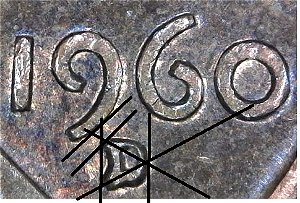
Mint-Mark-Location-Graphing-Teachings!!-Newbies-Take-A-Look!!

Okay now, we put them side by side to compare!

Mint-Mark-Location-Graphing-Teachings!!-Newbies-Take-A-Look!!

As you can see the shape of the graphing is very very similar to each other.

Okay, Just so you know that I am not just lying about this, I will show you why this is not RPM 38

Check out the side by side comparison with your cent and RPM 38, they do not match as you can see by the shapes of the connecting lines.
First picture below, is RPM 38 taken from variety vista. Second picture is your coin in question.
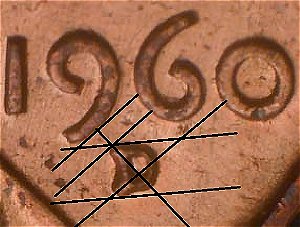
Mint-Mark-Location-Graphing-Teachings!!-Newbies-Take-A-Look!!

Yes, it is rather a lot of work for you to do, but once you get the hang of it, you can do it without thinking. If I can teach myself this, I am confident that you will learn faster then me cause I am a slow learner. Beats having to pay for attribution, beats not getting an answer.

Here is some tips I have for you on paint!
If you need to undo, At the very left hand corner there is two blue arrows pointing left and right. That is the undo button.
Also, after you paste your picture to paint, the corner of your picture, you can click that and hold while dragging it, to resize the picture. Variety vistas pictures always seem small on paint, so I always have to resize it.


Here is the Post that I was talking about. As you can see, no one wanted to touch the attribution part, and just said "YES its an RPM. instead of telling you what one, as the question was.
As you can see, this method gives you the answer.

http://goccf.com/t/322475

Anyways, this took me a lot of time to explain, I really would appreciate if you tell me that you used this because of this teaching! If you have any questions, comments, or if you want to give me a pointer/advice on how to use paint better, let me know!! I will also make a youtube video very soon to walk you through it if this kind of overwhelms you! I know it would overwhelm me! It really isn't that complicated though, I think a little kid could figure out how to do this without even me teaching them.
But let me know if this is confusing, I will try to make that video for you soon and send it directly too you when I get it finished.

Edited by Coppergold
06/27/2018 03:09 am
Pillar of the Community
Bate's Avatar
United States
1937 Posts
 Posted 06/27/2018  04:26 am  Show Profile   Bookmark this reply Add Bate to your friends list Get a Link to this Reply
Thanks Mr. Coppergold..very helpful..
Pillar of the Community
carwash's Avatar
United States
664 Posts
 Posted 06/27/2018  08:49 am  Show Profile   Bookmark this reply Add carwash to your friends list Get a Link to this Reply
Thanks Coppergold I'm going to work on using this.

Pillar of the Community
United States
559 Posts
 Posted 06/27/2018  10:26 am  Show Profile   Bookmark this reply Add wrongnumber to your friends list Get a Link to this Reply
That's pretty straight forward. Don't see how anyone would have a problem understanding what to do. Nice job :)
New Member
Bonnied911's Avatar
United States
1 Posts
 Posted 06/27/2018  10:50 am  Show Profile   Bookmark this reply Add Bonnied911 to your friends list Get a Link to this Reply
Good teaching. I'm definitely going to use your idea.
Bedrock of the Community
Earle42's Avatar
United States
10038 Posts
 Posted 06/27/2018  11:31 am  Show Profile   Bookmark this reply Add Earle42 to your friends list Get a Link to this Reply
Great post! I also use this technique for determining fake coins.

Get a pic of a real example of the coin in question from Heritage/NFC/PCGS online pics, and carefully draw lines between prominent design features on either side of the coin. Do the same with the coin you question as being real. Compare the pics side by side.

A very easy way to tell most fakes. Using colored lines also makes it even more obvious and a faster ID.
http://goccf.com/t/318013#2707393

Also, a free program named Monosnap can reside in your menu bar and always be right there to use. Its fast, simple, and pretty much intuitive.
How much squash could a Sasquatch squash if a Sasquatch would squash squash?
Download and read: Grading the graders
Costly TPG ineptitude and No FG Kennedy halves
https://ln5.sync.com/dl/7ca91bdd0/w...i3b-rbj9fir2
Bedrock of the Community
Errers and Varietys's Avatar
United States
74346 Posts
 Posted 06/27/2018  12:01 pm  Show Profile   Bookmark this reply Add Errers and Varietys to your friends list Get a Link to this Reply
Awesome Coppergold! That's something new that I've learned today! Thank you for sharing it with us! That's a great teaching moment.
Errers and Varietys.
Valued Member
da Swampster's Avatar
United States
420 Posts
 Posted 06/27/2018  2:02 pm  Show Profile   Bookmark this reply Add da Swampster to your friends list Get a Link to this Reply
Really good lesson and explaination, Coppergold.. Hope you don't mind if I point out where a wording change will help:

See how I used the mint marks features to determine the exact location of the mint mark?
That should read something like:
See how I used the graph to determine the exact location of this mint mark's features?

Also: Is the 'nine' line even necessary..? I don't think it actually is, other than to present a visual 45 degree line.. But if you think it's necessary and it isn't simply a straight-up 45 degrees to the horizontal, how and/or why did you determine its angle and what's its purpose in helping to determine either this coin's given mint mark designation or if it is a new find..? If what it really is is an end point for the diagonal and vertical lines to prevent them from continuing into infinity which would only serve to further confuse newbies, then I believe it should remain but be stated as such.. It'll get dropped as users become more savvy..

One other thing: You need to note why / how you chose the line's angles.. The diagonals seem to be extentions of the serif splits, but what about the 'horizontals' and 'verticals'..? For example: The left-side vertical appears to be based on touching the outermost points of the "D".. Is the right-side vertical a simple repeat since there's only one touch point..? If it isn't the same, what is it based on..?

Ditto with the horizontals.. In the example shown it's obvious the bottom line is a repeat of the top.. However, how did you choose the top line's angle, since there appears to be only one touch point..?

I'm not asking this to trip you up or anything like that.. I'm merely pointing out there needs to be reasoning explainations included in this guide in relation to its primary function, which are beyond How To Use Paint.. As in: There's logic when there's two touch points.. What's the reasoning when there appears to be one only, and can it be somewhat variable as long as the lines are parallel..? Things like this need addressed here to establish validity is all..

Merely wishing to help you make this function as precise and concise as possible..

Swamp
Edited by da Swampster
06/27/2018 2:12 pm
Pillar of the Community
Coppergold's Avatar
United States
939 Posts
 Posted 06/27/2018  7:27 pm  Show Profile   Bookmark this reply Add Coppergold to your friends list Get a Link to this Reply
Hey I don't mind constructive criticism. I might actually rewrite this and redo everything to make it better. I just realized that I used the wrong photo in my last picture at the bottom and it's too late to change it. But I like constructive criticism. Helps me out a lot and I don't want to teach them wrong. I'm kind of learning about this and trying to teach at the same time. But thank you a lot for the information, I'll redo this on my day off.
Valued Member
United States
75 Posts
 Posted 01/23/2019  10:28 pm  Show Profile   Bookmark this reply Add Reclaimed to your friends list Get a Link to this Reply
Coppergold I would like to thank you for the lesson & all help and info I receive is much appreciated.
  Previous TopicReplies: 9 / Views: 1,428Next Topic  

To participate in the forum you must log in or register.


Disclaimer: While a tremendous amount of effort goes into ensuring the accuracy of the information contained in this site, Coin Community assumes no liability for errors. Copyright 2005 - 2026 Coin Community Family- all rights reserved worldwide. Use of any images or content on this website without prior written permission of Coin Community or the original lender is strictly prohibited.
Contact Us  |  Advertise Here  |  Privacy Policy / Terms of Use

Coin Community Forum © 2005 - 2026 Coin Community Forums
It took 0.32 seconds to rattle this change. Forums

