| Author |
 Replies: 15 / Views: 2,416 Replies: 15 / Views: 2,416 |
|
|
Pillar of the Community
 United States
8946 Posts |
I recently located a nice $20 star note with a print run of 320k. Problem is it has some writing on the right margin of the note. I was wondering if it was better to leave as is or if their is a safe way to remove it without damaging it. I'm more versed in coins then currency so I don't knkw much about paper. Thanks http://www.mycurrencycollection.com.../NB00236770* |
|
|
|
Pillar of the Community
United States
7730 Posts |
Providing you try to remove the pencil marks use an art gum eraser. Use very light pressure and take your time. I've had some success over the years doing it that way. Good luck!
Edited by westernsky
07/13/2019 6:05 pm
|
|
Bedrock of the Community
United States
94367 Posts |
Probably just me, but I couldn't find a pic of the note at your link.
|
|
Pillar of the Community
 United States
8946 Posts |
Haven't uploaded it there yet @coinfrog. Still figuring how to photo bills.
|
|
Bedrock of the Community
United States
94367 Posts |
Easiest was by far is to scan them from a 4-function printer. Do you run Windows 10?
|
|
Pillar of the Community
United States
4637 Posts |
I recommend practice. Find a similar condition test note, write in pencil on the margin and practice...see what happens. I saw a graded note posted on a different forum recently that had an EPQ designation AND pencil annotations in the lower margin. 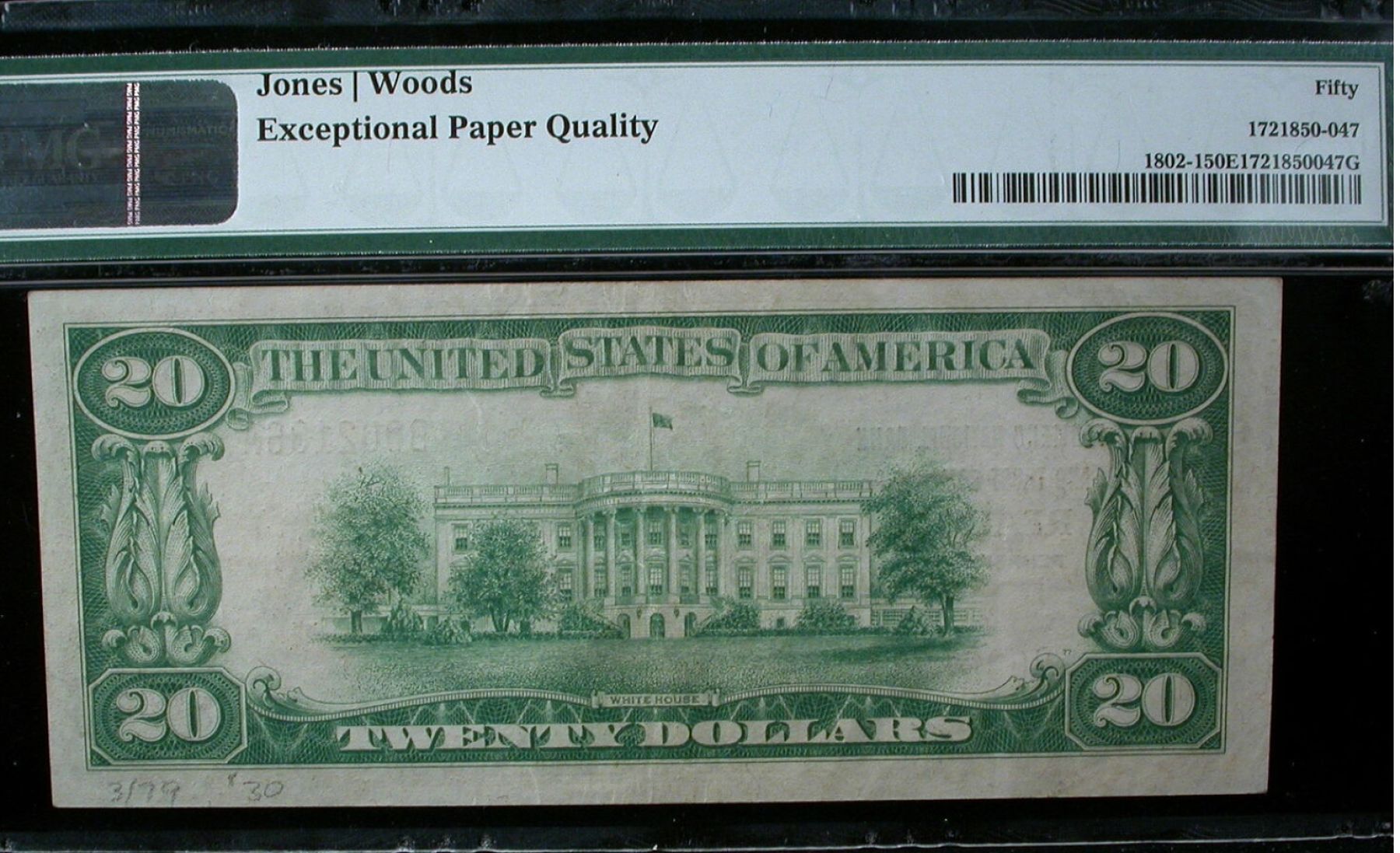 |
|
Pillar of the Community
United States
8946 Posts |
@Coinfrog nope windows 8. We have a 3 function printer w/ a scanner but for some reason it refuses to scan the note.
@SteveInTampa that's for the advice I'll try that.
|
|
Pillar of the Community
Canada
3733 Posts |
Quote:
We have a 3 function printer w/ a scanner but for some reason it refuses to scan the note. some printers won't scan bills, so place a piece of white thin carboard or paper bigger than the bill, over it, than place in scanner and try that. Quote:
I recommend practice. Find a similar condition test note, write in pencil on the margin and practice...see what happens. Completely agree. and a top notch soft eraser is necessary, not those cheap white ones.. |
|
Bedrock of the Community
United States
94367 Posts |
Grape - You can scan anything BUT notes and save to your computer files?
|
|
Pillar of the Community
United States
8946 Posts |
Yep coinfrog. I can save it or email it
|
|
Bedrock of the Community
United States
12915 Posts |
Some scanner software prevents you from scanning things it recognizes as currency to prevent counterfeiting. Mine is old enough that it doesn't have that protection.
|
|
Pillar of the Community
United States
789 Posts |
I used to sell copiers. Larger copier/scanners have a chip that contains reference software that is able to tell when you scan currency, stocks, bonds and some other convertible paper items.
If someone attempted to scan such an item, the machine would throw a specific code that the end user could not reset. When they called for service, the technician was obligated to take steps to let either the FBI or Secret Service (can't remember which) know about it.
Fortunately, we never had any trouble with this.
|
|
Pillar of the Community
United States
4618 Posts |
-----Burton 50+ year / Life / Emeritus ANA member (joined 12/1/1973) Life member: Numismatics International, CONECA Member: TNA, FtWCC, NETCC, EveryCountry (online) coin club Owned by three cats and a wife of 40+ years (joined 1983) Author: 3rd Edition of the Sample Slabs book, https://www.sampleslabs.info/ |
|
Pillar of the Community
United States
8946 Posts |
Whelp that would make sense. Makes my life harder :p
|
|
Pillar of the Community
United States
8946 Posts |
This was my best effort.Had to put a one ply tissue over part of it and re-do the color in photoshop as it completly threw the color and saturation. 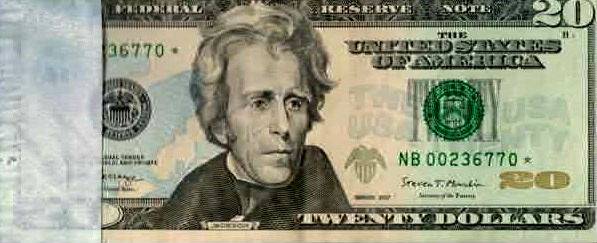 |
|
Pillar of the Community
United States
8946 Posts |
|
| |
Replies: 15 / Views: 2,416 |
|







 Posted 07/13/2019 6:08 pm





