What is a good scanner to use for coins? I use a cheap CanoScan LIDE 25. However, I can't get it to shoot the coins straight on. They're all shot an a low angle. See accompanying scan of one of my prizes that I found in a roll.
This is my first post in this newsgroup. I do not see my photos in the preview. Don't know if they will appear in the post.
*** The problem with the image appearing was likely the fact you had ".pdf" in the file name since pdf files are not allowed it likely confused the software. I removed it from the file name and it's working now.
I also moved from Main Coin Forum to the Photography forum ***
You're always going to see the lighting that way from a scanner, because that's how they work. Both the actual scanning sensor, and the lighting, are on a bar extending across the bed of the scanner. The "scanner" part passes over the coin first, with the lighting always right behind it.
There's nothing wrong with the image you present here. It's known that this is what scanners do, and we learn to filter the odd coloring out when considering the coin. You won't be able to show luster with a scanner (not easily, anyways), and it's an accepted part of posting scans.
The only thing you could do is increase the resolution of the scan; your Canon has the ability to create an accurate scan of that coin which won't fit on your computer screen.
Disclaimer: While a tremendous amount of effort goes into ensuring the accuracy of the information contained in this site, Coin Community assumes no liability for errors. Copyright 2005 - 2026 Coin Community Family- all rights reserved worldwide. Use of any images or content on this website without prior written permission of Coin Community or the original lender is strictly prohibited. Contact Us | Advertise Here | Privacy Policy / Terms of Use










 roll.
roll. 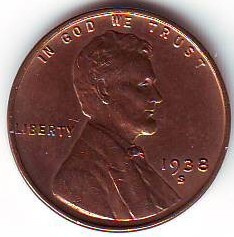


 Posted 12/11/2008 12:44 pm


 Very nice picture from that scanner. Is the coloring we see what the coin looks like, or is the coloring fof a bit?


