| Author |
 Replies: 10 / Views: 2,845 Replies: 10 / Views: 2,845 |
|
|
Valued Member
United States
117 Posts |
I found this dime, and wasn't sure to put it on ebay, or have it certified. Saw one like it on Fred Wienvergs site selling for $20K. Is there any way for a "novice" to tell which "bad cladding" is worthy of spending the $ for certification? BadCladDime.jpg |
|
|
|
Valued Member
United States
146 Posts |
pennybright, A little more info is needed here.Plus a picture link that works would be helpful. RW  |
|
Valued Member
 United States
117 Posts |
Since I have never successfully posted a picture to a post, and have NO clue on how to add one to a reply, before starting a new "thread" can you guide me on how to add a pict. to a reply?
(Really sorry about this).
|
|
Valued Member
United States
146 Posts |
pennybright, I am assuming you have a digital camera or a scanner to upload pictures to your harddrive and have software to reduce pictures to 100kb or less. assuming that,when you click on reply another screen pops up.Just below the box for your reply is a camera image followed by "Insert an Image File".Click the camera image and you will get another screen that will let you browse your hard drive and upload image.After you do that and close that window you will be back at your reply screen and several lines of code will have been inserted this is your image. Most will be useless. Keep all text starting at http:// through Name_JPG and eliminate everything else. Hold your mouse down and highlight the text that is left. At the top are 14 buttons under format.Hold your mouse over the 4th button from the right,it should say insert image,click it.It will insert the necessary HTML. If you do it right you can click preview button and picture will show up in preview screen. hope this helps RW Edited by coffeecup57
02/12/2007 12:19 am
|
|
Valued Member
United States
117 Posts |
|
|
Valued Member
United States
146 Posts |
pennybright, Looks like you are there,now if you will go back and edit your post and put HTML img tags on either side of your link the picture will show up in the post. Thats what the insert image button does for you. From your picture the coin looks more like a well circulated,dirty toned Roosevelt dime.I can see shiny spots on the coin which could be from the flash of your camera or lights from your scanner bed. Even if it were a missing clad layer,it would be worth keeping but not worth the expense of certification. Below is the only missing clad layer coin I own,which came from Fred Weinberg.Bought a couple years ago for around $200 might have been a little more or a little less.In hand the color makes it look just like a lincoln 1c piece. 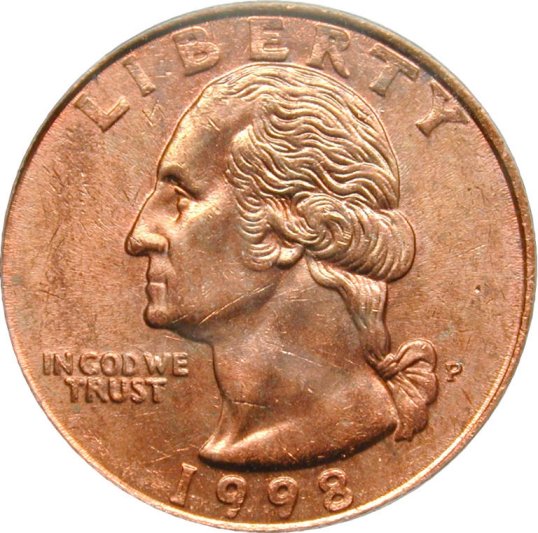 hope this helps RW |
|
Pillar of the Community
United States
7123 Posts |
Keep in mind that there are many unclad coins which are not real mint errors Like this one . These coins need to be seen by a qualified person in hand to really be able to attribute them as real missing clad errors .   Metalman Edited by Metalman
02/12/2007 3:45 pm
|
|
Valued Member
United States
117 Posts |
Ah-ha...I see the difference! Thank you.
|
|
Valued Member
United States
146 Posts |
metalman, Is that plated? Do you know the story? RW |
|
Pillar of the Community
United States
7123 Posts |
Hi coffeecup
This quarter came out of a mixture that I whip up to aid in the cleaning of my Metal Detector finds.
I believe it was plated by the leached copper from the cents that it was in with .
Metalman
|
|
Bedrock of the Community
United States
20753 Posts |
That same bleeding over onto other coins can also be done with simple jewlry cleaner and mixing copper coins with plated or Silver ones. Occationally it can happen also by dipping coins in a dish soap solution. However, that is a tuff one due to all he different chemicals in different brands.
|
| |
Replies: 10 / Views: 2,845 |
|










 Posted 02/11/2007 8:58 pm


