| Author |
 Replies: 26 / Views: 5,042 Replies: 26 / Views: 5,042 |
|
New Member
United States
16 Posts |
I have seen several threads written about camera's, lighting, and in some the idea of the background is thought to be irrelevant. As a photographer I know that your choice of background effects the look of the image. Now I know that most people like to start off any photography project with " I can fix it in photoshop" but if you begin with getting the best possible image with your camera, you will spend more time doing other things than playing with photoshop. Here are examples of how the background effects the color of the coin. In these examples, the only thing changed was the color of the background. All were cropped to 1600x1550 and the background color cropped out. NO other editing was done. Look how dramatic the color of the coin changes.     For this particular coin, the grey background provides the closest color cast of the coin. With just a quick adjustment, the coin can be accurately shown. With the other 3 colors, more time must be spent editing to represent the coin in a true manner. Here you can see a side by side:  Edited by Cygnus
02/23/2013 2:42 pm
|
|
|
|
Pillar of the Community
United States
4132 Posts |
How did the one with the black background end up lighter than the one with the gray background? Was one background shiny/reflective and the other flat?
|
|
Rest in Peace
United States
7075 Posts |
Wow! Thanks for sharing that information.
|
|
Pillar of the Community
Australia
2830 Posts |
|
|
Pillar of the Community
 United States
4051 Posts |
I assume the difference is the light that reflects off the lens or other surface is what's causing the color shift. Most obvious is the red background, which gives a red look to the coin. I've read in some threads the recommendation to use a white background, but I prefer to make the background as dark and non-reflective as possible. I have never had the urge to try a colored background (red, blue, green, or whatever) but this experiment shows that it's not a good idea to use any brightly-colored backgrounds. Thanks for the demo...
Contact me for photographic equipment or visit my home page at: http://macrocoins.com |
|
Pillar of the Community
Canada
3692 Posts |
One guy on YouTube exhibits firearms, and he's discovered that BLUE backgrounds are the best. I wonder if it's true for coins?
|
|
Pillar of the Community
United States
4132 Posts |
I try to keep everything near the coin black. I try to keep my hands away from the area, as some flesh-colored light occasionally ends up splashing onto the coin.
Blue generally makes things look brighter and whiter, so it might "enhance" the look of some coins, and probably makes the bluing on gun-steel look nicer.
|
|
Valued Member
Australia
90 Posts |
Same coin same lighting - Background colour change. The Australian Copper can be enhanced if background colour is chosen wisely.  |
|
Rest in Peace
United States
7075 Posts |
That has been an eye-opener for me.
I am wondering if this is unique to digital cameras or if this happened with film. I seem to remember hearing about 'color correction' but that was a long, long time ago.
|
|
Pillar of the Community
United States
4132 Posts |
It's pretty universal. Basically, if you have a colored background, you're going to have colored light bouncing off of it and all around the photography space and onto the coin. A red background is going to bounce red light on to the coin and make it look more red. And if your lens has any flare, it's going to cast additional red light all over the image. A black background is going to minimize any extraneous light and flare, and give you the most contrast. Likewise, for portraits of people, a white background often looks good because of the broad, flat, diffuse bounced light smooths out all the shadows and imperfections.
|
|
Rest in Peace
United States
7075 Posts |
Thanks. That makes perfect sense.
|
|
New Member
 United States
16 Posts |
Quote:
How did the one with the black background end up lighter than the one with the gray background? Was one background shiny/reflective and the other flat? Every background was matte paper. I never recommend using reflective backgrounds for most photography. The exceptions are jewelry or other small products. The reason the colors change is the bouncing of the light. Even though your eyes don't see it, the spill bounces back towards the camera. It does that for everything, it isn't just limited to coins. If you really want to get fancy with your coin photography, stop by a home improvement store and pick up some florescent light covers (the milky white) and place a light underneath it. Don't use any lights above, but use a very slow shutter speed on your camera and you will see how the light will actually wrap around the coin from underneath. Each type of coin will work differently so choose the background that works best for that coin. Copper like early cents, Half Cents and Two Cent Pieces tend to photograph best with a black background. For flying cents and early Lincolns, white tends to work best. Early nickel including the 3 cent tend to do best with grey or white. Most silver will look best with grey. Proof coins are the exception and look best with black. Edited by Cygnus
02/25/2013 9:08 pm
|
|
Pillar of the Community
United States
4132 Posts |
But how did the black background end up bouncing more light than the gray?
|
|
Pillar of the Community
United States
8534 Posts |
I had a heck of a time with this coin until I tried this color... 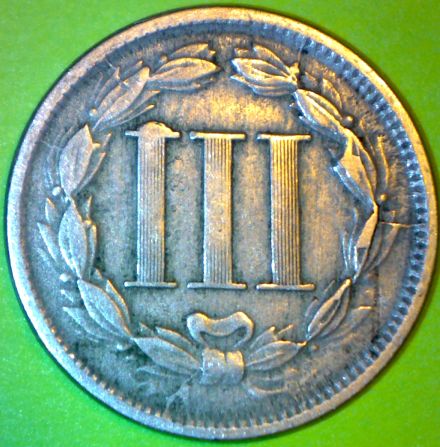 Oregon coin geek.....*** GO BEAVS ! ! ! ***
|
|
New Member
United States
16 Posts |
Quote:
But how did the black background end up bouncing more light than the gray? Black does not absorb light it scatters it causing more bounce. |
|
Pillar of the Community
United States
1511 Posts |
Wow, that's really good to know, I had no idea! I jut got a USB cam and was having a hard time getting the color/lighting right, I will have to experiment with backgrounds now! Thanks for the eye opener!
|
| |
Replies: 26 / Views: 5,042 |







 Posted 02/23/2013 6:53 pm





