| Author |
 Replies: 13 / Views: 2,123 Replies: 13 / Views: 2,123 |
|
|
Pillar of the Community
United States
1137 Posts |
Example pic for USB camera 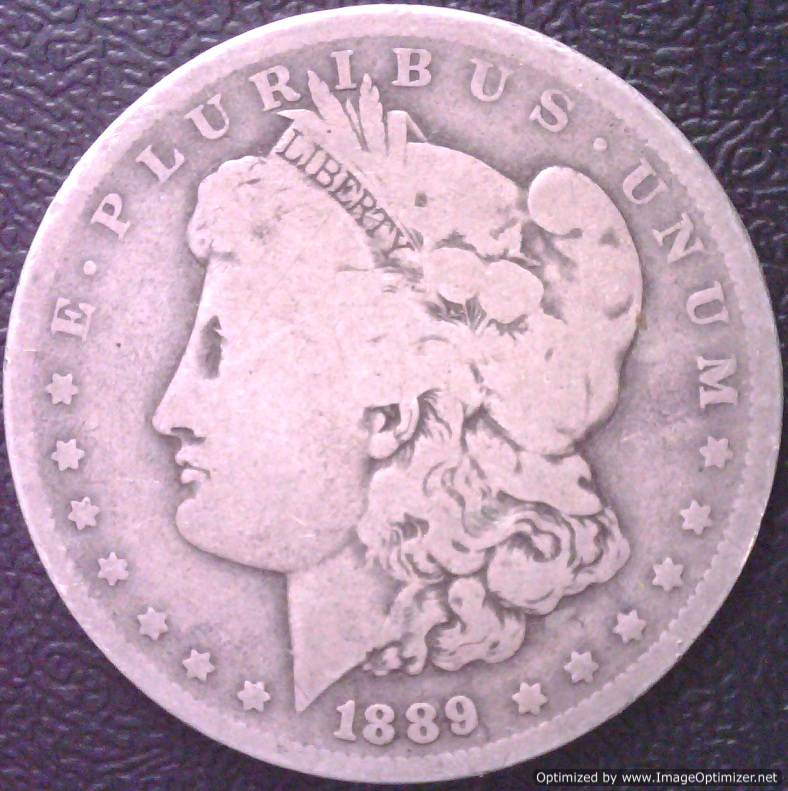 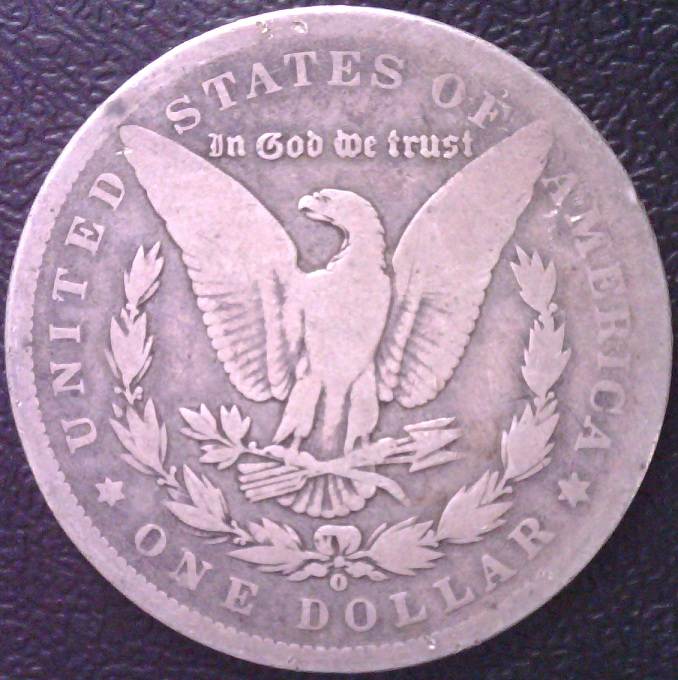 |
|
|
|
Pillar of the Community
United States
8534 Posts |
Thanks chzman ! What are you using for lighting ? I got that pinkish look when I changed the overhead lighting back to incandescent from the ccf. Had to go back.
Oregon coin geek.....*** GO BEAVS ! ! ! ***
|
|
Pillar of the Community
 United States
1137 Posts |
My walls in this room are all white, I tilt the shades to re-direct this light to the walls and ceiling, nothing usually hits the coin directly. Depends on how much cloud cover in my area, the day I am taking pictures, this is my preferred lighting source. Many times I need to take pictures at night, because of work. At night I use indirect lighting, nothing from the camera usually, unless its a dark coin and then I will turn up the light on the camera. Every day is different, this one only required, normal room lighting, no lamps, the camera lights were off.
|
|
Pillar of the Community
Canada
618 Posts |
That pink is soo pink --- You must have taken it in the pen!! Just kidding.
Is it possible your white is off-white, with pink hues.
I know some paints have chemicals which show pink when applied, and then dry to a white---this is to help the painter apply even coats. Maybe your white is not white--check it with a blazing dead white paint if you can find one.
|
|
Pillar of the Community
Canada
618 Posts |
Your background for the coin shows up purple? I bet its black. That means its a lighting problem for sure---bouncing pink hues.
|
|
Pillar of the Community
United States
1137 Posts |
Ya the color is off and if I were having a coin graded I would worry about it but since most of my posts will be about errors and getting the detail of the error on the pic is my primary concern. I will figure out a good lighting source at some point. I posted this to show 52 Raymo how the camera did with the size of the coin.
|
|
Pillar of the Community
 United States
4051 Posts |
Contact me for photographic equipment or visit my home page at: http://macrocoins.com |
|
Pillar of the Community
United States
1137 Posts |
wow, I am impressed, how did you take the pink hue out? Are you using Photoshop?
|
|
Pillar of the Community
United States
4051 Posts |
That was edited with Adobe Lightroom...Ray
Contact me for photographic equipment or visit my home page at: http://macrocoins.com |
|
Pillar of the Community
United States
1137 Posts |
Nice but I can not afford that.
|
|
Pillar of the Community
United States
2311 Posts |
what is the USB camera you use?
|
|
Pillar of the Community
United States
1137 Posts |
|
|
Bedrock of the Community
United States
10065 Posts |
[quote]Nice but I can not afford that.[quote] I have had a lot of people in this forum and others ask what I use for a graphics program - this is it. Look up a program called Photo Impact (by Ulead - or Corel). It is an incredibly unknown, incredibly powerful, and much more user friendly program than Adobe. You can get version 12 it on ebay for about 20.00 S&H included! Actually, I just looked and here is the latest version on ebay for around 20.00: http://www.ebay.com/itm/Ulead-Photo...em3382600948Although even a version as far back as 4 or 5 would work. I currently use V10 as its all I need. It takes very little effort to get rid of the pink tones - I often do this on my own coin pics until I finally take the time to look into making my own coin pic taking setup a lot better. How much squash could a Sasquatch squash if a Sasquatch would squash squash? Download and read: Grading the graders Costly TPG ineptitude and No FG Kennedy halveshttps://ln5.sync.com/dl/7ca91bdd0/w...i3b-rbj9fir2 |
|
Pillar of the Community
United States
1137 Posts |
good info, I can afford that lol - I will give it a try, thank you!
|
| |
Replies: 13 / Views: 2,123 |
|








 Posted 03/30/2013 2:57 pm


