| Author |
 Replies: 20 / Views: 4,980 Replies: 20 / Views: 4,980 |
|
Pillar of the Community
United States
4233 Posts |
Edited by kbbpll
11/04/2013 1:08 pm
|
|
|
|
Pillar of the Community
Canada
972 Posts |
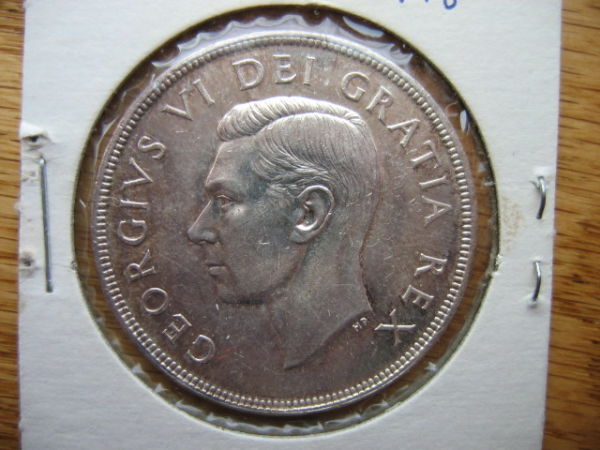
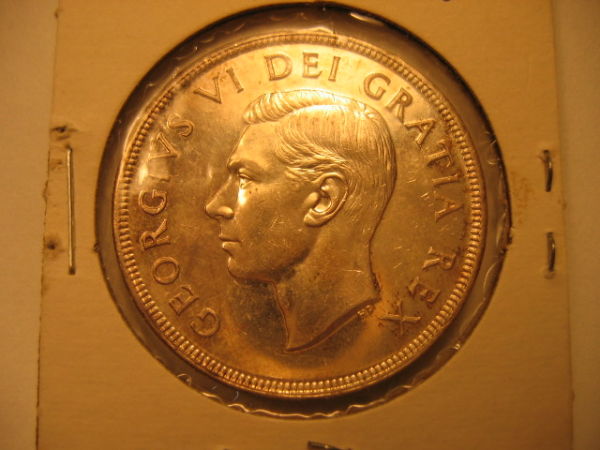
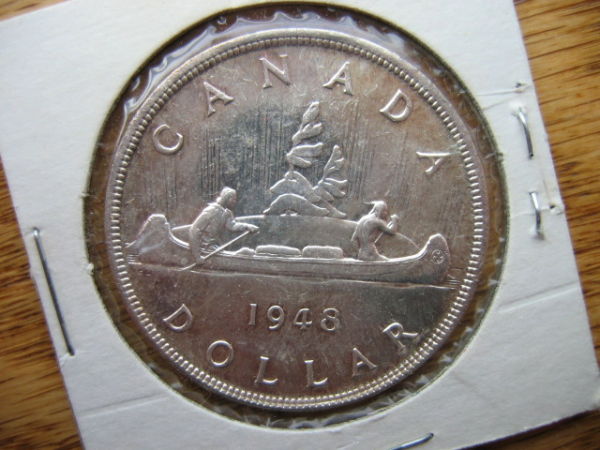
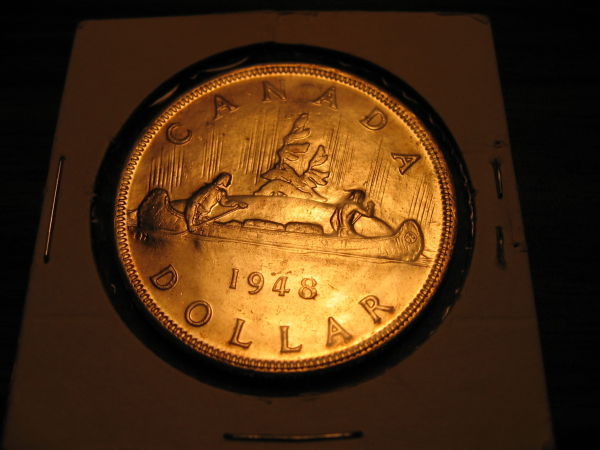
 kbbpll Your grandpa had good taste in Canadian silver dollars. Very nice looking dollar. IMO it's looks to be around ICCS (Canadian Grading Co.) MS62 and possibly a MS63. In todays coin market it's value would be in the $2000-2500 range. (Just so your kids know). Thanks for sharing.  |
|
Bedrock of the Community
Canada
10743 Posts |
Hi kbbpll, Yeah, too much light on a couple of your photos, the second pic is better but, show us a obverse shot.
Looks like a MS62/63 or so to me.
|
|
Pillar of the Community
Canada
5417 Posts |
My first thought was 64 but looking at the coin closer and considering Canadian standards a better grade would be 63/62+.
|
|
Pillar of the Community
 Canada
9901 Posts |
MS63
"Dipping" is not considered cleaning...
-from PCGS website
|
|
Pillar of the Community
Canada
686 Posts |
I am far from a photographer, I just have a nice camera that makes me look like one. My simple advice for taking decent pictures would be to put the coin on a white surface (a piece of paper, a shirt, etc) have two lights hitting it from 10:00 and 2:00 (adjust the positions so that when taking a picture from directly above, the lighting brings out the best in the coin), and then take a picture of the coin from directly above it, and get the camera as close as you can while maintaining focus, and not interfering with the light. Once you have the picture, use Google Picasa to edit it. The goal is to make the coin look as realistic as possible. Use the "pick neutral colour" option on your white surface (this tells Picasa "this is white, adjust everything so that this is white"). Then just crop the picture so that only the coin shows.
|
|
Pillar of the Community
Canada
1461 Posts |
Hard to see the quality of the fields on the picture. MS63 on wear. Other than the cheek, I don't see too much else.
|
|
Pillar of the Community
 United States
4233 Posts |
Thanks for suggestions jg86. I'll try them. Problems I have are in natural light from straight above it looks like a scan, and under a lamp somehow it goes all golden. The dark areas in the two non-yellow pictures are actually reflections off the camera lens. I'll try different and multiple lights as you suggest, and Picasa. There are some nicks in front of the nose and by the A and the R in Rex, and above the 4 on reverse. Also the one on the neck which is more obvious. I know, hard to see. MS63 might be generous... I appreciate all your replies.
|
|
Bedrock of the Community
Canada
11922 Posts |
|
|
Pillar of the Community
United States
4233 Posts |
Did anyone notice the die rotation? It's only about 30 degrees, so I don't know if that qualifies. Is there a "diving canoe" variety? :)
|
|
Pillar of the Community
Canada
1461 Posts |
|
|
Valued Member
Canada
220 Posts |
When taking my pictures I like to have the camera directly above the coin and use the flash. Then I take a piece of paper and put it over the flash to filter it. You can check out my pics to see if you like the results....key is to have the flash at 90 degrees or the coin will be dark.
|
|
Valued Member
83 Posts |
Hi Michael,
With all due respect - and while everyone may have their own different "techniques" with regards to taking coin pics - there's no doubt that blasting the light on coin from flash, whether filtered or not, can make the fields look mirrored even when they are not - marks / defects can be hidden behind reflection.
It's probably not the best way to accurately portray surface of coin - try turning off flash and using a light source.
|
|
Pillar of the Community
United States
4616 Posts |
Come join the coin photography forum here if you really want to get sucked in...
-----Burton 50+ year / Life / Emeritus ANA member (joined 12/1/1973) Life member: Numismatics International, CONECA Member: TNA, FtWCC, NETCC, EveryCountry (online) coin club Owned by three cats and a wife of 40+ years (joined 1983) Author: 3rd Edition of the Sample Slabs book, https://www.sampleslabs.info/ |
|
Pillar of the Community
Canada
1461 Posts |
I disagree that the flash makes the coin looks better. Although it may light up part of a coin and give it a "sheen", it's easily distinguishable from the real thing. The flash actually causes an effect of light bouncing of every imperfection on the coin and there for amplifying those features not visible to the naked eye. As an example, scratches and hairlines will be far more visible with a flash then without. Natural light, or dull surrounding/indirect light will make those features less visible. Too much white light tends make the coins look more washed out.
Edited by TheCoinHunter
11/05/2013 5:56 pm
|
|
Valued Member
Canada
220 Posts |
Just my opinion, it works well for me. I'm sure everyone has their own techniques that work for them. I've tried with natural and artificial light and it doesn't show the nicks and dings as thecoinhunter describes. As long as I have the flash filtered, it shows little glare. Here's an example of filtered flash directly over the coin...I should have pointed out that I don't use filtered flash on circulated coins, only mint coins. 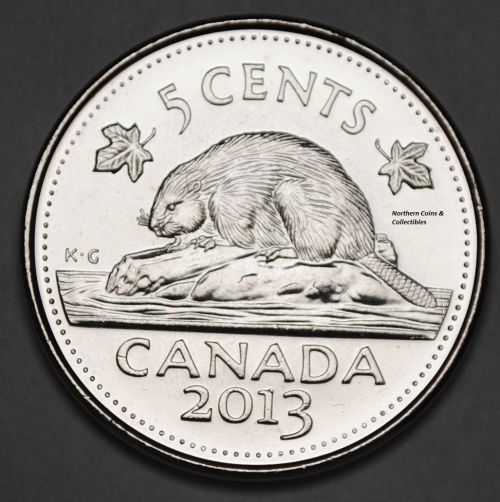 and this is my attempt at natural light..... 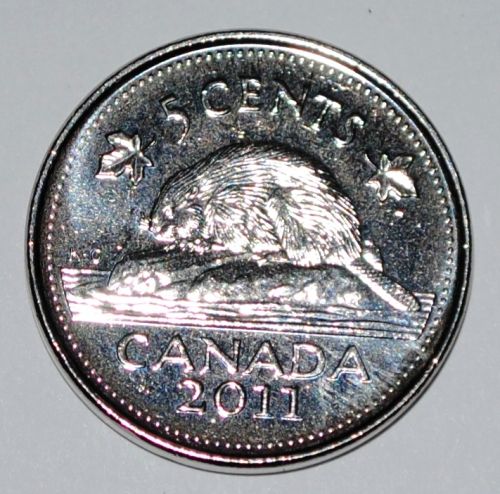 Both coins are mint BU coins fresh from the roll. which one would sell better? |
| |
Replies: 20 / Views: 4,980 |








 Posted 11/04/2013 07:26 am





