| Author |
 Replies: 15 / Views: 10,969 Replies: 15 / Views: 10,969 |
|
|
Valued Member
United States
160 Posts |
I am trying to figure out the best method for cataloging my collection. It isn't that big but I thought it would be better to start now rather than wait until it is overwhelming. I have a mix of raw and graded stuff. I started using an excel spreadsheet, but I think there must be a better solution. I googled some software and also looked up a few apps on my iPhone. One that looks promising is Coinvault (though it seems to have some limitations). Anyway, curious as to what everyone else does. Thanks
|
|
|
|
Pillar of the Community
Canada
5417 Posts |
I use excel. Not sure about phone apps but I just email the excel file to myself and download it onto my phone. Although looking for phone apps wouldn't hurt....
|
|
Pillar of the Community
United Kingdom
2942 Posts |
There would be nothing created that would remotely come close to suiting my cataloging needs so I make my own which is based on html.
|
|
Pillar of the Community
Canada
3692 Posts |
I use Word and run it on my phone. It takes a while to load but all the info is there. Same with pdfs and image files. If I had to sit and input every little thing on my phone I'd get no actual work done.
Good idea getting it done while it's fresh. Maybe keep backup files periodically on your email just in case your computer kaputs on you.
Edited by Libertad
12/31/2013 03:04 am
|
|
Pillar of the Community
United States
9811 Posts |
I have created a Filemaker Pro database in the past I really liked, but as I moved into collecting a single series (2¢ pieces) by die variety - I have not built anything to handle the amount of items I now have, a conventional database doesn't do what I want, so I may have to create a new one soon. For standard collections an Excel spreadsheet or Access/Filemaker Pro database should be pretty simple, depending on what fields you need. I've looked at several commercial collection programs and nothing seemed to do what I wanted. Here are a few of the more common programs out there (I don't endorse nor use any of them myself), though I have heard good things about Trove software's offering, and they offer a demo of their software to try out first. Exact Change is for world collections and US, the other two mainly handle US coins but can do either, Trove also has a currency program and grading software, (I like PCGS Photograde best, it's free and online too)! http://www.carlisledevelopment.com - Collectors Assistant (has lots of add on modules). http://www.trovesoftware.com - Coin Elite (one of the oldest and best reviewed). http://www.exactchange.info - Exact Change (Don't know much about this one, they have a comparison chart with all the other software out there, and it looks impressive, it's also the only one I know that runs on a Mac as well as Windows). Hope that helps you out - let us know if you decide to get one, I'd love to read a review of it. "Buy the Book Before You Buy the Coin" - Aaron R. Feldman - "And read it" - Me 2013! ANA Life Member #3288 in good standing since 1981, ANS, Early American Coppers Member (EAC), Colonial Coin Collectors Club member (C4), Conder Token Collector Club member (CTCC), Civil War Token Society (CWTS) member, Liberty Seated Collectors Club (LSCC) & Numismatic Bibliomania Society member (NBS), USMex, Member in good standing, 2¢ variety collector. See my want page: http://goccf.com/t/140440Edited by westcoin
12/31/2013 04:15 am
|
|
Pillar of the Community
United States
1746 Posts |
I use a MS Access database that I created. It works fine for me.
|
|
Pillar of the Community
United States
1261 Posts |
I have two methods for cataloging my collection. I use an App from Saints Software called US Coin Collector that I really like. That way I always have my collection and images of coins with me at all times. I used other apps and software but this one has worked out the best for me. I also have an Excel spreadsheet.
|
|
Moderator
 United States
197387 Posts |
I use a spreadsheet. I do not require a lot, so it has served me well for a very long time. I have no problem viewing it with Quickoffice on my Android phone. |
|
Pillar of the Community
Canada
2786 Posts |
I use http://www.numista.comFREE, HUGE catalog (20,000+ coins) plus you can add or edit coins already in the catalog, room for personal notes per coin, exportable to excel the link in my sig shows my OFEC using numista |
|
Bedrock of the Community
United States
20753 Posts |
Possibly like the majority of people on Earth, I use Excel. One nice thing to remember about Excel is you can put your entire collection on a flash drive, floppy, CD, etc and take it anywhere. Almost every one with a computer has Excel. As to what to put in it for a collection. Here is what I did. I started making columns for date, mint, grade, value based on the Red Book 2010 edition, original cost, where purchased, when purchased, receipt yes or no, where stored such as in Album, roll, 2x2, etc. This ment that each collection would take up massive amounts of space if I wanted to print it out. So I started to wittle away at what is really not important. I ended up with date, mint and grade. I never plan on selling them so value, where and from who I got them and many other things just are not worth my time. Just a record of what I have is all that is important to me. |
|
Pillar of the Community
United States
1391 Posts |
I second numista, there is a lot going for it, the French politics are not a plus but it is free.
wade: I thought you were getting ride of your world coins?
|
|
Pillar of the Community
United Kingdom
856 Posts |
I actually still use coin tickets. Small disks of acid-free paper around the size of the coin (mine are about 32mm / 1¼"). I write brief details about the coin, weight, when I got it, from whom and how much and if it has provenance, some details of earlier owners. Obviously I also keep the tickets written by previous collectors too as they are part of the history of the coin. Bit like this one: 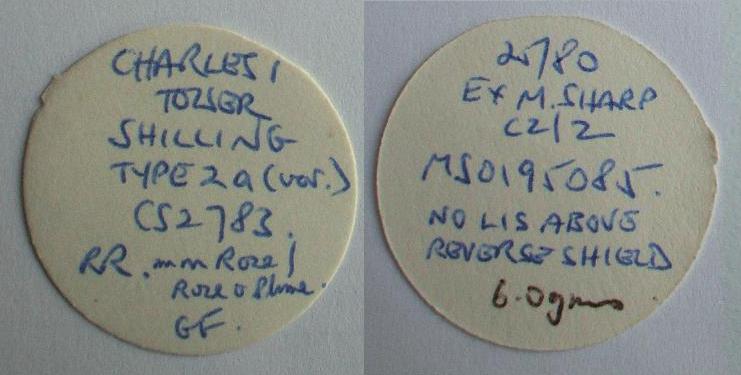 And yeah, I admit it. I do also keep digital photographs and details in Excel too, in case I need them. I'm not entirely committed to living in the 19th century! |
|
Pillar of the Community
United States
688 Posts |
I also use Excel. I keep track of Date, Mint Mark, Coin Type, Grade and Expected Value. I have separate tabs setup for where the coins are stored. They only thing I don't keep track of are the common date LWC that I have, however I do keep records of the more valuable LWC |
|
Pillar of the Community
United States
1554 Posts |
|
|
Pillar of the Community
United States
1839 Posts |
I use Excel and keep in a free dropbox folder which can be accessed anywhere there is internet. From my computer at work, my smartphone, etc.
|
|
Pillar of the Community
United States
1234 Posts |
|
| |
Replies: 15 / Views: 10,969 |
|







 Posted 12/31/2013 02:56 am


