| Author |
 Replies: 16 / Views: 3,450 Replies: 16 / Views: 3,450 |
|
Pillar of the Community
United States
2403 Posts |
I have a Dansco 7171 i.e. Morgan dollar Date set. I know most of the VAMs of the Morgans I keep in this book. Is there a way to label each coin with their VAMs without hurting the value of the Dansco Album itself? |
|
|
|
Pillar of the Community
United States
5825 Posts |
Just do it neatly.
The album new is only about $30.
Many of your Morgans will be worth that much.
|
|
Pillar of the Community
United States
1119 Posts |
stick on labels that can be removed. like a P Touch labeler
|
|
Bedrock of the Community
 United States
12924 Posts |
Quite a good question. There are transfer decal character sets you can buy/use if you are very patient and have a steady hand. For those reasons I don't recommend them.  PTouch label makers are adequate, but you will always see the edges of the labels on the pages thus they will stand out, no matter how square and centered they are. The labels just have different reflective properties. Some folks have suggested transparency sheets (like for overhead projectors) that you run through your printer, punch holes in, and insert between the leaves of your album. I kinda like that except for knowing that given time the ink will likely pull off the transparency and stick where it doesn't belong. My recommendation -- take up calligraphy and give it the personal touch with an archival quality pen. It would be very nice if PTouch (or someone) would create a print transfer cartridge. Print, apply to surface, peel backing. All that remains is label/ink. |
|
Pillar of the Community
United States
946 Posts |
How about just included a piece of paper with the album itself noting which Vams are which. That way you don't have to write on the Album,and who knows what is in that ink that you are writing oh so close to your coins with. Id put it on a piece of paper in a ziplock bag.
Edited by jdiablo30
08/11/2016 06:46 am
|
|
Moderator
 United States
196470 Posts |
All good suggestions, but I do like jdiablo's the best. The Dansco albums for ATB Quarters and Presidential dollars have information sheet between each page. They really annoyed me at first, but I have actually come to appreciate them. |
|
Pillar of the Community
United States
968 Posts |
You could take jdiablo30's idea one step further and take pictures of each page, print them out, and write the VAMs on it.
|
|
Moderator
United States
196470 Posts |
I like that, too! Maybe even highlight the diagnostics for the particular VAM. |
|
Pillar of the Community
 United States
2403 Posts |
Quote:
You could take jdiablo30's idea one step further and take pictures of each page, print them out, and write the VAMs on it. I like this. Will give it a try. Thanks everyone.  |
|
Moderator
United States
196470 Posts |
Good luck and feel free to share your results.  |
|
Pillar of the Community
United States
2403 Posts |
TY instead of writing the VAMs in I'm gonna try my hand at editing pictures to add Text under each coin. My writing looks worse than a Doctors.
|
|
Pillar of the Community
United States
2403 Posts |
Again Ty all for your suggestions. They were all great. Here is a picture of my 1st page after editing in the VAMs to the picture. VAM labels are on picture only not Album. 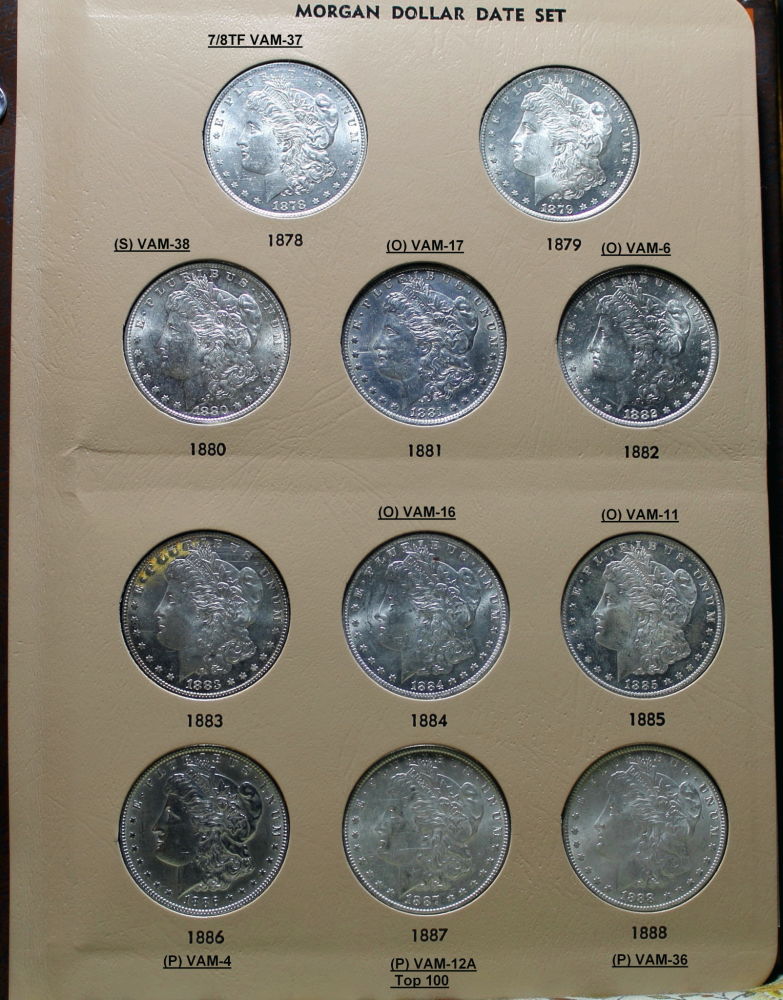 What do you think. I think it came out great! |
|
Moderator
United States
196470 Posts |
Looks good. |
|
Moderator
United States
14463 Posts |
The labeling for VAMs looks good. Here is a different question for labeling in Dansso Albums: how do you remove/hide labels? Dansco started the new album & page (7114) for Jefferson nickels with the Return to Monticello design change, so the spots 2006-2016P in the last page of my 7113 album are now empty (thanks design change). Other than buying a new page without the labels, what are the suggestions? |
|
Moderator
United States
196470 Posts |
Maybe mix some model paints to match the colour and paint over the unwanted labels. Of course, I would still want to fill the holes. I hate empty holes, so even unlabeled holes get filled with something. So in my case, I would still fill them and be happy having some duplicates in another album. It is not like any of these holes are pricey to fill.  |
|
Moderator
United States
14463 Posts |
think I will cover the labels, and maybe fill the holes with varieties or blank planchets. I don't really like having duplicates  |
| |
Replies: 16 / Views: 3,450 |







 Posted 08/10/2016 10:46 pm





