| Author |
 Replies: 10 / Views: 3,063 Replies: 10 / Views: 3,063 |
|
|
Valued Member
United States
60 Posts |
Hi There, I have this Dime which seems kind of weird, I thought it was like some sauce or something, so I rubbed it slightly with a cloth to see if it would rub off, but it looks like its part of the coin. Planchet Error ? Also on a side note, does anyone have any advice on how to take better pictures or more clear pictures. Most of my pictures are distorted and I don't know why. I take them from the I-Phone and crop them on the phone and or I take the full pictures and crop them on the image optimizer. And I still get the same blurry result. 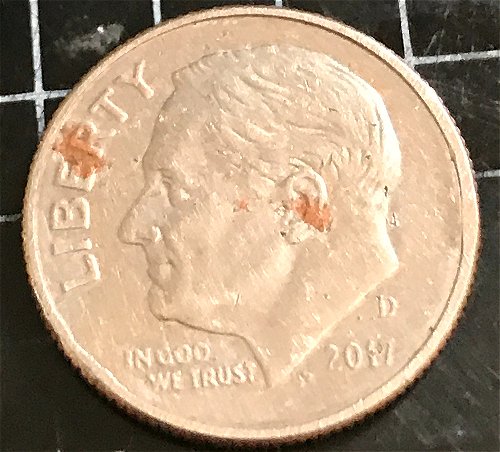 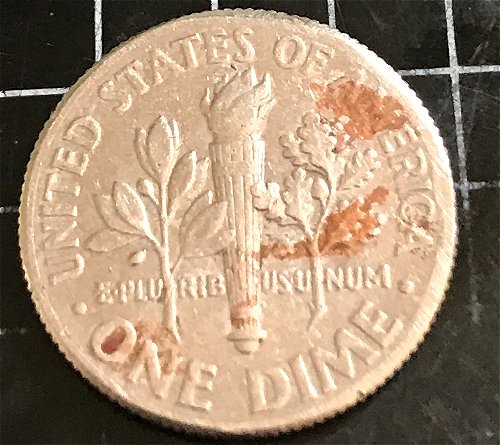 |
|
|
|
Pillar of the Community
United States
4963 Posts |
Quote:
I take them from the I-Phone and crop them on the phone and or I take the full pictures and crop them on the image optimizer. And I still get the same blurry result. I use an iPhone for my pictures as well; it takes a bit of practice. Try holding the phone directly over the coin, get it as close as you can without going out of focus (maybe 6-12"), and zoom in so that the coin occupies most of the frame. For small coins like dimes, you can shoot through a loupe to focus at much closer distances. |
|
Pillar of the Community
United States
7322 Posts |
Best to lay your phone on a stack of books with the coin in focus, then use a delayed shutter setting to prevent any movement while taking pictures
|
|
Valued Member
United States
356 Posts |
 with Numisma. This is a very dear subject to my heart (photographing coins without an extremely expensive setup) and it has taken me some time, and trial and error, to really learn how to take good quality photos with just my iPhone and a 10x loupe. I was just asked today on one of my posts about the pictures I took for that post. I considered it a very nice compliment. I have very shaky hands and have to really steady and firm everything up before taking the pic with my phone or else they will turn out blurry. Practice with the zoom feature like Numisma said. Take pics from different distances, angles, light sources, brightness, etc.....Using a loupe right up against the lens for close-ups seems to be a bit easier for me because my hands are able to really prop up on whatever surface I am using and I can really get much closer to the coin. Here's the link to my post (I think it was yesterday when I posted this one) but it just shows what an iPhone XR and a good quality triplet 10x loupe can produce. Sorry to get so long winded but I know how frustrating it can be trying to take good pics without having elaborate and expensive setups (which are also great alternatives too so please don't get me wrong). Hope this helps. http://goccf.com/t/396284EDIT: and I also agree with Greasy. Our comments must have crossed while I was typing a "book"..... lol Edited by Scuba1
03/30/2021 10:11 pm
|
|
Valued Member
United States
356 Posts |
One other thing I meant to add and believe me.... I am not even remotely close to being a photographic knowledgeable guy... I'm just trying to pass along some helpful info for us "cell phone" picture folks. I have also seen that the automatic focus and color adjustment on an iPhone (if that even makes sense) seems to turn the color or hue of the coin different colors depending on your backdrop or background color, no idea why this happens. For example- Lincoln Cents I have found a red background works best for me and for silver colored coins either a much lighter or much darker background color works well. Not sure why but just my observation and 2cents worth......
|
|
Pillar of the Community
United States
4963 Posts |
Scuba1, I concur with just about everything you said. I've also spent hours figuring out how to make it work.
I actually forgot to mention another trick I've found. If I try to use a loupe for anything bigger than about a small cent, the edges tend to get out of focus. What I do instead is pop one of the lenses out of an old loupe and tape it over the phone camera. It doesn't magnify the camera much, but it does allow it to focus at much closer distances so I don't have to hold it farther away and zoom in.
Building a stand from books is a good idea as well, but I guess I have fairly steady hands.
Sale4coin, sorry for hijacking your thread!
At a glance, it almost looks like the copper layer is showing through. The O in ONE, though, appears to have some of the red material inside it. I'm thinking it's some sort of stain that may have rubbed off some of the high points.
Edited by Numisma
03/31/2021 12:09 am
|
|
Valued Member
United States
356 Posts |
All around great info Numisma. That's some good advice there about taking out a lens and I'm sure it will benefit sale4coin and hopefully anyone else who reads this post too. I will definitely try that. We're all here to help each other out.  Thanks! |
|
Bedrock of the Community
United States
10635 Posts |
Back to the coin, it appears to be damaged by paint or stain. How or why is an unknown, just post mint damage. Value: 10 cents. Not worth trying to clean up/fix.  |
|
Pillar of the Community
Canada
6244 Posts |
One thing is shore: is not oxide. This color only the iron in one of the most pure state has. Must be some sort of paint. I will try mineral spirit, first, paint remover. Will not affect the coin on short and long term.
|
|
Bedrock of the Community
United States
62064 Posts |
 A spender. |
|
Pillar of the Community
United States
565 Posts |
Scuba1 FYI I have a bluetooth shutter remote you can google it for your type of phone it works great.
|
| |
Replies: 10 / Views: 3,063 |
|







 Posted 03/30/2021 9:54 pm





