Coin Community Family of Web Sites Join Thousands of Coin, Bullion, & Money Collectors
Join Thousands of Coin, Bullion, & Money Collectors Shop for APMEX Bullion on eBay!Specializing in Modern Numismatics 300,000 items to help build your collection! Royal Canadian Mint products, Canadian, Polish, American, and world coins and banknotes. Vancouvers #1 Coin and Paper Money Dealer Coin, Banknote and Medal Collectors's Online Mall


Username:
Password:
Save Password
Forgot your Password?


This page may contain links that result in small commissions to keep this free site up and running.

Welcome Guest! Registering and/or logging in will remove the anchor (bottom) ads. It's Free!

Whoa! Just Found A New Setting

To participate in the forum you must log in or register.
Author Previous TopicReplies: 21 / Views: 3,403Next Topic
Page: of 2
Pillar of the Community
Scooby Due's Avatar
United States
4000 Posts
 Posted 04/13/2011  12:24 am Show Profile   Bookmark this topic Add Scooby Due to your friends list Get a Link to this Message Number of Subscribers
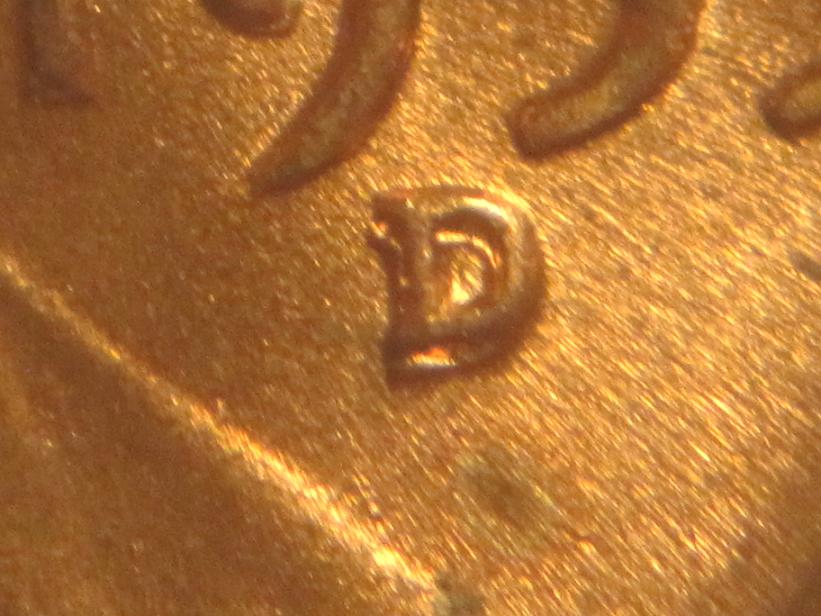
I accidentally hit something on my little $100 point and shoot and all of a sudden it just kept zooming and zooming.

This is a straight up shot right out of the camera through a loupe. No tweaking.
Whoa!--Just-Found-A-New-Setting


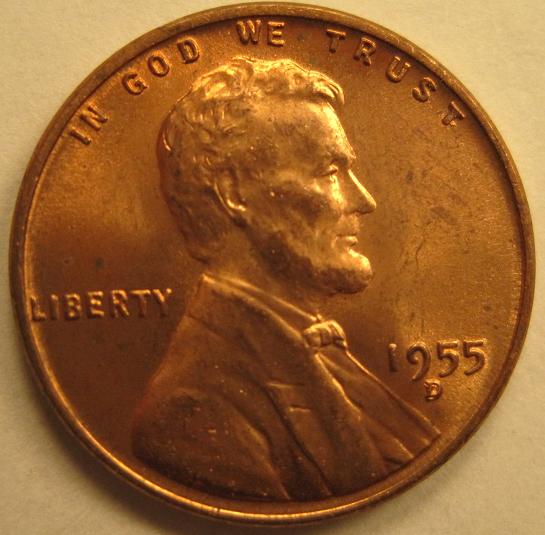
Good thing I found that "scope" setting when I did or I might have missed this one!
Whoa!--Just-Found-A-New-Setting
Edited by Scooby Due
04/13/2011 12:24 am
Pillar of the Community
foundinrolls's Avatar
United States
3507 Posts
 Posted 04/13/2011  12:28 am  Show Profile   Bookmark this reply Add foundinrolls to your friends list Get a Link to this Reply
Very Nice!

What a D/D

Have Fun,

Bill
Pillar of the Community
Darth Anarchus's Avatar
United States
1388 Posts
 Posted 04/13/2011  12:48 am  Show Profile   Bookmark this reply Add Darth Anarchus to your friends list Get a Link to this Reply
Nice Pics Scoob!... O, and beautiful Lincoln too, what a pic
Pillar of the Community
United States
810 Posts
 Posted 04/13/2011  01:33 am  Show Profile   Bookmark this reply Add Double Mint to your friends list Get a Link to this Reply
Nice! Whatd you do Scoob drop the camera.
Pillar of the Community
Rsxtacee's Avatar
United States
737 Posts
 Posted 04/13/2011  01:51 am  Show Profile   Bookmark this reply Add Rsxtacee to your friends list Get a Link to this Reply
Nice one Scoob! I'm wondering what setting you ran into lol.
Pillar of the Community
Learn More...
Canada
9864 Posts
 Posted 04/13/2011  01:58 am  Show Profile   Bookmark this reply Add DBM to your friends list Get a Link to this Reply
Nice! What brand and model of camera?
Moderator
Learn More...
John1's Avatar
United States
56855 Posts
 Posted 04/13/2011  06:53 am  Show Profile   Bookmark this reply Add John1 to your friends list Get a Link to this Reply
Nice photo scoob. No for the BIG question....do you remember WHAT you did so you can do it again?
John1
Valued Member
ayejay1974's Avatar
United States
314 Posts
 Posted 04/13/2011  07:01 am  Show Profile   Bookmark this reply Add ayejay1974 to your friends list Get a Link to this Reply
You wouldn't have missed that! The double D can be seen a mile away.
Pillar of the Community
scurry64's Avatar
United States
900 Posts
 Posted 04/13/2011  07:05 am  Show Profile   Bookmark this reply Add scurry64 to your friends list Get a Link to this Reply
That is a top-notch pic and a very nice coin.


Is that a 1955D-1MM-002?
Edited by scurry64
04/13/2011 09:26 am
Rest in Peace
numismo's Avatar
United States
3039 Posts
 Posted 04/13/2011  09:45 am  Show Profile   Bookmark this reply Add numismo to your friends list Get a Link to this Reply
Nice pix-good color too. Nice coin also.
Valued Member
ebm's Avatar
United States
117 Posts
 Posted 04/13/2011  11:13 am  Show Profile   Bookmark this reply Add ebm to your friends list Get a Link to this Reply
"through a loupe"

Seriously? How do you set this up? You shoot the pic through the camera and through a loupe? That's awesome.
Bedrock of the Community
coop's Avatar
United States
62064 Posts
 Posted 04/13/2011  11:58 am  Show Profile   Bookmark this reply Add coop to your friends list Get a Link to this Reply
Can you enlarge your image size on your camera? A larger setting will make the image clearer. When you get the image, then you can reduce the size of the image by editing it and you will have a nicer image.
Her are the image size options on my camera:
1. 640X480
2. 1024X760
3. 1280X960
The largest size image, then edited to be smaller image size will give more deatil to the image.
Bedrock of the Community
United States
10284 Posts
 Posted 04/13/2011  12:02 pm  Show Profile   Bookmark this reply Add TNG to your friends list Get a Link to this Reply

Quote:
You wouldn't have missed that! The double D can be seen a mile away.


Heck, I am hundreds of miles away and can see it plainly.
Pillar of the Community
Scooby Due's Avatar
United States
4000 Posts
 Posted 04/13/2011  1:40 pm  Show Profile   Bookmark this reply Add Scooby Due to your friends list Get a Link to this Reply

Quote:
...do you remember WHAT you did so you can do it again?

No. But, I'm not touching the settings ever again. Besides stumbling onto the zoom factor, I think my pics are getting better overall.

Quote:
You shoot the pic through the camera and through a loupe?

Yep. I put my camera on as much zoom as possible and just shoot the pic through my loupe. It worked pretty good even before finding this.

Quote:
What brand and model of camera?

I'll have to get back to you on that. I'm at work right now. All I recall is that it is a Canon. I'll have to get the model number later.

coop, I'm not sure about those settings and now I'm afraid to touch anything!
Pillar of the Community
acloco's Avatar
United States
3540 Posts
 Posted 04/13/2011  5:02 pm  Show Profile   Bookmark this reply Add acloco to your friends list Get a Link to this Reply
Great find...on BOTH!
Pillar of the Community
southsav's Avatar
2223 Posts
 Posted 04/13/2011  5:17 pm  Show Profile   Bookmark this reply Add southsav to your friends list Get a Link to this Reply
Very nice, I just checked my sony cyber shot 5.0 mega pixel, 4x opt zoom, I can't find any image size adjustments. Oh well, will keep using the loop.
  Previous TopicReplies: 21 / Views: 3,403Next Topic
Page: of 2

To participate in the forum you must log in or register.


Disclaimer: While a tremendous amount of effort goes into ensuring the accuracy of the information contained in this site, Coin Community assumes no liability for errors. Copyright 2005 - 2026 Coin Community Family- all rights reserved worldwide. Use of any images or content on this website without prior written permission of Coin Community or the original lender is strictly prohibited.
Contact Us  |  Advertise Here  |  Privacy Policy / Terms of Use

Coin Community Forum © 2005 - 2026 Coin Community Forums
It took 0.31 seconds to rattle this change. Forums



