Coin Community Family of Web Sites Join Thousands of Coin, Bullion, & Money Collectors
Shop for APMEX Bullion on eBay!300,000 items to help build your collection! Coin, Banknote and Medal Collectors's Online Mall Specializing in Modern Numismatics Join Thousands of Coin, Bullion, & Money Collectors Vancouvers #1 Coin and Paper Money Dealer Royal Canadian Mint products, Canadian, Polish, American, and world coins and banknotes.


Username:
Password:
Save Password
Forgot your Password?


This page may contain links that result in small commissions to keep this free site up and running.

Welcome Guest! Registering and/or logging in will remove the anchor (bottom) ads. It's Free!

Coin Expert

To participate in the forum you must log in or register.
Author Previous TopicReplies: 10 / Views: 3,525Next Topic  
Valued Member

Canada
219 Posts
 Posted 05/11/2013  07:42 am Show Profile   Bookmark this topic Add numidan to your friends list Get a Link to this Message Number of Subscribers
After 8 months of development, here is a program that you may appriciate.

Coin Expert vcv1.0

Coin Expert is the ultimate tool designed for the numismatist besides the loupe.

Most webcams and digital microscopes are sold with their own drivers and software. Most softwares enables numismatist to view their coins but do not offer additional tools useful in comparing coins and finding those rare varieties.

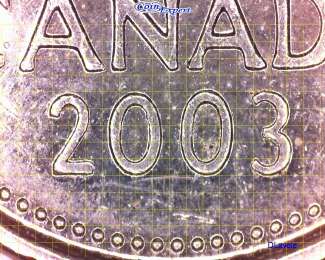
Coin Expert was design by a numismatist for numismatists. It interfaces with the webcams'/digital microscopes' driver to capture frames at the highest possible resolution and offer the best real time images. It also provides access to the driver's configuration dialog boxes used to adjust image's brightness, contrast, and much more. For a closer look, Coin Expert offers a digital zoom that can be activated by simply pressing the Page Up key on the keyboard.

The main difference that Coin Expert has from other software is the ability of drawing over real time captured images. The original idea came from Jack Griffin's Monographs. He was using a grid system to compare date spacing. This tool is available in Coin Expert and is activated under "Options". The grid system can be fix, regardless of the zoom factor of the microscope, or variable indicating 0.25mm spacing, accuracy depends on the calibration of the system. Although it is very simple to use, it lacks precision.
Coin-Expert
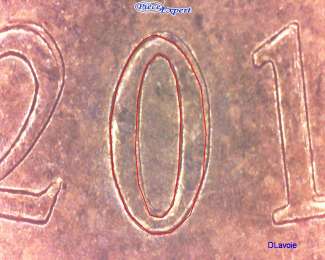
The second option is to draw traces, outlining the details the numismatist wants to examine and/or compare. A single click of the mouse button actives the trace mode and a double click terminates it. A few colors and different line thickness are available. All the time spent in drawing these traces is not lost. Traces can be saved for a later use. The saved traces can be exchanged between users of Coin Expert as long as proper calibration was performed.
Coin-Expert
Once save, you can open another trace or use the "clear" function to start a new trace. An error is produced while tracing, no problem, just use the "Undo" function to remove the last trace segment drawn.

Studying differences in dies, identifying portrait varieties, determining date spacing, distinguishing die clash from other marks, and figuring the type of doubling could not be easier with Coin Expert. When you want to share your findings, press F7 and a snapshot is taken and saved in the working directory. The program applies a filter to enhance the depth of image's details. Each JPG file saved is date stamped and the picture will include Coin Expert's logo and the user's name to protect the intellectual property.

I have decided to release the program free of charge for personal noncommercial use although any gifts of numismatic products or monetary donations through Paypal will be welcome. I can be reached using the following email: numi@netzero.net

Minimum requirements are:
Digital Microscope and manufacturer's device driver installed
Windows XP SP3 and Office 2003
Pentium 4 with 1G of memory

This software is released as a stand alone, therefore you will need to create your own shortcut! If you are not confortable with de posite files website, just send me an email and I will send you a copy of the software.

file: CPExpertvcv **(No Zip Files Allowed)** , contains CPExpertvcv.exe sfx installer.

Deposite file: http://depositfiles.com/files/17uiue9gh
Password: I_J_accept
Pillar of the Community
westcoin's Avatar
United States
9792 Posts
 Posted 05/12/2013  6:00 pm  Show Profile   Bookmark this reply Add westcoin to your friends list Get a Link to this Reply
Sounds interesting, wish it was on OSX though, I don't have much patience for and Microsoft products, though I do use Win7 - but only because I have to in astronomy, thank goodness that is changing too, a few years ago almost no programs were done for OSX now almost everyone is or has been ported over to OSX. Yay.

Downloading it now, will try it out later.
"Buy the Book Before You Buy the Coin" - Aaron R. Feldman - "And read it" - Me 2013!
ANA Life Member #3288 in good standing since 1981, ANS, Early American Coppers Member (EAC), Colonial Coin Collectors Club member (C4), Conder Token Collector Club member (CTCC), Civil War Token Society (CWTS) member, Liberty Seated Collectors Club (LSCC) & Numismatic Bibliomania Society member (NBS), USMex, Member in good standing, 2¢ variety collector.

See my want page: http://goccf.com/t/140440
Bedrock of the Community
United States
20753 Posts
 Posted 05/22/2013  4:05 pm  Show Profile   Bookmark this reply Add just carl to your friends list Get a Link to this Reply
Sounds interesting but a bit to complicated compared to just a simple magnifying glass or microscope. The name tells it all. Good for expers only.
Valued Member
Canada
219 Posts
 Posted 05/22/2013  6:59 pm  Show Profile   Bookmark this reply Add numidan to your friends list Get a Link to this Reply
Hi Westcoin, I was not planning to port it over to OSX, sorry.

Just Carl ouch
If you have a digital microscope and you take the time to explore the program, you too can become an expert in just a few hours

Here is a simple tutorial
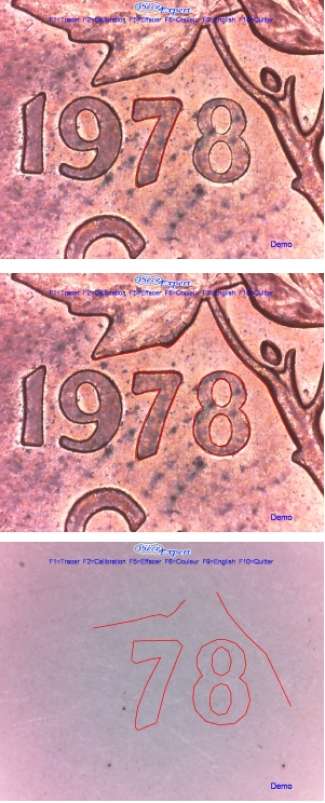
Canadian 1c 1978 small 8 vs large 8

Get out your Canadian 1c 1978.
Take the most beautiful 1978 penny, which will become your reference coin.
With the mouse, make an outline around the seven ( single click or press F1 to activate and double click or press ESC to finish). See first picture. Note that the outline doesn't need to be perfect!

Now do the same for the eight, a portion of the branch, and a portion of the leaf. See second picture.

When you are finished, you can save the trace (F4).

Remove the reference coin (See third picture) and choose another 1978 penny that you align with your trace. If you're lucky, you'll find coins with a large 8 and others with a small 8.

Coin-Expert
Edited by numidan
05/22/2013 7:02 pm
Valued Member
Canada
219 Posts
 Posted 05/25/2013  10:03 am  Show Profile   Bookmark this reply Add numidan to your friends list Get a Link to this Reply
2nd Tutorial
The study of die clashes

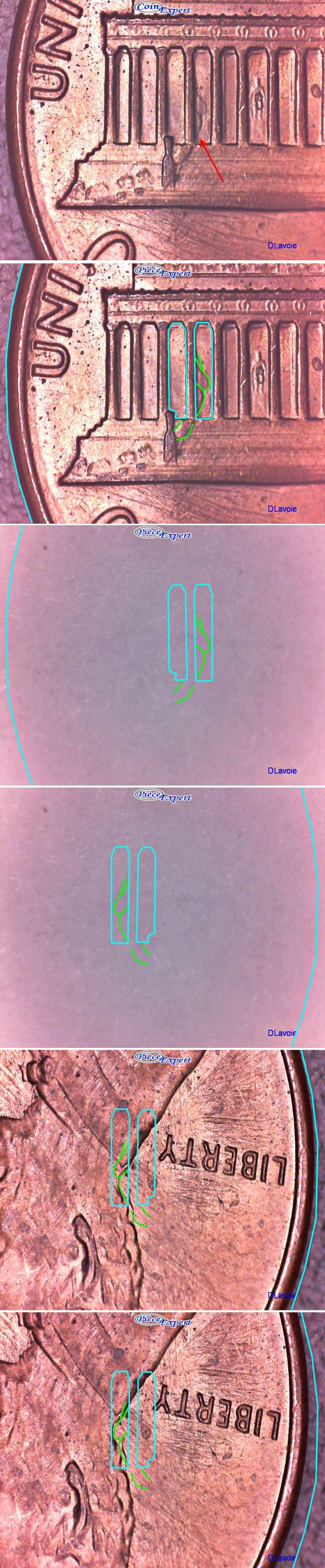
I like die clashes. When I suspect that a mark found on the surface of a coin might be due to a die clash, I use the different illustrations that exist on the web to validate it. But in rare occasions, the mark has similar characteristics to an impression left by a die clash but I it does not concur with any illustrations found. For example, this might be due to the fact that the working dies were aligned differently than the photos used to make the illustrations. For these cases, Coin Expert can be used to investigate the mark.

Here are the steps to follow
Take a coin with a mark to investigate. (First photo)

Trace the mark you want to study (in green). Change the color (in cyan)
Now trace some details around the mark and if possible, the contour of the coin. (2nd and 3rd photos)

Save trace (press F4)

Use the mirror function. (right button + Mirror) (4th photo)

Turn the coin and try to align the trace with the details of the coin. (5th and 6th photos)

What are your conclusions ... clashing or not?

Coin-Expert
Bedrock of the Community
Earle42's Avatar
United States
10034 Posts
 Posted 05/25/2013  10:00 pm  Show Profile   Bookmark this reply Add Earle42 to your friends list Get a Link to this Reply
I agree with Westcoin that an OSX version would be nice. I have been back and forth across the fence between Microsoft and Apple a number of times since the early 90s. Currently OSX, IMO, is so much more user-friendly, trouble free, and stable. Presently the only time I have trouble on my computer is when I am running Windows (natively, since my Mac is Intel based).

Nice looking program though.
How much squash could a Sasquatch squash if a Sasquatch would squash squash?
Download and read: Grading the graders
Costly TPG ineptitude and No FG Kennedy halves
https://ln5.sync.com/dl/7ca91bdd0/w...i3b-rbj9fir2
Bedrock of the Community
United States
20753 Posts
 Posted 05/27/2013  11:33 am  Show Profile   Bookmark this reply Add just carl to your friends list Get a Link to this Reply

Quote:
Just Carl ouch
If you have a digital microscope and you take the time to explore the program, you too can become an expert in just a few hours

All great for those that are young enough to spend time looking at each coin. But after many, many years of coin collecting, having virtually many thousands of coins, just fun filling an Album. If there is a little thing on a coin that needs magnification, I'll just pass for now. Life for me is to short.
Pillar of the Community
BadToTheBone's Avatar
United States
1795 Posts
 Posted 05/28/2013  12:12 pm  Show Profile   Bookmark this reply Add BadToTheBone to your friends list Get a Link to this Reply
@Carl....excellent point.
@Earl42 I agree with you 100%.
Valued Member
Canada
219 Posts
 Posted 06/21/2013  10:20 am  Show Profile   Bookmark this reply Add numidan to your friends list Get a Link to this Reply
3rd Tutorial
Study of types of doubling

I have seen many topics on this forum who asked the intervention of members to identify the type of doubling found on their coin. To properly identify the types of doubling, take the time to read the explanations of a Mortar Set, Die Deterioration Doubling, Die shift, Repunched Die and Doubled Die that could be found on this site (http://www.coinsandcanada.com/coins...rieties.php) or other sites on the web.

Observe the following drawing. It compares the reliefs of hub doubling (WDD) and Mechanical Doubling (MDDe) to a normal coin.

Coin-Expert

From this, we can defined two categories, doubling inside of the relief (MDDe) and outside of the relief (WDD). It is very important to see this difference because if the apex's edge of a suspected doubled die coin is smaller compared to a normal coin, in all cases it is Mechanical Doubling (Also known as "Die Shift", "Ejection Doubling", " Machine Doubling" and "Die Chatter").

Conversely, if the doubling is outside of the relief, further investigation is required. We need to explore the edges of the doubling to clearly identify the type of doubling. I have defined two subcategories, rough/un-uniform edges and smooth/uniform edges. In the subcategory rough/un-uniform edges, this is not really doubling but the appearance of a doubling. Mortar Set and Die Deterioration Doubling are found in this subcategory. In the other subcategory smooth/uniform edges we find Repunched Die and Doubled Die.

Coin-Expert

In the US, Doubled Die is then broken down into 8 different classes;
Class 1, Rotated : misaligned in a clockwise or counterclockwise direction.
Class 2, Distorted: hub's design moves toward the rim between hubbings.
Class 3, Design: die bearing another design.
Class 4, Offset: misaligned in an offset direction.
Class 5, Pivoted: misaligned via rotation with a pivot point near the rim.
Class 6, Distended: hub that was distended.
Class 7, Modified: modified between the die's hubbings.
Class 8, Tilted: die and/or hub is tilted during a hubbing.

Coin Expert can be used to study the relief on a coin and quickly determine Mechanical Doubling from hub doubling. Coin Expert can also be used to identify the class of a doubled die by determining the movement of the hub.

Here are the steps to follow;

Take a coin without doubling as your reference coin.

Click to activate the "trace" option, to outline the details you want to study. Double click (or press Esc) to terminate.

Save trace (F4)

Take the coin with doubling.

Align the coin with the outline and determine if the doubling is outside or inside the outline (relief).

If it is outside, determine if edge is rough/un-uniform or smooth/uniform by using the zoom function (press "Page Up") or moving the coin to align the doubling with the outline.

Conclude

Edited by numidan
06/21/2013 10:21 am
Valued Member
Canada
219 Posts
 Posted 02/26/2021  3:30 pm  Show Profile   Bookmark this reply Add numidan to your friends list Get a Link to this Reply
Here is a completely revamped version to take advantage of 64 bits Windows operating system.

What has changed?
- The software was completely re-written in C++ to take advantage of 64 bits operating systems. Thus, improving the overall speed of various features the program offers.
- The main GUI window was redesign to only have toolbars. This gives the user direct access to the various features and tools that Coin Expert offers.
- The calibration was changed completely. Properly configured, it will minimize any luminance distortion due to the type of lighting used.
- The user has complete control over the microscope's available settings.
- Better digital zoom feature providing sharper image close-ups in real-time.
- Use of color map to reproduce coin color surfaces regardless of microscope settings.
- A new save dialog interface is introduced to standardize the name used when saving a captured image.

Download link:
https://drive.google.com/file/d/1W7...?usp=sharing

Open Zip file and copy the folder anywhere on your hard disk.
Inside this folder you must double click on "vcredist_x64" to install Microsoft C++ library which is required by program. Once install, you might need to reboot your computer.

To start program, double click on "CPExpert_vQt.exe" file.


Edited by numidan
02/26/2021 3:31 pm
Bedrock of the Community
Earle42's Avatar
United States
10034 Posts
 Posted 02/26/2021  4:54 pm  Show Profile   Bookmark this reply Add Earle42 to your friends list Get a Link to this Reply
@OP:
This sort of reminds me of the kind of tech needed to make an AI grading system for coins (under development and very promising). The system is consistent in assigning the same grade to the same coin. Which is a lot better than the subjectivity uses by grading companies. Mintstate.com is where you can access the AI coin grader.
How much squash could a Sasquatch squash if a Sasquatch would squash squash?
Download and read: Grading the graders
Costly TPG ineptitude and No FG Kennedy halves
https://ln5.sync.com/dl/7ca91bdd0/w...i3b-rbj9fir2
  Previous TopicReplies: 10 / Views: 3,525Next Topic  

To participate in the forum you must log in or register.


Disclaimer: While a tremendous amount of effort goes into ensuring the accuracy of the information contained in this site, Coin Community assumes no liability for errors. Copyright 2005 - 2026 Coin Community Family- all rights reserved worldwide. Use of any images or content on this website without prior written permission of Coin Community or the original lender is strictly prohibited.
Contact Us  |  Advertise Here  |  Privacy Policy / Terms of Use

Coin Community Forum © 2005 - 2026 Coin Community Forums
It took 0.38 seconds to rattle this change. Forums