| Author |
 Replies: 44 / Views: 9,527 Replies: 44 / Views: 9,527 |
|
Pillar of the Community
United States
1599 Posts |
I have been shooting pictures most of the afternoon with an AmScope, Canon T1i. I am having trouble getting the object in focus. I can get it just right in the eyepeice, but the camera is seeing something totally different, not in focus. Shooting in live view I cannot seem to get the screen view in focus. Here are a couple of my shots. I'm sure the problem is with the operator and not the equipment. Any ideas? Thanks! 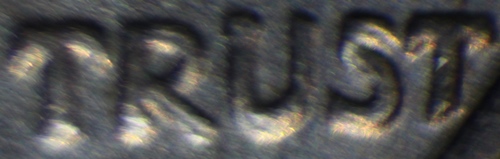 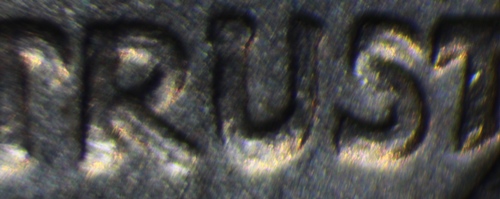 |
|
|
|
Moderator
 United States
56855 Posts |
Both pics look blurry to me. Sounds like a camera problem not the scope but I am not a pro. John1  |
|
Pillar of the Community
United States
5825 Posts |
Are you shooting in Manual mode?
Just a couple sanity checks.
I had a problem for a while using Autofocus mode (different camera and lens than yours).
When I pushed the shutter release the camera would quickly refocus.
When you're focusing that close even small amounts of vibration becomes very significant.
Consider using a shutter release, manual or wireless.
And another vibration source is the mirror flipping out of the way at the moment of exposure.
I can set the camera to delay the actual exposure a few seconds to overcome that.
Just techniques I use.
|
|
Pillar of the Community
United States
4051 Posts |
If you are seeing problems in the Live View screen, then the issue is with the scope. Snapping the shot in Live View is best you can do, since EFSC is active.
I'd suggest putting an eyepiece on the trinocular port to see if the sharpness is the same as on the eyepiece ports.
Is the magnification at the camera the same as the magnification at the eyepieces?
|
|
Pillar of the Community
United States
1476 Posts |
 Any news on this yet? |
|
Forum Dad
United States
24227 Posts |
Never could get my AmScope to focus right, sitting here collecting dust for about two years. Wish I'd never bought it. |
|
Pillar of the Community
 United States
1599 Posts |
I am still having focusing problems and it has gotten very frustrating. I figured it was the same old problem of operator error since I have bought good equipment. Kanga, shooting in live mode I can only control focus manually and I am shooting with my mouse so there should not be any vibration. On the plus side I am having lots of fun with the microscope searching for varieties, etc. I can really see things I couldn't with just a loupe. Anyway, I will keep working on the photo end. Any additional ideas/suggestions would hugely appreciated! Thanks
|
|
Pillar of the Community
United States
4051 Posts |
Your original images you posted are short in Y and wide in X. I assume you have cropped them unless you have a very odd camera. Can you post a whole pic so we can see what you're getting overall? Is this a 100% crop image? If so, you should not expect it to be sharp.
|
|
Pillar of the Community
United States
9810 Posts |
I'm seeing movement not focusing issues, I think you need to double check your mounting setup. Cheap tripod? Every part locked down? Something is moving it looks like.
"Buy the Book Before You Buy the Coin" - Aaron R. Feldman - "And read it" - Me 2013! ANA Life Member #3288 in good standing since 1981, ANS, Early American Coppers Member (EAC), Colonial Coin Collectors Club member (C4), Conder Token Collector Club member (CTCC), Civil War Token Society (CWTS) member, Liberty Seated Collectors Club (LSCC) & Numismatic Bibliomania Society member (NBS), USMex, Member in good standing, 2¢ variety collector. See my want page: http://goccf.com/t/140440 |
|
Pillar of the Community
United States
1599 Posts |
westcoin-my camera is attached to the microscope and on a sturdy table. I am shooting in "live mode" and using my mouse for the shutter release. I have to manually focus using this set up. It is not only that I cannot get a focused shot, I cannot get a focused image on my computer screen so I dont think vibration is causing the problem. When I leave live mode and focus manually through the camers I still cannot get a focused shot. Here is my setup. 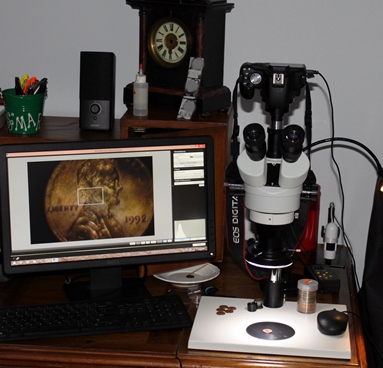 This pic was taken by trying to focus through the camera rather than live view. This is as good as I can get it. 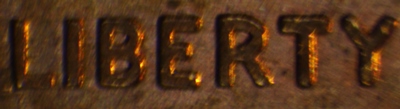 Not sure what my problem is (probably me) but my frustration level is very high. Am I missing something in the operation? If I am right, I see others doing the same type of shooting with basically the same setup and not having this problem. HELP! |
|
Pillar of the Community
United States
1599 Posts |
rmpsrpms/others-when I put the eyepiece on the trinocular port, I can focus to a perfect image just as through the regular port. This suggest that the issue is with the camera and/or adapter, but I am at a loss as to what to do to fix this. Any suggestions?
|
|
Pillar of the Community
United States
9810 Posts |
Is the camera slowly (almost imperceptible) creeping at all? Or maybe the camera and binocular side aren't par focal (focusing at the same length)? If you focus using the eyepiece in normal - is the camera in focus? If not can you raise the camera up while viewing in live view until it is focused? You can use a par focal ring to lock the final position.  I use these all the time in my telescope shooting, sometimes it is just easier to get an eyepiece in focus with my eye first, then dropping the camera in. First goal is to get the camera in focus, then remove it from my telescope drop in my camera, with a par focal ring on it already, then pull the eyepiece outwards from the draw tube until it is focused. At this point I slide the par focal ring down to mate with the draw tube edge, and tighten the ring in place. Next time I want to shoot with that camera, I pick the eyepiece out, drop it in and focus, now when I remove the eyepiece and drop in the camera it should be in focus. Hope this makes sense. "Buy the Book Before You Buy the Coin" - Aaron R. Feldman - "And read it" - Me 2013! ANA Life Member #3288 in good standing since 1981, ANS, Early American Coppers Member (EAC), Colonial Coin Collectors Club member (C4), Conder Token Collector Club member (CTCC), Civil War Token Society (CWTS) member, Liberty Seated Collectors Club (LSCC) & Numismatic Bibliomania Society member (NBS), USMex, Member in good standing, 2¢ variety collector. See my want page: http://goccf.com/t/140440 |
|
Pillar of the Community
United States
4051 Posts |
Quote:
rmpsrpms/others-when I put the eyepiece on the trinocular port, I can focus to a perfect image just as through the regular port. This suggest that the issue is with the camera and/or adapter, but I am at a loss as to what to do to fix this. Any suggestions? It's almost certainly not the camera, so you may have a bad adapter. What are you using optically between the trinoc port and camera? Contact me for photographic equipment or visit my home page at: http://macrocoins.com |
|
Pillar of the Community
United States
1599 Posts |
Here are pics of my trinocular port and the canon adapter on my camera. I can focus through the tri port with the eyepiece except the eyepiece does not fit into the tri port. I just have to hold it steady over the port. Even if I remove the part shown in pic 1 below, the eyepiece will not fit in the port. The only focus control is by moving the scope head up and down. Is there a way to do a finer focus or is there something else that is supposed to be between the canon adapter and the port? THANKS for your help! 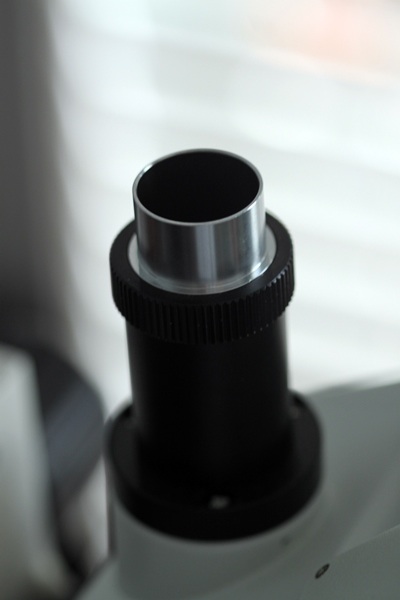 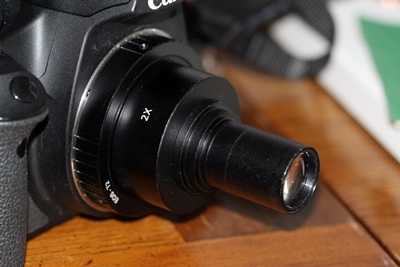 |
|
Pillar of the Community
United States
1599 Posts |
My camera fits loosely (it can move a full 360 degrees) in the port. Shooting live view with a mouse not on the scope base should not be causing the problem. As I mentioned previously, I cannot even get focused (not in live view) looking through the camera when in the port.
Per your question, the image is in perfect focus through the eyepiece but not through the camera.
Edited by jprine
08/19/2014 4:47 pm
|
|
Pillar of the Community
United States
4051 Posts |
I'll bet the problem is the optics in the camera adapter. If you take the adapter off the camera and use it as an eyepiece, is the image as good as with your regular eyepiece?
Edited by rmpsrpms
08/19/2014 10:06 pm
|
| |
Replies: 44 / Views: 9,527 |










 Posted 07/28/2014 08:06 am


