| Author |
 Replies: 16 / Views: 2,737 Replies: 16 / Views: 2,737 |
|
New Member
5 Posts |
What does everyone use to keep track of coins when collection? Which program software? I'm starting a collection of Morgan silver dollars and I wanted to avoid getting duplicates. |
|
|
|
Moderator
 United States
194677 Posts |
I use spreadsheets, which have served me well over the last 30+ years.  |
|
Pillar of the Community
United States
3848 Posts |
I've been using pen and paper. Not so efficient now, especially with hundreds of silver dollars. Will transfer to a spreadsheet this summer.
I keep a list in my wallet and a pic of the list on my phone of the coins I need for the sets. If I stop by a coin shop or show, I pull out the list, and know exactly what coins I need. I do this with all denominations, and keep an extra notecard with overton varieties.
Suffering from bust half fever. Want to learn how to attribute early half dollars by die variety? Click Here: http://goccf.com/t/434955Shoot me a PM if you are looking to sell bust halves. |
|
Pillar of the Community
 United States
5713 Posts |
I agree an Excel spreadsheet is the way to go. You can have separate pages for different denominations. If you are focusing on Morgans, you can customize the columns to include the date and MM, date purchased, purchase price, where purchased, grade, certification number (if applicable), VAM number, and any other comments. You can even add photos of the coin if desired. And you can sort your list by either the coin date or the date purchased. I can't think of a better option. |
|
Pillar of the Community
United States
4497 Posts |
If the coins are in NGC and PCGS holders, the registry is a good place to organize the coins. Using an album, I just fill the holes. I have also used my Red Book for raw coins as I just put a check and $ amount spent by the coin for the series that I am collecting. |
|
Moderator
United States
105334 Posts |
Quote:
I use spreadsheets, which have served me well over the last 30+ years. There were 'spreadsheets' 30+ years ago - I don't remember that program on my Vic-20's 5-1/4 floppy drive  I use MS Excel for my tracking purposes - and has worked well for me for the past 12+ years |
|
Valued Member
United States
105 Posts |
I use this app on my phone called Coins Checker for a quick review in case something pops up on ebay but also have a spreadsheet to keep track of cert numbers and any other notes. I'd be interested to here if anyone else has other recos of apps where variety info can be tracked. 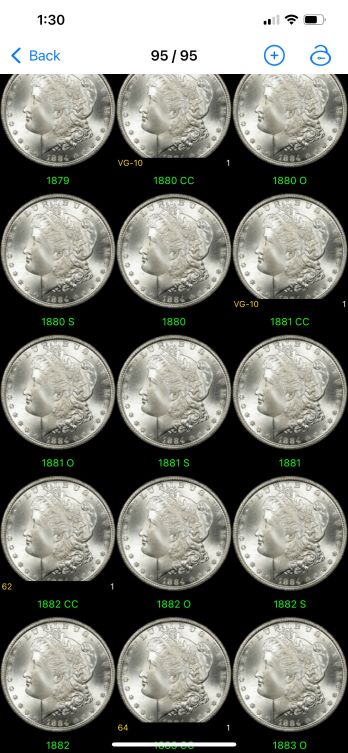 |
|
Pillar of the Community
United States
3342 Posts |
Quote:
You can even add photos of the coin if desired I've wanted to figure out how to add or link photos of the coins into Excel for a long time. Can you provide instructions or a link to them? I'd be greatly appreciative! Quote:
There were 'spreadsheets' 30+ years ago - I don't remember that program on my Vic-20's 5-1/4 floppy drive Like many other concepts merged into today's technology, "spreadsheets" actually existed before Microsoft and the other companies commandeered the term. People called paper ledgers spreadsheets ages ago.  "Nummi rari mira sunt, si sumptus ferre potes." - Christophorus filius Scotiae
|
|
Pillar of the Community
United States
878 Posts |
I wish I had a better way. I use excel too, but I'd like to add pictures of coins to the file and that's hard to do within an excel.
|
|
Moderator
United States
105334 Posts |
There is a way to link photos to the line items in excel, Can't remember off hand, but not too hard once you get it started.
|
|
Pillar of the Community
United States
5713 Posts |
Quote:
I've wanted to figure out how to add or link photos of the coins into Excel for a long time. Can you provide instructions or a link to them? There are several tutorials online that explain how in detail. Basically, you go to the insert tab, then select picture and choose which photo you want to add. Once you add the photo, you can format it to lock it into a specific cell. |
|
Pillar of the Community
United States
2703 Posts |
I've been using Numista.com, which is hosted on the web and has catalog information for much of the world coinage (all eras). It lets you add several photos and notes for each coin regarding variety, condition, etc. I like it because my data is centralized and available across all my devices.
|
|
Moderator
United States
194677 Posts |
Quote:
There is a way to link photos to the line items in excel, Can't remember off hand, but not too hard once you get it started. You can paste photos directly into a cell or embed links to external content. |
|
Pillar of the Community
United States
3342 Posts |
Quote:
You can paste photos directly into a cell or embed links to external content.  I decided to add a couple of columns for links to the photos on the computer. All I have to do now is ensure that the photos aren't renamed or moved for any reason. Once I get things organized in the proper folder, I will populate the columns. "Nummi rari mira sunt, si sumptus ferre potes." - Christophorus filius Scotiae
|
|
Pillar of the Community
United States
2295 Posts |
I first started using Lotus 1-2-3 to organize and track my coins, back in 1986. I use Excel now and it is great and easy to use. I know there are a lot of online and local programs to use, but I prefer Excel due to the cost of the software. Some online programs will keep the worth of your coins up to date, which is a nice feature, but I can't justify the cost, since I don't need an exact up to date value for my coins.
|
|
Moderator
United States
194677 Posts |
Quote:
I first started using Lotus 1-2-3 to organize and track my coins, back in 1986. I use Excel now and it is great and easy to use. I started around the same time, but with a spreadsheet program on the Commodore 64, then later 128. |
| |
Replies: 16 / Views: 2,737 |










 Posted 07/05/2022 12:58 pm


