| Author |
 Replies: 16 / Views: 4,377 Replies: 16 / Views: 4,377 |
|
Valued Member
United States
87 Posts |
 Hi, I am new here and a casual collector. I have several Whitman Classic books that have 'blank' pages- ones that don't have the coin date and or mint (P, D, or S) under the coin slot. Note: These are the books with the slide in windows so they are sealed and you can still see the face and obverse sides of the coin. I also have folders that have 'open' slots (the type that only shows one side of the coin and no protective covering) that are blank. I want to label these blank slots, especially the 'edge' dated coins like Sacagawea because the date and or mint isn't obvious. Beyond a paint pen, any ideas on a sticker manufacturer or label maker that makes lettering that small, etc.... I would prefer a label maker that I can match the font and gold color. Another concern... is there any fear of reaction of these labels (the ink perhaps or adhesive) with the storage materials that could potentially damage the coins? or even reaction with the coins themselves? I know that my coins are not especially valuable, but the proofs are really pretty and I want to keep them in good condition. Any suggestions? Any help would be appreciated. Thanks!
|
|
|
|
Rest in Peace
United States
7075 Posts |
 I'm going to ask that your post be moved to another section so that it gets the proper attention. I haven't dealt with album labeling problem but I am sure that someone here has. |
|
Valued Member
 United States
87 Posts |
|
|
Pillar of the Community
United States
4085 Posts |
You can always buy a label maker at places like Target or Wal-mart and make custom labels. I think that clear labels look best. You can find these in the stationary or office supply section. If you have a computer with printer, I have also used clear mailing labels; you can print onto them and then trim them to size. This is more complicated but gives you lots more options in terms of font size and color. Edited by KenKat
06/26/2016 4:12 pm
|
|
Pillar of the Community
United States
5227 Posts |
|
|
Bedrock of the Community
United States
11951 Posts |
Maybe JustCarl will give his opinion.
He is the Whitman guy.
Seems like he has mentioned Whitman has a label kit
|
|
Pillar of the Community
United States
650 Posts |
I have used Avery clear address labels. Although it works better on cardboard 2X2, it also works on folders and albums. If you have MS Word, you just use a recommended template. You can customize the font and text size to anything you want. I use scissors to cut the label down to size. I've also heard of people using rub off letters that you can get at Office Depot.
|
|
Moderator
 United States
194816 Posts |
|
|
Bedrock of the Community
 United States
12910 Posts |
I will caution that using the above sheets that jbuck references takes considerable skill and patience to get the labeling aligned correctly and perfectly straight, particularly when you are working one letter/number at a time. Not for the faint of heart or of shaky hand. I personally have pretty steady hands but could never make the transfers work to my satisfaction. Something was always off every time. There are no doubt tricks/tactics I am unaware of, but my 1999 SBA labels in my SBA Whitman Classic look like they were done by a 4-year-old. |
|
Moderator
United States
194816 Posts |
|
|
Bedrock of the Community
United States
12910 Posts |
I like Whitman Classic albums too. The blue does it for me I think. My MO is I use Whitmans for my "from circulation" collections, where the Dansco are my proof and UNC albums.
|
|
Pillar of the Community
United States
992 Posts |
Go buy a lettering template or set like the draftsmen used to use and a fine-point pen, you'll get very nice results if you do it right, and no ugly labels.
|
|
Moderator
United States
194816 Posts |
|
|
Pillar of the Community
United States
9807 Posts |
"Buy the Book Before You Buy the Coin" - Aaron R. Feldman - "And read it" - Me 2013! ANA Life Member #3288 in good standing since 1981, ANS, Early American Coppers Member (EAC), Colonial Coin Collectors Club member (C4), Conder Token Collector Club member (CTCC), Civil War Token Society (CWTS) member, Liberty Seated Collectors Club (LSCC) & Numismatic Bibliomania Society member (NBS), USMex, Member in good standing, 2¢ variety collector. See my want page: http://goccf.com/t/140440 |
|
Bedrock of the Community
United States
20753 Posts |
Quote:
Seems like he has mentioned Whitman has a label kit They are not kits but sheets of plastic with letters and numbers that can be transferred to your Albums and Folders. I've seen them at coin shows, coin stores and places on line. They usually come in packets with a stick. The stick is used to rub one side of the sheet and it then transfers the letters/numbers to what ever you try them on. I use a sharpened ice cream stick. I've used them on many black pages in Albums. Try Wizard coin supply on line or check out hobby and coin stores for them. I also recommend going to the Whitman Web site for those but there they are a bit expensive. I really like them and once you get used to using them, they get easier and easier to use. 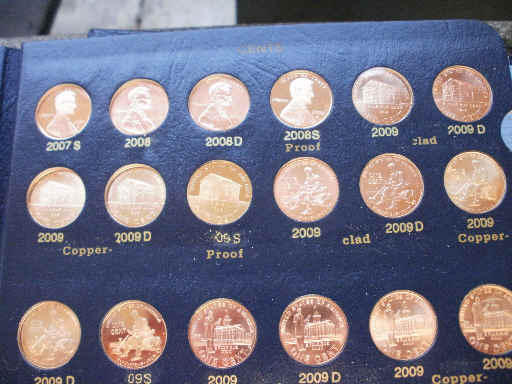 This is an example of what I did to make additional info for the 2009 Cents. I had to use the word Clad since that was all that was available. Edited by just carl
07/04/2016 11:45 am
|
|
Valued Member
United States
87 Posts |
Thank you everyone for your help. I tried the clear labels and printing on them but they didn't show up. I'm not sure about the draftsman lettering... that sounds a little complicated.
Next, I'm trying the Wizard coin supply suggestion...
|
| |
Replies: 16 / Views: 4,377 |






 Posted 06/26/2016 4:04 pm





